
devolo dLAN 1200+ WiFi ac Manual
PDF manual · 45 Pages
English



Quick check
Incorrect answer, please try again.
Chat with your devolo dLAN 1200+ WiFi ac manual using AI
Get instant AI answers from your devolo dLAN 1200+ WiFi ac manual
Ask anything about the devolo dLAN 1200+ WiFi ac. Answers come from this manual, with the pages they are based on.
Ask a Question
Do you recommend dLAN 1200+ WiFi ac?
Yes No
Sophia Shaw
6 months ago
Does this powerline adapter work reliably across three floors in an older building with difficult wiring conditions?

Manual.ly
6 months ago
Yes, the Devolo dLAN 1200+ system is engineered to overcome difficult wiring challenges across multiple floors. Most customers successfully extend their network in under five minutes without new cables. While top speeds are theoretical, real-world throughput is stable enough for streaming and gaming. For best results, connect both adapters to the same electrical circuit phase. This device is also compatible with standard WiFi cloning for seamless coverage.
Sincere Barrows
10 months ago
Does the devolo 1200+ powerline kit reliably extend WiFi over multiple floors, and what can I realistically expect in terms of speed and stability?
Manual.ly
10 months ago
Most customers report stable, fast connections when extending through the house power network, even across several floors. For best results, plug the first adapter near your router, then pair the units using the buttons/WiFi Clone (if you want the same SSID). Performance depends on your home's electrical wiring and the circuit/phase: same circuit or phase usually gives the highest throughput. Using a LAN cable to the remote adapter can deliver the most consistent speeds (closer to your internet plan). Note that the listed 1200 Mbps is a theoretical maximum; real speeds are typically lower and vary by conditions. Also avoid unsuitable power strips and update firmware via the devolo Cockpit app for smoother operation.
Video Manual
So greifst du ohne Passwort auf den Devolo dLAN 1200+ zu
Frequently Asked Questions
Plug the first unit into a power outlet near your router and connect it via Ethernet. Plug the second unit into a wall outlet in another room and connect your device to its WiFi or Ethernet port.
Is this answer helpful?
Yes you can. Press and hold the encryption button on both your existing unit and the new unit within two minutes to synchronize them securely into the network.
Is this answer helpful?
Yes the system uses WPA2 encryption standards out of the box. You can set a unique password for the dLAN network to prevent unauthorized access to your powerline data.
Is this answer helpful?
Yes the device features parental controls. You can set time limits for specific devices on the network to ensure healthy internet habits for your family members.
Is this answer helpful?
Yes it works with any standard router that has an Ethernet port. The dLAN units act as bridges to extend the network signal without replacing your modem.
Is this answer helpful?
Yes you can disable the LED indicators through the web configuration interface or the my devolo app to prevent light disturbance in sleeping areas.
Is this answer helpful?
Red blinking lights usually indicate connection issues or that the encryption process is ongoing. Ensure you plug directly into the wall and press encryption buttons correctly.
Is this answer helpful?
Advantages and Disadvantages
Advantages

- Powerline combined with WiFi provides complete home coverage without new cables.
- Range plus technology ensures stable high speed signals through thick walls.
- Integrated power outlet saves energy strip space for other appliances.
- WPA2 encryption ensures secure data transmission over the power lines.
- Simple setup process using buttons or smart phone application management.
Disadvantages

- Performance varies depending on the quality of existing electrical wiring.
- Units require direct wall outlets for optimal signal transmission.
- Full control options usually need additional software installation on a PC.
- LED indicators might be too bright for some bedroom environments.
- Only one Ethernet port per adapter in the basic bundle configuration.
Product Specification
Type
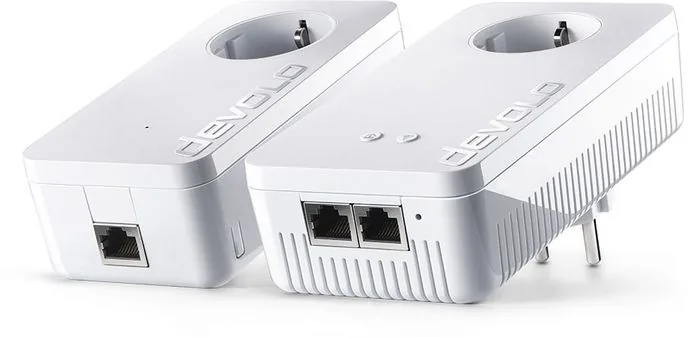
Powerline Adapter, WLAN Access Point, Bundle
Form Factor
2x Socket Adapters
Interface
2x RJ-45 (10/100/1000Base-T), 1x RJ-45 (10/100/1000Base-T)
Connection
HomePlug AV2, 1x WLAN 802.11a/b/g/n/ac (1x 2.4GHz or 1x 5GHz, WPS Button)
Data Rate
1x HomePlug AV2 (1200Mbps, 128-bit AES), 1x 2.4GHz WLAN (300Mbps, 2x2), 1x 5GHz WLAN (867Mbps, 2x2)
Compatibility
HomePlug AV2
Features
Built-in Outlet, Bundle (2x Adapters)
Band Support
Dual Band
Security
128-bit AES, WPS, WPA, WPA2
Product Description
Transform Your Home Network Today
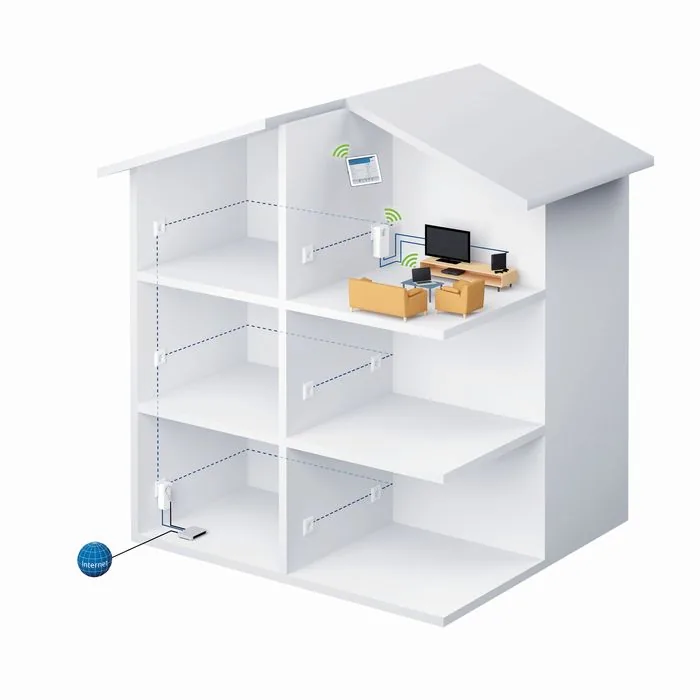
Transform your home network instantly with the devolo dLAN 1200+ WiFi ac Starter Kit, 2-unit bundle Manual provides the roadmap for effortless setup. This comprehensive solution blends powerline technology with high-speed wireless connectivity to cover every corner of your property. Imagine extending your internet connection to every room without running new Ethernet cables through walls or floors. The system utilizes your existing electrical wiring to transmit data securely and efficiently. This device acts as both a powerline adapter and a wireless access point simultaneously. Setup is straightforward. You plug the main unit into a router near your modem. The second unit goes into a distant room plugged directly into a wall socket for stability. Avoid power strips for best performance as they can block signals effectively.
Security is paramount in modern homes with many devices online. The device supports WPA2 encryption standards out of the box to keep data safe. You can manage access controls easily through a web interface or companion app. Parental controls allow you to limit internet time for specific devices for children health. Guest networks ensure visitors stay safe while keeping your main data private and secure. The integrated power outlet is a clever feature that saves space on energy strips. You can plug other devices into it without losing network access or wasting valuable wall space in a busy room.
Management tools simplify administration for users of all levels today. Use the my devolo App on your smartphone for on-the-go control without being tethered. The Web Configuration Interface offers deep technical settings for advanced users who need precision. You can adjust channel bandwidth and optimize transmission rates for peak performance. The range plus technology ensures stable signals even through thick concrete walls or interference sources common in cities. It uses all three power lines for better throughput compared to standard single-phase adapters.
Installation software like devolo Cockpit helps on PCs to visualize the network topology clearly. Firmware updates are supported to keep devices secure against emerging threats. The reset button allows quick recovery if issues arise during configuration. Remember to connect units directly to outlets to maintain maximum speed potential. The LED indicators show status at a glance with clear color coding. White lights mean connection active and secure for data transfer. Red lights indicate connection issues during setup or problems that need attention. Adjust settings to turn off lights if they are distracting during sleep hours.
For complete instructions on features here, consulting the devolo dLAN 1200+ WiFi ac Starter Kit, 2-unit bundle Manual is recommended for advanced configuration options. This ensures you maximize performance and utilize all capabilities for your specific needs. Whether gaming streaming high content or working from home this kit delivers reliable connectivity. It replaces the need for complex cabling projects and messy wires cluttering your floor. Enjoy seamless coverage throughout your property with minimal effort. Protect your data with robust encryption methods built into the hardware firmware. The hardware design fits discreetly in most homes due to a low profile aesthetic. The devolo ecosystem supports scaling up with more units if needed. This kit offers a balance of performance and ease of use for all users.
Notes
-
Ensure units are plugged directly into the wall.
-
Secure your network with a strong password.
-
Check for firmware updates regularly.
Search for 67,706 Manuals online


Type-in Brand or Model
Hans Mueller
8 months ago
Does this kit work reliably over 3 floors with different electrical phases, and what are the real-world speed expectations?
Manual.ly
8 months ago
Users report reliable connections across multiple floors and phases. While theoretically 1200 Mbps, real speeds often range around 300 to 500 Mbps depending on network quality. Direct wall sockets help reduce interference. Firmware updates via the Devolo Cockpit app ensure optimal performance.