
devolo dLAN 1000 duo+ Manual
PDF manual · 29 Pages
English



Quick check
Incorrect answer, please try again.
Chat with your devolo dLAN 1000 duo+ manual using AI
Get instant AI answers from your devolo dLAN 1000 duo+ manual
Ask anything about the devolo dLAN 1000 duo+. Answers come from this manual, with the pages they are based on.
Ask a Question
Do you recommend dLAN 1000 duo+?
Yes NoFrequently Asked Questions
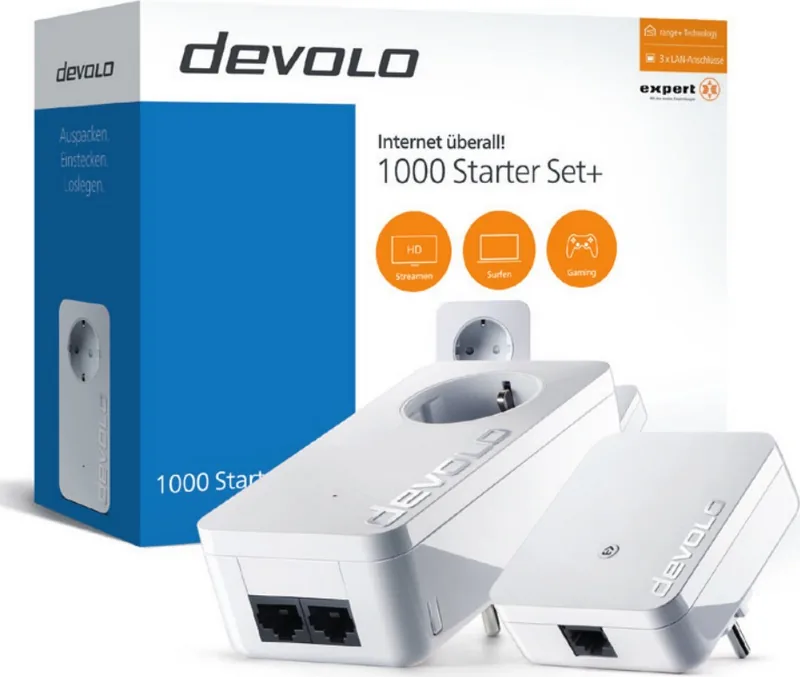
The starter set includes two dLAN 1000+ adapters (white), two Ethernet cables, printed installation instructions and CE documentation. The adapters feature two RJ‑45 ports each, an integrated pass‑through power socket and an encryption button.
Is this answer helpful?
Plug one adapter into a wall outlet and connect it to your router via Ethernet. Plug the second adapter into another outlet and connect your device. Press the encryption button on the first adapter for about 1 second, then press the button on the second within two minutes to create an encrypted network. Alternatively use devolo Cockpit to add devices and set a network password.
Is this answer helpful?
No—each adapter includes an integrated pass‑through power socket so you retain outlet use. The built‑in filter also helps reduce electrical noise and can improve data transmission compared with plugging into multi‑strip or noisy outlets.
Is this answer helpful?
The devices use HomePlug AV2 powerline technology and provide high throughput suited for streaming and gaming, with AES‑128 encryption for data security. Actual speeds depend on wiring quality, interference, and distance; link LEDs and the devolo Cockpit show relative connection quality.
Is this answer helpful?
Yes. devolo Cockpit (Windows, macOS, Ubuntu) discovers adapters, displays link quality and device info, lets you set or change network passwords, and update firmware. The my devolo mobile app allows monitoring and basic configuration from smartphones and tablets.
Is this answer helpful?
Performance drops when adapters are plugged into surge protectors, multi-socket extenders, or electrically noisy circuits. For best results, plug adapters into single wall outlets, avoid long extension leads, and separate noisy appliances. devolo provides bandwith optimization tips in the manual.
Is this answer helpful?
Press and hold the adapter's encryption button for at least 10 seconds. The adapter receives a new random network key and is removed from the previous dLAN network. To rejoin another network, use the pairing procedure or devolo Cockpit.
Is this answer helpful?
Advantages and Disadvantages
Advantages

- Easy plug-and-play setup: convert two outlets into a secure wired network quickly using the included adapters and Ethernet cables.
- Dual RJ-45 ports per adapter: connect two devices simultaneously (PC, TV, game console) without additional switches.
- Integrated pass-through socket with noise filter: keeps outlet available and reduces electrical noise for better throughput.
- Hardware encryption button plus devolo Cockpit/app: flexible security options—quick pairing or managed passwords and firmware updates.
- Clear status LEDs and management software: visual diagnostics and Cockpit app show link quality and let you manage network settings.
Disadvantages

- Performance depends on home electrical wiring and is reduced by extension leads, surge protectors, or noisy appliances.
- Fast Ethernet ports (100 Mbps) limit peak wired speeds compared with gigabit alternatives for heavy local transfers.
- Powerline signals can be impacted by building topology and distant fuse boxes, reducing range or throughput.
- Some advanced features require devolo Cockpit or app and initial setup on a compatible OS or device.
- Adapters occupy wall outlets and may be bulky on crowded sockets despite the pass-through feature.
Product Specification
Type
Powerline adapter (standalone), bundle
Form factor
2x socket adapter
Connection
1x RJ-45 (10/100Base-T, 1 device), 1x RJ-45 (10/100Base-T, 2 devices)
Connection
1x HomePlug AV2 (2-68MHz, 2 devices)
Transmission
1x HomePlug AV2 (200/500/600/1000Mb/s, OFDM 4096/1024/256/64 QAM, QPSK, BPSK, 128bit AES, 2 devices)
Dimensions
2.56x5.12x1.57in (WxHxD, 1 device), 2.64x3.43x1.14in (WxHxD, 1 device)
Compatibility
HomePlug AV2
Features
integrated socket (1 device), bundle (2x Powerline adapter)
Manufacturer warranty
three years
Product Description
devolo dLAN 1000+ Starter Set white — Reliable Powerline Networking
The devolo dLAN 1000+ Starter Set white, HomePlug AV2, RJ-45, 2-pack Manual introduces a simple, secure way to extend a home network using existing electrical wiring. The two white adapters convert any power outlet into a network port, offering plug-and-play convenience for rooms where Wi‑Fi is weak or additional wired connections are needed. Each adapter features two RJ‑45 Fast Ethernet ports, an integrated pass-through power socket to preserve outlet availability, and a physical encryption button for quick, hardware-based network pairing.
These HomePlug AV2 adapters support AES‑128 encryption and deliver high throughput across the household electrical system. The package includes two dLAN 1000+ adapters, two Ethernet cables, and quick-start documentation. One adapter connects to your router and is plugged into a wall outlet; the second plugs into any other outlet and links devices like smart TVs, game consoles, or desktop PCs via Ethernet. LEDs indicate status: white steady for a secure connection, blinking patterns for pairing, power‑save, or connection issues.
Beyond the hardware pairing via the encryption button, devolo provides the devolo Cockpit software and the my devolo mobile app to discover adapters, manage network settings, set or change a network password, update firmware, and monitor link quality. Cockpit shows connection lines between adapters with color-coded quality (green/orange/red) and can centrally manage passwords or generate strong random keys. The devices are compatible with modern OSes including Windows, macOS, and Ubuntu.
Safety and practical tips: use wall outlets rather than power strips or multi-socket extenders for best performance, avoid plugging adapters into surge protectors that may filter the dLAN signal, and position adapters to allow ventilation. If you remove an adapter from a network, press and hold the encryption button for 10 seconds to assign a new random key and isolate it. devolo documents CE conformity, disposal guidance, warranty details, and technical specifications (power consumption, operating temperatures, filter characteristics) in the manual.
Whether you need stable wired links for streaming, gaming, or remote work, the devolo dLAN 1000+ Starter Set white offers a practical alternative to running new Ethernet cable or relying on inconsistent Wi‑Fi, combining ease of setup, integrated power pass-through, and dedicated management tools for secure home networking.
Notes
- Uses AES‑128 encryption; pairing via button or devolo Cockpit.
- Two RJ‑45 ports per adapter allow connecting multiple devices.
- Integrated filtered pass-through socket preserves outlet use and improves signal quality.
Search for 67,706 Manuals online


Type-in Brand or Model