
DAP Audio Core Mix-3 USB Manual
PDF manual · 22 Pages
English


Quick check
Incorrect answer, please try again.
Chat with your DAP Audio Core Mix-3 USB manual using AI
Get instant AI answers from your DAP Audio Core Mix-3 USB manual
Ask anything about the DAP Audio Core Mix-3 USB. Answers come from this manual, with the pages they are based on.
Core Mix-3 USB Maintenance Schedule
Disconnect from mains and wipe with a damp cloth. Do not use alcohol or solvents.
Disconnect from mains and wipe audio connectors with a damp cloth. Ensure they are completely dry before reconnecting.
Check the system and power cable for damage at regular intervals. Replace damaged cables immediately.
Ask a Question
Do you recommend Core Mix-3 USB?
Yes NoFrequently Asked Questions
Yes, the CORE MIX-3USB has two USB Type B ports functioning as audio interfaces compatible with both Mac and PC operating systems for DJ software routing.
Is this answer helpful?
Use the built-in MP3 module with USB slots or SD card slots to capture master mix audio directly onto removable media without extra hardware.
Is this answer helpful?
The manufacturer provides a warranty until one year after the date of purchase, requiring original packing for any returns or claims.
Is this answer helpful?
No, fader replacement should only be carried out by a qualified technician to avoid damaging the board or voiding the warranty.
Is this answer helpful?
Use the electronically balanced XLR-type input. Ensure phantom power is off before plugging in the dynamic mic to avoid issues.
Is this answer helpful?
Yes, for PC software accessing single soundcards, installing the freeware ASIO4ALL allows proper configuration for the mixers USB ports.
Is this answer helpful?
The unit operates on 100 to 240Vac at 50 or 60Hz with a fuse rating of T1A. Ensure voltage matches before connecting to mains.
Is this answer helpful?
Advantages and Disadvantages
Advantages

- Dual USB audio interfaces allow seamless connection to both PC and Mac workstations for modern DJ setups.
- Built-in MP3 recorder enables direct audio capture using USB sticks or SD cards for live performance documentation.
- 60mm VCA faders offer durable performance and smooth control for mixing tracks during live events.
- Independent variable FX send on every channel provides enhanced creative possibilities for sound design.
- 3-band EQ is available on all channels to allow precise frequency adjustment per input signal.
Disadvantages

- System is not designed for permanent operation and requires consistent breaks to prevent defects.
- Fader replacement must be carried out by a qualified technician to maintain safety and warranty coverage.
- Power supply voltage must strictly match specifications to avoid potential damage or voiding warranty terms.
- Unbalanced outputs on the record module may introduce noise when using very long cable runs.
- An RMA number is required for all returns which can slow down the replacement process.
Product Specification
Channels
3
Equalizer
3-Band
Kill-Switches
No
Inputs
Phono In (RCA), 6x Stereo Line In (RCA), Mic In (XLR / 0.25 inch Combo), FX Return (RCA)
Outputs
Master Out (XLR), Master Out (RCA), Record Out (RCA), FX Send (RCA), Headphones (0.25 inch Jack)
Features
Audio Interface
Dimensions
10.55x14.96x3.46 in (WxHxD)
Weight
8.82 lbs
Product Description
Discover Professional Mixing
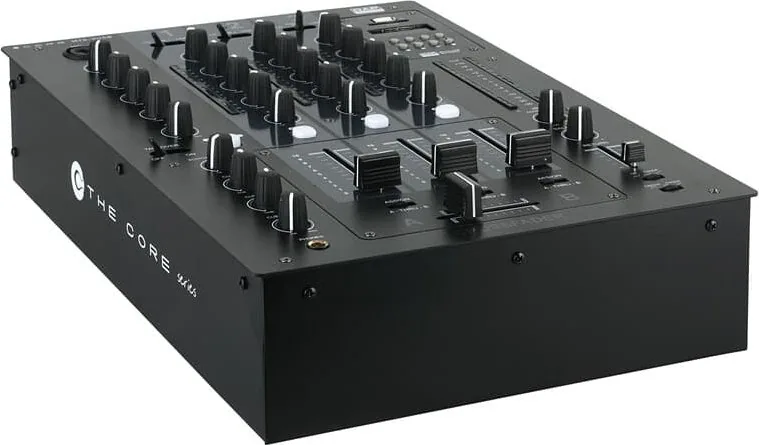
The DAP Audio Core Mix-3 USB offers an exciting experience for performers. This device brings excitement to any venue whether you want simple plug-and-play action or a sophisticated show. You rely on DAP Audio for excellent audio products. We design and manufacture professional audio equipment for the entertainment industry. New products are being launched regularly to keep customers satisfied.
Integrated Recording Features
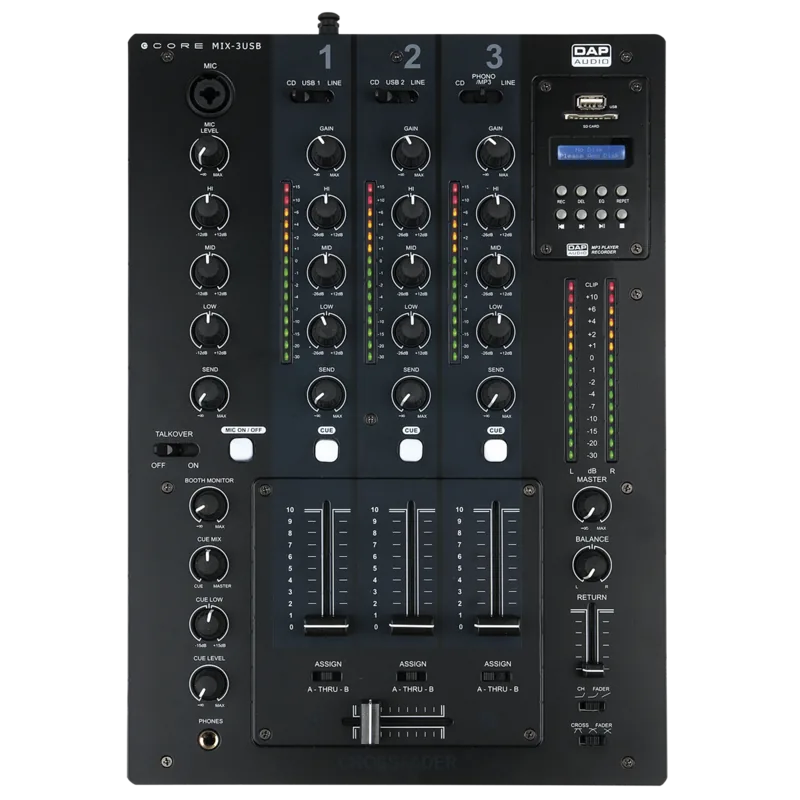
The CORE MIX-3USB is a DJ mixer with 8 analogue inputs. It features 2 independent USB audio interfaces connecting your laptop. Audio of your DJ software routes directly through the MIX-3 USB. It has an independent variable fx send for each channel. The microphone channel has a 3 band EQ and talkover function. It makes MC-ing safe and easy for party jocks. The return is controlled by a 45mm fader for external effects. Low tone control on the headphone output lets you adjust your favorite sound. All the pots are firmly locked on the internal chassis. The Core Mix-3 USB has a separate fader print board.
Performance And Stability
It is equipped with unbalanced and balanced outputs. There is built in MP3 player-recorder capability. The MP3 module allows recording performances directly on USB or SD. Following the DAP Audio Core Mix-3 USB Manual ensures you get the best from the unit. It is equipped with 60mm VCA faders. The system provides the effect you need. You can connect your laptop and route the audio. This makes setup easy. The frequency response reaches 20Hz to 20Khz. Dimensions measure 268 by 381 by 88 mm. Weight is roughly 4.6 kg for heavy duty stability.
Reliability And Warranty
The manufacturer will not accept liability for damages caused by non-observance of instructions. This system contains no user-serviceable parts. Servicing refers to qualified technicians only. Never let the power-cord contact other cables. Handle the power-cord with caution. You can get some of the best quality products. So next time turn to DAP Audio for great audio equipment. Always keep the unit clean and disconnect power before cleaning. The warranty lasts for one year after date of purchase. Ensure the right color cable is connected. This setup provides years of trouble-free operation for your DJ needs.
Setup And Maintenance
Check contents upon receipt and notify dealer if damaged. Return merchandise must be sent prepaid in the original packing. Highlite will not accept returned goods without an RMA number. Be prepared to provide model number. The shipment includes power cable and user guide. Make sure signals into the mixer are balanced. Avoid ground loops for best sound. Operate the unit with AC ground wire connected. Always disconnect power from mains. Extreme frequency boosts may lead to overdriving equipment. Reduce input signal level if necessary. This machine is a great choice for professional venues.
Search for 67,706 Manuals online


Type-in Brand or Model