

Cyrus Stream-XR Manual
PDF manual · 22 Pages
English



Quick check
Incorrect answer, please try again.
Chat with your Cyrus Stream-XR manual using AI
Get instant AI answers from your Cyrus Stream-XR manual
Ask anything about the Cyrus Stream-XR. Answers come from this manual, with the pages they are based on.
Ask a Question
Do you recommend Stream-XR?
Yes NoFrequently Asked Questions
Connect stereo audio interconnect cables between the analogue output and the analog input of a pre-amplifier or integrated amplifier. The rear panel provides RCA analog outputs for this purpose.
Is this answer helpful?
Auto-standby automatically switches the unit to standby after twenty minutes of inactivity to save energy consumption. If music is playing, this feature will not activate.
Is this answer helpful?
Yes, the remote can learn commands from two other remote control handsets. You can program it to control TVs or satellite receivers by following specific keypad steps.
Is this answer helpful?
The warranty period is three years. Claims should be made through the retailer where the equipment was purchased for fastest service and support.
Is this answer helpful?
Use a damp cloth for cleaning. Do not use liquid or aerosol cleaners. Never expose the product to rain, moisture, or water to avoid damage to internal components.
Is this answer helpful?
Firmware updates are available via the Cyrus website. Download the latest software versions to add new features or restore operations if issues arise.
Is this answer helpful?
Yes, the PSU-XR is an optional DC power supply designed to upgrade internal components. It connects via interconnect cable to stabilize voltage for better performance.
Is this answer helpful?
Advantages and Disadvantages
Advantages

- High quality ESS XR tuned DAC delivers exceptional audio clarity.
- Intuitive touch pad controls respond to light inputs easily.
- Remote control learning capability simplifies unified system setup.
- Network streaming supported via BluOS ecosystem for versatility.
- Durable die-cast chassis ensures stability on any surface.
Disadvantages

- Complex setup requires careful reference to documentation.
- Auto-standby can activate unexpectedly if no music plays.
- External PSU required for optimal performance upgrade.
- Troubleshooting requires some technical knowledge to resolve.
- No user serviceable parts prevents DIY repairs easily.
Product Specification
Type
Streaming Player
D/A Converter
24bit/192kHz
Tuner
Internet Radio
Audio Formats
AAC, AIFF, ALAC, FLAC, MQA, OGG/Vorbis, WAV, WMA
Streaming Clients
Apple AirPlay 2, Deezer, Qobuz, Roon, Spotify
Audio Connections
Digital Audio In (Coaxial), Digital Audio In (Optical), Digital Audio Out (Coaxial), Digital Audio Out (Optical), Pre Out (RCA)
Other Connections
USB-A, RJ-45
Wireless
Wi-Fi 5 (WLAN 802.11a/b/g/n/ac)
Features
Remote Control
Color
Black
Dimensions
8.46 x 2.95 x 13.98 inches (W x H x D)
Weight
6.61 lbs
Product Description
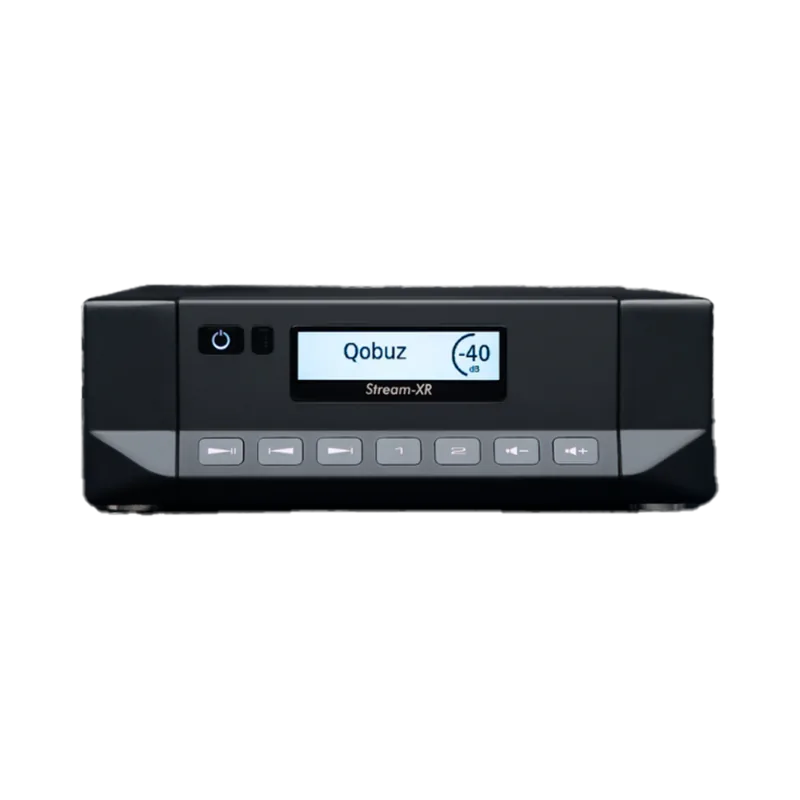
Elevate Your Audio Experience with the Cyrus Stream-XR
Music lovers seeking high fidelity will find the perfect companion in the Cyrus Stream-XR streamer. This device builds a better music experience by combining powerful internal components with modern network streaming capabilities. Users gain access to a vast library of high-resolution audio sources through its versatile connectivity options. Power management is handled efficiently with dedicated standby modes that reduce consumption automatically. Controls respond to touch inputs.
Connecting your analog and digital sources is straightforward. The rear panel includes RCA analog outputs and digital inputs for coaxial and optical signals. You can also link USB storage devices directly to play local libraries. Network integration relies on a strong Ethernet port and built-in Wi-Fi antenna. The unit supports the BluOS ecosystem, ensuring seamless streaming from various services and devices.
Referencing the guidance found in the Cyrus Stream-XR Manual helps users maximize hardware potential. Optional upgrades like the external PSU-XR power supply can further enhance performance. This dedicated power supply connects via a specific interconnect cable to stabilize voltage. Regular cleaning should be performed using a damp cloth without liquids entering openings. Ensure ventilation slots remain unblocked to prevent overheating during long listening sessions. The unit utilizes an ESS XR tuned DAC for exceptional clarity.
The accompanying remote control offers extensive functionality including code learning. It can program commands for TVs and other audio equipment to create a unified system. Battery replacement is simple with standard AAA options provided in the packaging. Volume control works in precise decibel steps for accurate level adjustments. Preset memory allows quick access to favorite listening modes and inputs.
Enclosure ensures durability and stability on any surface. Firmware updates are available online to keep the system current. Troubleshooting guides cover common issues like sound loss or connection drops. Proper maintenance extends the life of this high-end audio component significantly. Auto-standby saves energy when no music plays for 20 minutes. The product ships with warranty for peace of mind.
Important Notes
Keep this equipment away from heat sources like radiators. Never place candles or naked flames on top of the unit. Ensure the power cord is routed safely to avoid tripping hazards. Do not attempt to service the equipment yourself as there are no user serviceable parts. Always contact authorized service centres for repairs.
Search for 67,706 Manuals online


Type-in Brand or Model