
CyberPower Value Pro Manual
PDF manual · 2 Pages
English



Quick check
Incorrect answer, please try again.
Chat with your CyberPower Value Pro manual using AI
Get instant AI answers from your CyberPower Value Pro manual
Ask anything about the CyberPower Value Pro. Answers come from this manual, with the pages they are based on.
Ask a Question
Do you recommend Value Pro?
Yes NoFrequently Asked Questions
The series includes VP700E(I)LCD, VP1000E(I)LCD, VP1200E(I)LCD, and VP1600E(I)LCD. Each model offers specific Volt-Amp and Wattage capacities to suit different computer and peripheral requirements.
Is this answer helpful?
Turn the UPS off and unplug at least one piece of equipment. Wait 10 seconds, then depress the circuit breaker button on the back of the unit to reset it. Finally, turn the UPS back on to resume operation.
Is this answer helpful?
No, you should not use this product for medical or life support equipment. It is not sold or certified for applications that affect patient care or life support safety.
Is this answer helpful?
It is recommended to recharge the battery for at least eight hours upon first use or receipt. Shipping and storage may cause charge loss, so leave the unit plugged into an AC outlet for this duration.
Is this answer helpful?
To maintain optimal battery life when storing for an extended period, you should recharge the battery every three months. Ensure the unit is covered and fully charged before extended storage.
Is this answer helpful?
The unit supports PowerPanel software versions for Windows and Linux including Windows 10, 8, 7, Vista, XP, 2000, 2003, and Server 2008. This allows for status monitoring via USB or serial connections.
Is this answer helpful?
Advantages and Disadvantages
Advantages

- Automatic Voltage Regulation protects against inconsistent utility power efficiently
- High resolution LCD display shows vital UPS information and status clearly
- Battery backup ensures data is saved during power outages
- Surge protection ports safeguard network and telephone lines
- Compatible with PowerPanel software for remote management monitoring
Disadvantages

- Not suitable for medical or life support applications due to certification
- Extended runtime requires careful calculation of equipment power load
- Battery replacement is necessary periodically every few years
- Must not be used near aquariums or damp environments for safety
- Initial recharging takes at least eight hours for full capacity
Product Specification
Type
Tower
Classification
VI (Line-Interactive)
Voltage
230V
Input
C14
Interfaces
USB, serial
Data Line Protection
2x RJ-11 / RJ-45
Charge Time
8h
Features
LCD, HID Support
Manufacturer Warranty
3 years (2 years battery)
Product Description
Safeguard Your Digital Assets with CyberPower
Maintaining a stable power environment is crucial for protecting valuable electronics and ensuring data integrity in any setting. The CyberPower Value Pro UPS series stands out as a robust solution for managing power inconsistencies. This equipment protects your computer system and peripheral devices from surges, spikes, and complete utility losses. The built-in features ensure that your software can automatically save open files and shut down the system safely during a power outage. It provides peace of mind for home offices and small business environments alike.
Understanding Capacity and Power
The VP700 through VP1600E models offer a range of Volt-Amp ratings to accommodate different loads. It is important to ensure that the total requirements of your equipment do not exceed the rated capacity. For optimal performance, keep the load below eighty percent of the unit rating. This practice prevents overload conditions which could trigger circuit breakers or shut downs. The units provide Automatic Voltage Regulation to handle inconsistent utility power efficiently. Different outlets offer battery backup or surge protection depending on the specific model selected.
Display and Control Features
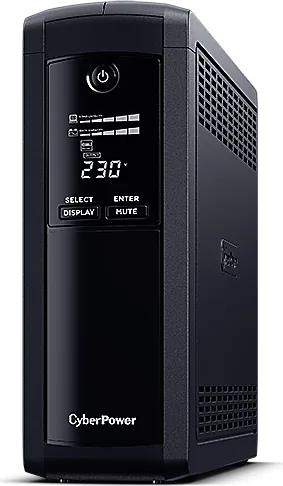
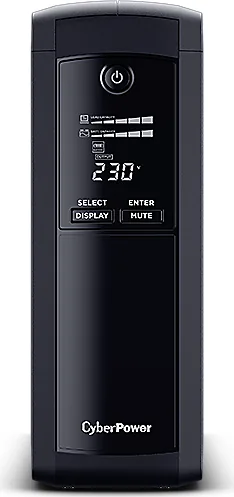
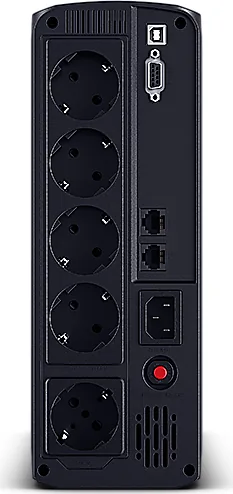
Each model is equipped with a high resolution LCD module display. This intelligent display shows all relevant UPS information using clear icons and messages. Users can access details regarding input voltage, output voltage, and estimated run time easily. The control panel includes dedicated buttons for muting alarms or selecting display contents. This interface allows for manual configuration without requiring constant software interaction on the PC. Information contained within the CyberPower Value Pro UPS Manual highlights these technical specifications clearly. A circuit breaker is also present on the back to provide fault protection against electrical anomalies.
Installation and Safety Protocols
Safe installation is paramount for preventing hazards. The UPS must be connected to a grounded AC power outlet with proper fuse protection. Ensure the location remains free of conductive contaminants and operates within specified humidity levels. Do not use this equipment for medical or life support applications as it is not certified for such critical environments. Avoid placing the unit near water sources like aquariums which poses a serious electrical risk. Keep it away from transportation to avoid shock damage during transit.
Battery and Network Management
Recharging the battery for at least eight hours is recommended before full operation to achieve maximum capacity. The system supports standard network cabling through protection ports to safeguard fax and telephone lines. Communication ports allow connection to the computer for status monitoring via PowerPanel software. When stored for extended periods, the battery requires periodic recharging every three months to maintain health. Auto restart functionality helps restore operation after power returns.
Final Considerations and Usage Tips
Understanding troubleshooting methods helps resolve common issues like tripped circuit breakers. If the utility fails, the unit automatically switches to battery power. Leave the device plugged into the AC outlet at all times to maintain optimal battery charge. Proper grounding and avoiding extension cords are vital for long term reliability and safety. Always refer to the technical specifications regarding dimensions and weight during planning.
Search for 67,706 Manuals online


Type-in Brand or Model