
Corsair Hydro Series H105 Manual
PDF manual · 12 Pages
English



Quick check
Incorrect answer, please try again.
Chat with your Corsair Hydro Series H105 manual using AI
Get instant AI answers from your Corsair Hydro Series H105 manual
Ask anything about the Corsair Hydro Series H105. Answers come from this manual, with the pages they are based on.
Ask a Question
Do you recommend Hydro Series H105?
Yes NoFrequently Asked Questions
An arrow located on the side of the fan indicates the specific direction of the air flow. Look for this marker to ensure proper intake or exhaust configuration for your case airflow.
Is this answer helpful?
No, re-installation of the H105 cooler will require you to clean off the pre-applied thermal paste and apply an aftermarket paste. This ensures fresh contact for optimal heat transfer.
Is this answer helpful?
Additional screws can be purchased from corsair.com. Check the official website for hardware compatibility and availability for your specific cooler configuration needs.
Is this answer helpful?
For optimized cooling, Corsair recommends the radiator is mounted hose down. This orientation helps with air circulation and thermal management within the system.
Is this answer helpful?
Use a small flathead screwdriver to pry out the default metallic grey ring at three corners. Then merely press the replacement ring of choice into place as shown in the instructions.
Is this answer helpful?
Yes, the Intel mounting bracket must be removed from the pump before installing the AMD mounting bracket. Remove the retention ring and swap the bracket to fit AMD platforms.
Is this answer helpful?
Connect the pump power cable to any available 3-pin or 4-pin fan header. Connect the included Y-header cable to any available header and plug fans into the Y-cable.
Is this answer helpful?
Advantages and Disadvantages
Advantages

- Extreme Performance 240mm radiator design handles high thermal loads well.
- Customizable colored accent ring allows for personal aesthetic customization easily.
- Compatible with a wide range of Intel and AMD mounting sockets universally.
- Includes pre-installed Intel mounting bracket for quick initial setup.
- SP120L fans provide efficient airflow and quiet operation during use consistently.
Disadvantages

- Requires manual replacement of pre-applied thermal paste for re-installation process.
- Specific standoffs are needed which vary between Intel and AMD sockets.
- Installation instructions vary significantly depending on the specific socket type.
- Backplate installation steps differ for LGA 115X versus LGA 1366 sockets.
Product Specification
Type
Internal (Closed System)
Heat Sink
CPU, Copper
Compatibility
1150, 1151, 1155, 1156, 1200, 1356, 1366, 2011-0, 2011-1, 2011-3, 2066, AM2, AM2+, AM3, AM3+, FM1, FM2, FM2+
Radiator
9.45 inches (Radiator Class), 1.50 inches (Radiator Height), Aluminum
Fan
2x 4.72x4.72 inches, 800-2700 RPM, 72.98 CFM, 37.7 dB(A)
Expansion Reservoir
N/A
Pump
12V
Connectors
N/A
Manufacturer Warranty
5 Years
Note
AM4 Conversion Kit Available.
Product Description
Unleash Extreme Performance with the Corsair Hydro Series H105
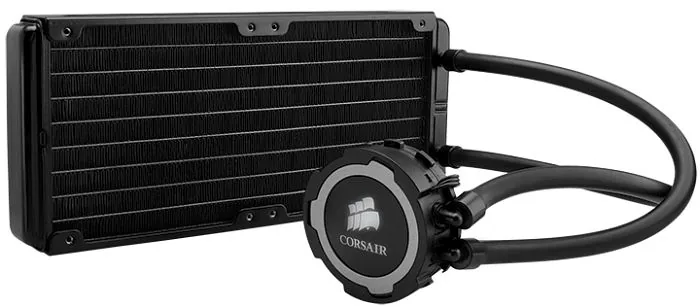
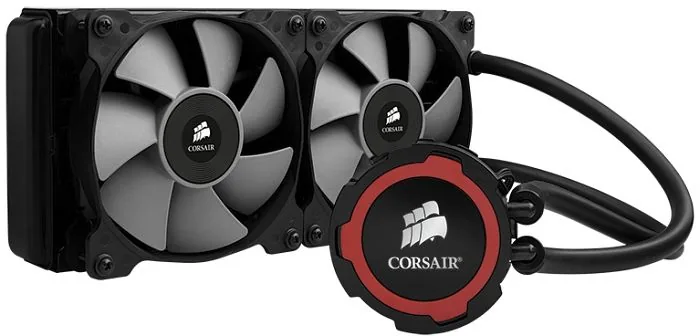
Building a high-performance PC requires reliable cooling systems that can manage intense heat loads. The Corsair Hydro Series H105 delivers extreme performance with a robust 240mm liquid CPU cooler setup. This system is designed specifically for enthusiasts who demand top-tier thermal management while maintaining system stability. Whether you are gaming or processing complex tasks, this cooler handles the thermal pressure efficiently.
Customization and Aesthetics
One standout feature is the ability to replace the colored accent ring on the pump unit. Using a small flathead screwdriver, users can pry out the default metallic grey ring and swap it for a choice of customization. This adds a personal touch to your build without altering the mechanical performance or efficiency of the liquid cooling loop. It allows you to match your system theme perfectly with the Corsair Hydro Series H105 Manual style adjustments.
Installation Experience
Setting up the H105 involves detailed steps for both Intel and AMD platforms to ensure broad compatibility. Intel sockets require a backplate installation before attaching the pump unit securely. AMD setups involve swapping the mounting bracket after removing the retention ring carefully. For the best results, the quick start guide ensures every screw is tightened correctly to prevent leaks and ensure longevity.
Performance Considerations
The included SP120L fans provide efficient airflow and are mounted onto the radiator unit. For optimal cooling, mounting the radiator with the hose down is recommended by the manufacturer. Connecting power is straightforward using standard 3-pin or 4-pin headers found on most motherboards. The included fan Y-header allows multiple fans to connect easily to one port for simplified wiring management.
Maintenance and Support
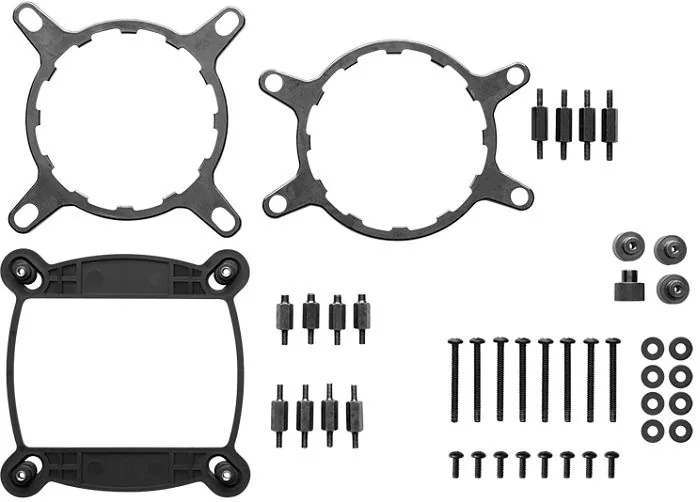
If thermal paste is needed for re-installation, it must be cleaned off the block surface completely. Additional radiator screws for push/pull configurations are available online through official channels. The unit includes necessary hardware like long fan screws and specific standoffs for different socket types such as LGA 2011 or LGA 115X. This comprehensive approach ensures compatibility across various systems without needing extra aftermarket modifications.
Connectivity and Power
Connect the pump power cable to any available fan header on the motherboard for operation. The system supports connection flexibility for different motherboard configurations found in modern workstations. Ensure all cables are routed neatly inside the case to maintain good airflow dynamics. Proper power connection ensures the pump circulates fluid effectively throughout the cooling loop.
Community and Resources
Corsair provides extensive support through their forums and website for users needing assistance. Users can find additional information regarding troubleshooting or part availability online easily. Customer support numbers are available for USA and Canada residents to discuss any specific issues. International support contacts are also provided for broader geographic assistance needs. This ensures owners can get help if they encounter installation difficulties or warranty claims.
Conclusion
This liquid cooling solution combines reliability with user-friendly customization options for everyone. It stands out as a high-end choice for demanding computer builds requiring stability. Users benefit from detailed instructions that cover both major processor architectures thoroughly. The hardware included covers most standard needs right out of the box for immediate use.
Search for 67,706 Manuals online


Type-in Brand or Model
Klaus Bergmann
8 months ago
Is the Corsair H105 quiet enough for gaming, or do the stock fans need to be replaced due to noise levels?
Manual.ly
8 months ago
The pump operates very quietly and is often unnoticeable. However, the included fans are frequently described as loud at maximum speeds. To achieve silence, most satisfied customers recommend upgrading to aftermarket quiet fans. With fan replacement, the unit provides exceptional cooling performance while maintaining a low noise profile. The radiator is also quite thick, so ensure it fits your case clearance. Overall, it offers great value if you manage fan expectations.