
Corsair 7000D Manual
PDF manual · 92 Pages
English



Quick check
Incorrect answer, please try again.
Chat with your Corsair 7000D manual using AI
Get instant AI answers from your Corsair 7000D manual
Ask anything about the Corsair 7000D. Answers come from this manual, with the pages they are based on.
Ask a Question
Do you recommend 7000D?
Yes NoFrequently Asked Questions
No, polarity does not matter for the power switch and reset switch headers. However, correct polarity is essential for the LED headers to function properly.
Is this answer helpful?
If you receive a damaged case or a non-working fan, visit support.corsair.com to request an RMA. They will arrange for the replacement of any defective parts.
Is this answer helpful?
The case supports both 120mm and 140mm fans. The front and top can take up to three 140mm fans each, while the rear supports one 140mm fan.
Is this answer helpful?
Yes, the Corsair 7000D supports vertical GPU mounting. However, you must purchase the CORSAIR PCIe extension cable separately to enable this feature.
Is this answer helpful?
The case comes equipped with six HDD trays and three SSD trays, providing extensive storage capacity for multiple hard drives and solid-state drives.
Is this answer helpful?
Advantages and Disadvantages
Advantages

- Massive internal volume supports E-ATX boards and extremely long graphics cards up to 330mm.
- Exceptional cooling options with mounts for up to four 140mm fans and large radiators.
- Hinged motherboard door allows for easy installation without fully removing the side panel.
Disadvantages

- Very large physical dimensions require significant desk or floor space.
- Vertical GPU mounting requires buying the PCIe riser cable as a separate accessory.
- Heavier than standard cases due to robust steel construction and thick tempered glass.
Product Specification
External
N/A
Internal
6x 2.5"/3.5" (horizontal, drive rails), 4x 2.5"
Ports
1x USB-C 3.1 (10Gb/s, 20-Pin Key-A Header), 4x USB-A 3.0 (5Gb/s), 1x 3.5mm Jack (Line-In/Out)
PCI Slots
11 (3x Riser Card)
Fan (rear)
1x 140mm or 1x 120mm (optional)
Fan (left)
N/A
Fan (right)
4x 120mm (optional)
Fan (top)
3x 140mm (optional) or 3x 120mm (optional)
Fan (bottom)
N/A
Fan (other)
N/A
Radiator Sizes
120/140/240/280/360/420/480mm front, 120/140/240/280/360/420mm top, 120/140mm rear, 120/140/240/280/360/420/480mm right
Motherboard
up to ATX (10.9" wide)
Supported Motherboards
Mini-ITX (6.7"x6.7")/µATX (9.6"x9.6")/ATX (12"x9.6")/E-ATX (12"x10.9")
Power Supply
ATX (max. 8.9" deep)
Power Supply Position
bottom
CPU Cooler
max. 7.5" height
Graphics Cards
max. 17.7"
Lighting
no lighting
Dimensions (WxDxH)
9.8x23.6x21.7"
Volume
2.89 cu ft
Weight
41.23 lbs
Case Type
Big-Tower
Front
Mesh, internal dust filter
Top
partially closed, mostly fan grille, external dust filter
Bottom
partially closed, fan grille, external dust filter
Left
closed, glass
Right
partially closed, fan grille front
Rear
partially closed, fan grille top right, PCI slots (8x horizontal, 3x vertical)
Front I/O Position
Case side: top, Height: Front, Position: center
Features
Cable management, dust filter, graphics card mountable vertically, glass window
Note on E-ATX
Motherboard and case manufacturers designate different dimensions as E-ATX. Motherboards with E-ATX/SSI EEB dimensions of 305x330mm or 12"x13" are not supported.
USB Spelling
Link
Product Description
Corsair 7000D: The Ultimate Full-Tower PC Case for Enthusiasts
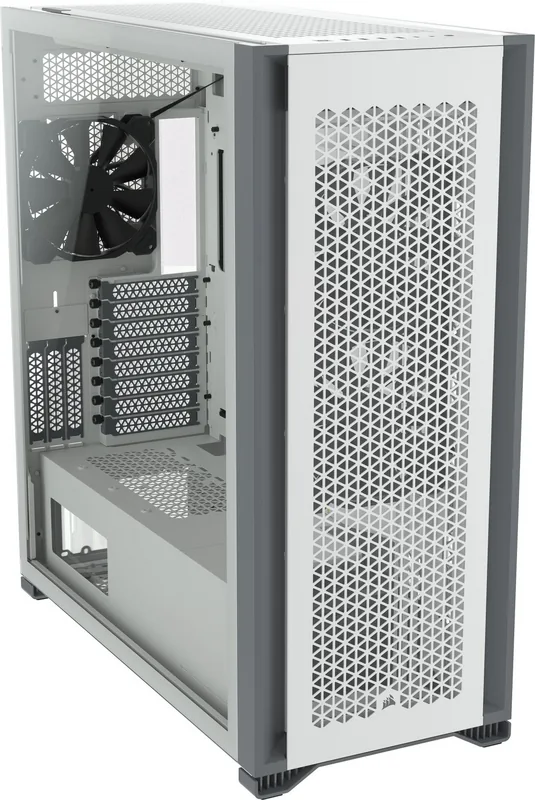
The Corsair 7000D represents the pinnacle of full-tower PC case engineering, designed specifically for users who demand maximum expansion, cooling performance, and build flexibility. This massive chassis offers an expansive interior that accommodates the most powerful components available on the market today. Whether you are building a high-end gaming rig, a workstation for video editing, or a liquid-cooled monster, the 7000D provides the space and structural integrity required to handle it all.
One of the standout features of this case is its incredible storage capacity. It includes dedicated trays for up to six hard drives and three solid-state drives, ensuring you have ample room for vast data libraries and fast boot drives. The motherboard tray is uniquely designed with a hinged steel door, allowing you to install your motherboard from the side without removing the entire panel, simplifying the assembly process significantly. Additionally, the case supports vertical GPU mounting when used with the optional PCIe riser cable, opening up new aesthetic possibilities for showcasing your graphics card.
Cooling is paramount in a system this size, and the 7000D delivers with extensive fan and radiator support. You can mount up to four 140mm fans on the front and top, along with additional options on the rear and motherboard tray. For those running extreme water cooling loops, the case supports radiators up to 480mm in length at the front and 420mm at the top. The included dust filters on the front and top ensure that your internal components stay clean while maintaining optimal airflow. The tempered glass side panel allows you to admire your custom build, while the solid steel front and top panels provide a sleek, professional look.
Key Features and Specifications
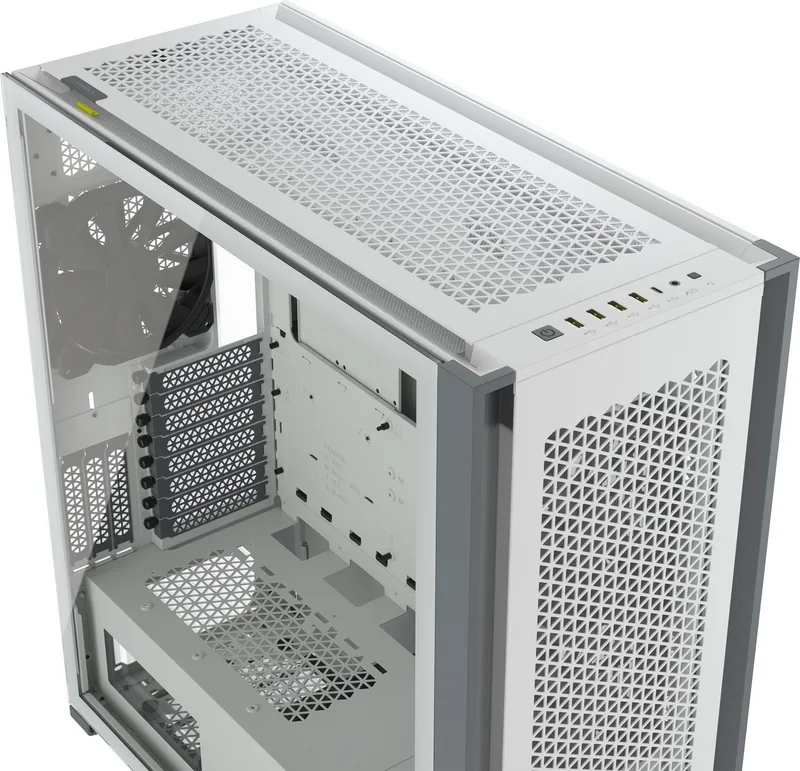
The dimensions of the Corsair 7000D are substantial, measuring 550mm in length, 600mm in height, and 248mm in width. Despite its size, the design prioritizes usability. The removable PSU window cover lets you access power supply connections easily, and the cable management area is spacious enough to hide even the largest bundles of wires. The I/O panel at the top front offers modern connectivity, including USB 3.1 Type-C, USB 3.0 ports, and HD audio jacks. With support for E-ATX motherboards and GPUs up to 330mm long, this case leaves no room for compromise.
Important Notes
- Ensure you have sufficient clearance around your desk or setup area due to the large footprint of the case.
- The vertical GPU mounting feature requires purchasing the CORSAIR PCIe extension cable separately.
- Always remove the cable cover before installing fans on the motherboard tray.
Search for 67,732 Manuals online


Type-in Brand or Model