

Cooler Master Synk X Manual
PDF manual · 28 Pages
English



Quick check
Incorrect answer, please try again.
Chat with your Cooler Master Synk X manual using AI
Get instant AI answers from your Cooler Master Synk X manual
Ask anything about the Cooler Master Synk X. Answers come from this manual, with the pages they are based on.
Synk X Maintenance Schedule
Wipe them with water or detergent regularly or when they are dirty to prevent jamming and keep the ground clean.
Wipe them with water or detergent regularly or when they are dirty.
Wipe the surface of the seat with water or detergent regularly or when it is dirty.
Ask a Question
Do you recommend Synk X?
Yes NoFrequently Asked Questions
Reserve at least 1.5 square meters to safely tilt the seat back and extend the leg rest. Ensure level surface placement.
Is this answer helpful?
Only use certified battery packs made by the original manufacturer and strictly follow the specifications in the manual.
Is this answer helpful?
Wipe the surface of the seat, 4D armrest pads, and pressure caster wheels with water or detergent regularly when dirty.
Is this answer helpful?
The seat weight capacity is maximum 136 kg. The reclined backrest weight capacity is maximum 96 kg. Armrest pad is 23 kg.
Is this answer helpful?
There are three main input modes: AUX for wired devices, BT for Bluetooth connection, and 5.8G for tactile transmitter connectivity.
Is this answer helpful?
Synk X may have entered protection mode due to overheating. Restart the system and reduce the vibration level to resolve.
Is this answer helpful?
Please visit the official Cooler Master website for the terms of the warranty covering all accessories except consumables.
Is this answer helpful?
Advantages and Disadvantages
Advantages

- Immersive haptic feedback translates audio to sensations
- Adjustable 4D armrests reduce shoulder strain
- Large weight capacity of 136 kilograms
- Seven RGB lighting modes with breathing effects
- Wireless Bluetooth and 5.8G connectivity options
Disadvantages

- Heavy total weight of 29.4 kilograms
- Requires manual assembly with multiple steps
- Built-in battery is not user-replaceable
- Requires 1.5 square meters for recline space
- Premium price point for haptic features
Product Specification
Type
Gaming Chair
Material
Plastic (PU)
Color (Primary Color, Accent Color)
Black
Backrest
yes, tiltable, 135 degrees
Armrest
yes, height adjustable, side adjustable, depth adjustable, swivel
Weight Capacity
286.60 lbs
Features
Gas spring, headrest, lumbar support, footrest, synchronized mechanism, Force Feedback, incl. Li-Ion Battery
Weight
64.82 lbs
Manufacturer Warranty
2 Years
Product Description
Experience Ultimate Gaming Immersion
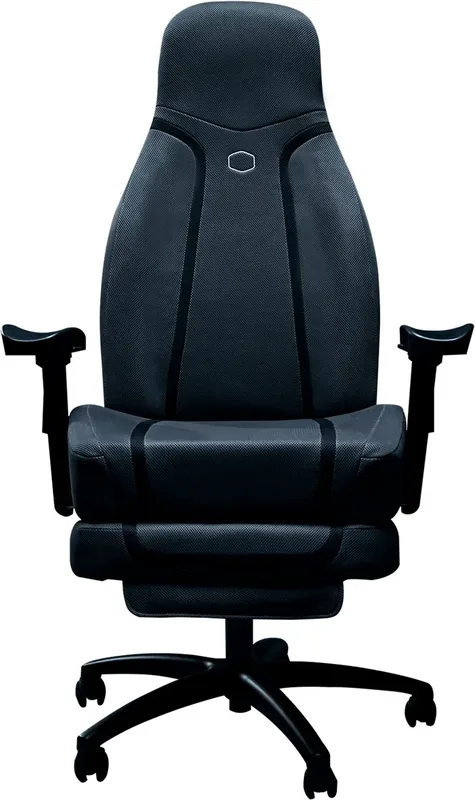
The Cooler Master Synk X Gaming Chair, Black Manual is designed to redefine your seating experience during intense gaming sessions. This cross-platform immersive haptic chair brings a new level of realism by translating in-game audio and effects into tactile sensations. Users can feel every explosion and engine rumble directly through the seat and backrest vibrations controlled via the intuitive side interface. The audio inputs support Bluetooth and wired connections simultaneously for maximum flexibility when connecting consoles or PCs effectively to your setup.
Advanced Ergonomics and Comfort
Advanced ergonomics are central to this design. Comfort is paramount for marathon gaming, and the Synk X delivers with flame-resistant foam and a breathable mesh seat. The metal pipe structure supports up to 136 kilograms, ensuring stability for various body types. A retractable leg rest extends up to 36 cm and features a two-level length adjustment perfect for relaxation modes. The 4D armrests offer significant flexibility with height, lateral, and rotation adjustments to reduce strain on shoulders and wrists during long play. Tilt tension knobs allow users to personalize the recline resistance to their preference.
Connectivity and Lighting
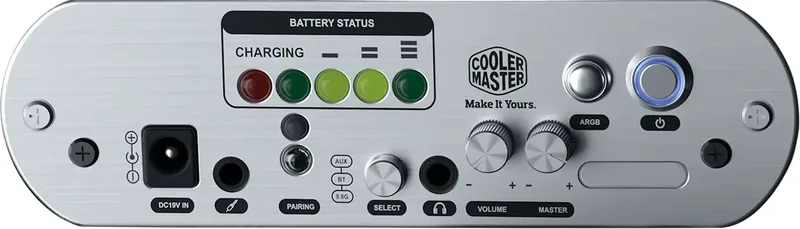
Connectivity is versatile with support for Bluetooth, AUX, and 5.8G wireless inputs. The control panel on the side manages volume and vibration levels effortlessly while monitoring battery status. RGB lighting allows for up to seven different illumination modes including rainbow breathing effects. Powered by a 5200mAh lithium-ion battery, the system operates independently without constant cable attachment. Charging indicator lights show power levels clearly. Users must avoid ingesting the battery pack due to chemical burn hazards associated with improper handling.
Assembly and Safety Guidelines
Setting up the chair involves assembling the base, pressure caster wheels, gas cylinder, and attaching the seat and backrest. Each step requires precise screw tightening to ensure the tilt structure remains secure during dynamic movement. Safety guidelines emphasize avoiding sitting on the armrests and keeping the chair on a level surface. Proper maintenance involves wiping surfaces with water or detergent regularly. Always follow power rules to protect the battery from over-discharging or extreme temperatures. Cleaning wheels prevents dust accumulation in the mechanism preventing jams. This product includes comprehensive instructions for setup, operation, and troubleshooting to ensure user safety. Regulatory compliance ensures safe radio frequency usage across regions for global consumers seeking performance and reliability in their home office. The assembly process ensures all components align correctly for optimal performance. Pressure caster wheels install into the base for smooth mobility. The gas cylinder supports vertical adjustments for the perfect viewing angle. Proper alignment prevents wobbling during use. This attention to detail ensures durability.
Search for 67,706 Manuals online


Type-in Brand or Model