
Cooler Master GM32-FQ Manual
PDF manual · 24 Pages
English



Quick check
Incorrect answer, please try again.
Chat with your Cooler Master GM32-FQ manual using AI
Get instant AI answers from your Cooler Master GM32-FQ manual
Ask anything about the Cooler Master GM32-FQ. Answers come from this manual, with the pages they are based on.
Ask a Question
Do you recommend GM32-FQ?
Yes NoFrequently Asked Questions
The monitor supports a maximum refresh rate of 165Hz when connected via DisplayPort at 2560x1440 resolution. Using HDMI, the maximum refresh rate is 144Hz at the same resolution.
Is this answer helpful?
Yes, the USB Type-C port supports video output and data transfer. It provides a 5V/3A output, which can charge compatible laptops or devices while displaying video.
Is this answer helpful?
Yes, the GM32-FQ is compatible with VESA 100x100mm wall mounts. The package includes necessary screws for attaching the monitor to a wall mount bracket.
Is this answer helpful?
The OSD menu offers several presets including Standard, Game, Gamer1, Gamer2, FPS, RTS, MOBA, Movie, Web, Text, MAC, sRGB, and Color Weakness Mode to suit various content types.
Is this answer helpful?
Turn off the monitor and unplug it. Spray a non-solvent cleaning solution onto a soft rag and gently wipe the screen. Never apply pressure directly to the screen or use harsh chemicals.
Is this answer helpful?
Yes, Cooler Master products typically come with a warranty. Please visit the official Cooler Master website for specific warranty terms and conditions for your region.
Is this answer helpful?
The monitor offers wide viewing angles of 178 degrees horizontally and 178 degrees vertically, ensuring consistent color and contrast even when viewed from the side.
Is this answer helpful?
Advantages and Disadvantages
Advantages

- Supports high refresh rates up to 165Hz via DisplayPort for fluid motion
- Features a quick 1ms MPRT response time to minimize ghosting
- Includes USB Type-C connectivity for video, data, and power delivery
- Offers extensive ergonomic adjustments including height, tilt, and swivel
- Provides multiple picture modes and advanced color calibration options
Disadvantages

- Maximum resolution of 2560x1440 may be lower than 4K monitors
- Built-in speakers are basic 2W units with limited audio depth
- Height adjustment range might be insufficient for very tall desks
- No built-in KVM switch functionality mentioned in specifications
- Requires specific shielded cables to fully meet EMC regulations
Product Specification
Function
Monitor (stationary)
Diagonal
31.5" (80.0cm)
Resolution
2560x1440 (QHD), 16:9, 93ppi
Panel
IPS (ADS), Manufacturer: BOE
Backlight
LED, Blue light filter, flicker-free
Brightness
400cd/m^2 (typical)
Contrast
1200:1 (static)
HDR
DisplayHDR 400
Response time
5ms (GtG), 1ms (MPRT)
Refresh rate
165Hz (2560x1440)
Variable synchronization
Adaptive Sync, AMD FreeSync Premium certified (48-165Hz via DisplayPort, 48-144Hz via HDMI, with LFC support, with HDR), NVIDIA G-Sync Compatible
Signal frequency
244kHz (H) / 48-165Hz (V)
Connections
2x HDMI 2.0 (144Hz@2560x1440), 1x DisplayPort 1.2 (165Hz@2560x1440), 1x USB-C 3.0 with DisplayPort 1.2 (Upstream, 5Gb/s, 165Hz@2560x1440), 1x USB-B 3.0 (Upstream, 5Gb/s), 2x USB-A 3.0 (Downstream, 5Gb/s), 1x 3.5mm jack (Line-Out), 1x DC-In hollow socket (power connection)
Shape
straight (flat)
Viewing angle
178°/178°
Coating
non-glare (matte)
Color depth
10bit (1.07 billion colors)
FRC
yes (8bit+2bit)
DCI-P3
95%
Speakers
Speakers (2x 2W)
Operation
mechanical buttons
Ergonomics
with stand, height adjustable (110mm), Pivot N/A, rotatable (+/-15°), tiltable (+20°/-5°)
VESA
100x100 (occupied)
Power consumption
29W (typical), 0.5W (standby)
Energy efficiency SDR (A to G)
37kWh/1000h (G)
Features
Slim Bezel
Screen-to-Body Ratio
91.00% (calculated)
Dimensions
28.17x22.72x10.78in (WxDxH) with stand compressed, 28.17x16.54x1.72in (WxDxH) without stand
Color
black (display frame) / black (lower bezel) / black (stand) / black (back)
Weight
16.75lbs (with stand), 13.67lbs (without stand)
Power supply
external
Warranty
two years
USB spelling
Link
Product Description
Cooler Master GM32-FQ 31.5: The Ultimate Gaming Display Experience
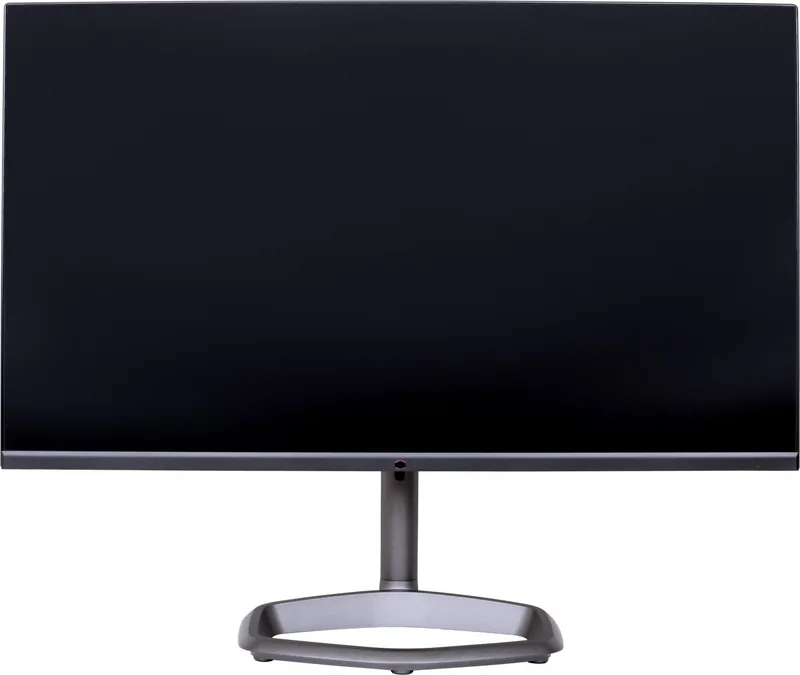
The Cooler Master GM32-FQ is a premium 31.5-inch gaming monitor designed to deliver exceptional visual clarity and performance for enthusiasts. With a stunning QHD resolution of 2560x1440, this display offers sharp details that bring your favorite games to life. The panel boasts a rapid 1ms MPRT response time, ensuring smooth motion without the blur often associated with fast-paced action scenes. Whether you are engaging in competitive shooters or immersive role-playing adventures, the GM32-FQ keeps you ahead of the curve.
One of the standout features of this monitor is its high refresh rate capabilities. Through the DisplayPort connection, users can achieve an impressive 165Hz refresh rate, while HDMI supports up to 144Hz at full QHD resolution. This seamless fluidity is complemented by Adaptive Sync technology, which eliminates screen tearing and stuttering for a cohesive visual experience. The monitor also includes a variety of preset picture modes tailored for different content types, including Standard, Game, Movie, Web, Text, MAC, sRGB, and even a specific Color Weakness Mode for accessibility.
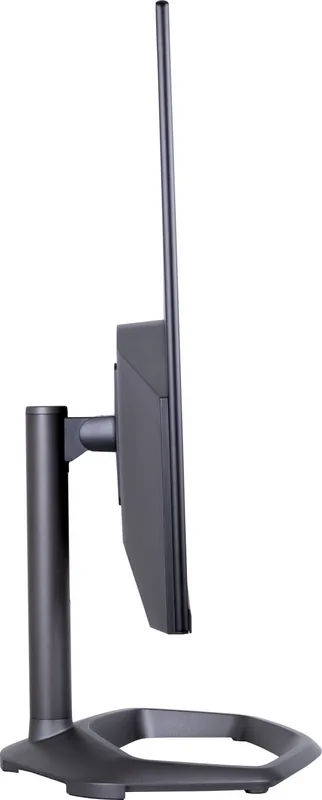
Ergonomics play a crucial role in long gaming sessions, and the GM32-FQ excels here as well. The adjustable stand allows for height adjustments ranging from 0 to 110 mm, ensuring you find the perfect viewing angle. You can also tilt the screen between -5 and +20 degrees and swivel it from -15 to +15 degrees. For those who prefer a cleaner desk setup, the monitor supports VESA 100x100 wall mounting. Connectivity is robust, featuring one DisplayPort, two HDMI ports, and a versatile USB Type-C port that handles video, data, and power delivery.
The on-screen display (OSD) menu is intuitive and packed with customization options. From adjusting contrast and brightness to fine-tuning colors across six axes, users have complete control over their image. Features like Black Stabilization enhance visibility in dark game areas, while the Crosshair function provides a tactical advantage in first-person games. The monitor also adheres to strict safety and environmental standards, including FCC Class B compliance and RoHS directives, ensuring it is safe for home use and eco-friendly.
Key Highlights
- High Refresh Rate: Up to 165Hz via DP for ultra-smooth gameplay.
- Fast Response: 1ms MPRT reduces motion blur significantly.
- Versatile Connectivity: Includes DP, HDMI, and USB-C inputs.
- Ergonomic Design: Fully adjustable stand with height, tilt, and swivel.
- Color Accuracy: Multiple color spaces including BT.709, DCI-P3, and BT.2020.
Important Notes
- Ensure you use shielded cables to comply with EMC requirements and prevent interference.
- Do not lift the monitor by the base; always support the screen itself when moving.
- Keep the monitor away from direct sunlight and moisture to prevent permanent damage.
- The monitor is intended for use with certified peripheral devices to avoid radio interference.
Search for 67,706 Manuals online


Type-in Brand or Model