
Conceptronic HUBBIES 01 Manual
PDF manual · 7 Pages
English



Quick check
Incorrect answer, please try again.
Chat with your Conceptronic HUBBIES 01 manual using AI
Get instant AI answers from your Conceptronic HUBBIES 01 manual
Ask anything about the Conceptronic HUBBIES 01. Answers come from this manual, with the pages they are based on.
Ask a Question
Do you recommend HUBBIES 01?
Yes NoFrequently Asked Questions
Connect the cable to a USB Type-C port on your computer. The hub will be recognized and installed automatically without any manual driver intervention.
Is this answer helpful?
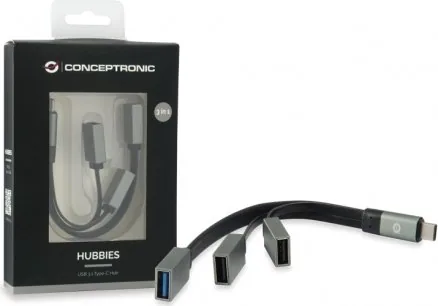
The package contains the USB 3.1 Type-C to 1-Port USB 3.0 plus 2-Port USB 2.0 Cable Hub and a Multi-language quick installation guide.
Is this answer helpful?
No driver installation is required. The USB hub is automatically recognized and installed by your computer upon connection.
Is this answer helpful?
The hub features one USB 3.0 port and two USB 2.0 ports, allowing connection to various peripherals simultaneously.
Is this answer helpful?
Yes, the input is USB 3.1 Type-C, making it compatible with computers that have available Type-C ports.
Is this answer helpful?
Yes, the compact design allows it to fit into laptop bags, making it suitable for mobile professionals and business travel.
Is this answer helpful?
Advantages and Disadvantages
Advantages

- No driver installation is required for automatic recognition.
- Includes three ports totaling USB 3.0 and USB 2.0 options.
- Supports USB 3.1 Type-C for modern input connectivity.
- Compact design for easy portability and travel.
- Separates high-speed and standard port usage.
Disadvantages

- Only one port supports high-speed USB 3.0 standards.
- Includes a quick guide rather than a comprehensive manual.
- Does not specify power delivery for charging devices.
- Only two ports are standard USB 2.0 speed.
- Requires a free USB Type-C port on host device.
Product Specification
Type
USB Hub
Form Factor
1x external wired (Non-removable connection cable, integrated cable)
Connection
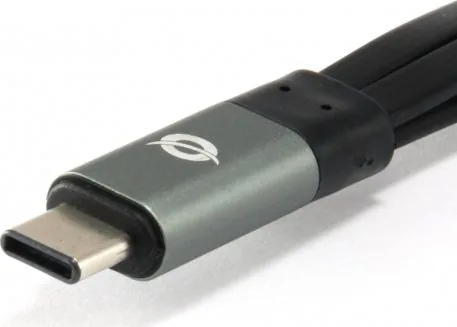
1x USB-C 3.0 (Integrated connector, 480 Mb/s, 39.37 in cable)
Ports
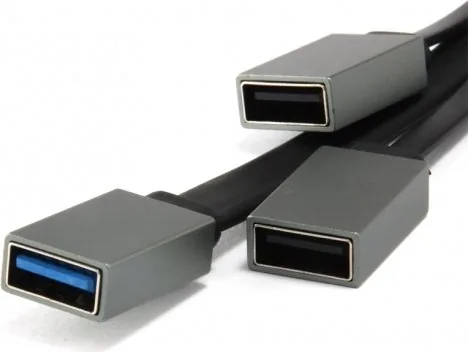
1x USB-A 3.0 (Female port on cable), 2x USB-A 2.0 (Female port on cable)
Transfer Speed
1x USB-A 3.0 (Female port on cable, 5 Gb/s), 2x USB-A 2.0 (Female port on cable, 480 Mb/s)
Power
Powered solely via connection
Dimensions
7.68x0.31x1.57 in (W x H x D)
Weight
0.95 oz
Compatibility
Universal
USB Orientation
Left
Product Description
Expanding Connectivity and Productivity
Expanding your connectivity options is essential for maintaining high productivity in a modern digital workspace. Many sleek laptops have very few ports, making it difficult to connect multiple peripherals simultaneously without cumbersome dongles. This is where the Conceptronic HUBBIES 01 becomes a vital accessory. It serves as a comprehensive bridge, allowing you to transform a single USB Type-C port into multiple functional connections instantly.
The core functionality revolves around expanding your professional workspace. By utilizing the USB 3.1 Type-C input, you gain access to one high-speed USB 3.0 port and two standard USB 2.0 ports. This arrangement ensures compatibility with devices from external hard drives to memory card readers. You do not need complex drivers to initialize the connection. Once you connect the cable to a free USB Type-C port, the operating system recognizes the device automatically.
Setting up your hub is incredibly straightforward. You simply turn on your computer and plug the included cable into an available port. The installation process is seamless, ensuring you spend less time configuring hardware and more time completing work. Detailed instructions are available to guide you through the steps. Referencing the Conceptronic HUBBIES Manual can provide further insights into troubleshooting or routine maintenance tasks for long-term reliability.
Portability remains another key advantage for mobile professionals. The compact design allows it to fit easily into laptop bags without adding bulk. Whether working in a busy coffee shop or traveling for a business meeting, having extra USB access means you are always prepared for unexpected connectivity needs. The build quality supports reliable data transfer speeds, ensuring files move smoothly.
Ultimately, this hub solves the problem of insufficient ports found on newer hardware. It expands the utility of your hardware without requiring expensive upgrades. Users benefit from instant connectivity and stability across various operating systems. Keep your workflow efficient by adding this versatile hub to your daily toolkit. It represents a practical solution for expanding digital possibilities.
Versatility is key when selecting peripherals. The mixture of ports supports legacy devices alongside newer high-speed requirements. You can plug a mouse and keyboard into the USB 2.0 ports while transferring large video files via the USB 3.0 port. This separation prevents bottlenecks. No drivers are required, which reduces potential compatibility errors.
In summary, the device offers a clean way to manage cables. You avoid cluttering your desk with multiple adapters. The automatic recognition feature saves time during setup. This solution is ideal for students, office workers, and creatives. It extends the life and capability of your current laptop. Enjoy the freedom of unlimited connectivity options today.
Search for 67,706 Manuals online


Type-in Brand or Model