
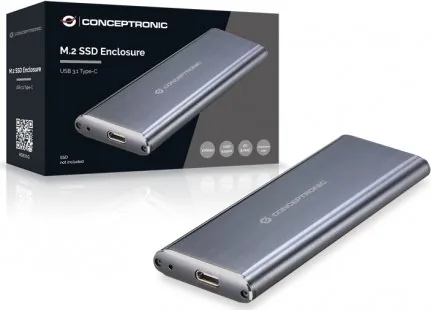
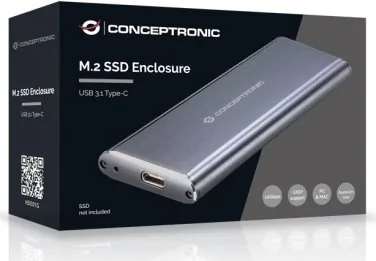
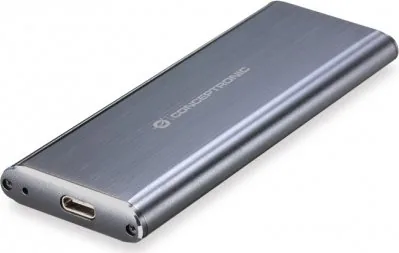
Conceptronic HDE01G Manual
PDF manual · 10 Pages
English



Quick check
Incorrect answer, please try again.
Chat with your Conceptronic HDE01G manual using AI
Get instant AI answers from your Conceptronic HDE01G manual
Ask anything about the Conceptronic HDE01G. Answers come from this manual, with the pages they are based on.
Ask a Question
Do you recommend HDE01G?
Yes NoFrequently Asked Questions
The enclosure accepts M.2 SSD modules; verify whether your specific HDE01G variant supports NVMe (PCIe) or SATA M.2 drives. Check the product specifications before installing to ensure protocol and key compatibility.
Is this answer helpful?
No drivers are typically required. Connecting the enclosure via the included USB-C cable to a modern OS will identify it as a USB mass storage device and install native drivers automatically.
Is this answer helpful?
When connected to a true USB 3.1 port, the enclosure can reach up to 10 Gbps (theoretical). If connected to a USB 2.0 port, transfer speeds will be limited to about 480 Mbps. Actual throughput depends on SSD performance, host controller, and cable quality.
Is this answer helpful?
Use your operating system’s safe removal feature (e.g., 'Safely Remove Hardware' on Windows). Select the device listed as USB mass storage, choose Stop, then confirm. Wait for the confirmation before disconnecting the cable to prevent data loss.
Is this answer helpful?
Yes. The package contains the M.2 SSD enclosure, a USB 3.1 Type-C cable, screws, a small screwdriver, and a multilingual quick installation guide to assist assembly and usage.
Is this answer helpful?
The HDE01G offers a slim aluminum shell that can dissipate some heat, but it lacks active cooling. For extended heavy workloads, temperatures can rise; monitor drive temps and allow cooling breaks or consider an enclosure with active cooling if sustained throughput is required.
Is this answer helpful?
You can use it with USB-C hubs or adapters, but performance depends on the hub’s supported USB version. To retain maximum speeds, use a hub or port that supports USB 3.1 (10 Gbps) or higher.
Is this answer helpful?
Advantages and Disadvantages
Advantages

- Compact aluminum enclosure provides portability and basic physical protection for M.2 SSDs.
- Easy tool-assisted assembly with included screws and screwdriver for quick drive swaps.
- USB-C 3.1 connectivity enables up to 10 Gbps transfer speeds on compatible hosts.
- No driver installation required; recognized as USB mass storage on most systems.
- Multilingual quick guide simplifies setup for international users.
Disadvantages

- Performance limited to host port: falls back to 480 Mbps on USB 2.0 connections.
- May not include thermal features; sustained heavy transfers could warm the drive.
- Compatibility depends on M.2 key and protocol (confirm NVMe vs SATA support).
- Basic accessory set; advanced users may prefer enclosures with active cooling or USB-C 3.2/Thunderbolt.
- Small screws and parts may be easy to lose during installation.
Product Specification
Form factor
M.2 2280, M.2 2260, M.2 2242, M.2 2230
Internal connector
1x M.2 (SATA)
External connector
1x USB-C 3.1 (10Gb/s)
RAID level
N/A
Fan
N/A
Dimensions
4.17x1.57x0.43 in
Weight
0.19 lb
Color
black
Special features
Aluminum housing, incl. USB cable (USB-A)
USB notation
Link
Product Description
Conceptronic M.2 SSD Enclosure, USB-C 3.1 Manual
The Conceptronic M.2 SSD Enclosure (HDE01G) is a compact, tool-assisted USB-C 3.1 external enclosure designed to turn an M.2 NVMe or SATA SSD into a portable high-speed drive. Supplied with a USB 3.1 Type-C cable, screws, and a small screwdriver, the enclosure emphasizes simple assembly and broad compatibility. Its lightweight aluminum shell and sliding PCB design let users install an M.2 module quickly and securely, while retaining portability for frequent transfers and backups.
Installation follows three clear steps: remove two screws and extract the PCB, seat the M.2 SSD and secure it with the included screw, then slide the PCB back into the case and reattach the front plate. No driver installation is necessary on modern systems — connect the Type-C cable to a USB 3.1 port and the drive should be recognized as a USB mass storage device. For best performance, use a native USB 3.1 port or a USB 3.0 PCIe host card; otherwise, transfers drop to USB 2.0 speeds (~480 Mbps).
The enclosure supports safe ejection procedures common to Windows and other OSes: use the system’s “Safely Remove Hardware” function before disconnecting to avoid data loss. Multilingual quick guides (English, German, French, Spanish, Italian, Portuguese, Polish) are included for international users, offering step-by-step assembly and disconnect instructions.
This product is suited for users who need a fast, portable solution for cloning, backup, or expanding storage without opening a laptop or desktop. It’s particularly useful for technicians, content creators, and power users who swap drives frequently or need fast external access to an M.2 SSD.
Notes
- To achieve up to 10 Gbps, ensure the host port supports USB 3.1; otherwise speeds will be limited.
- Always eject the enclosure safely to prevent data corruption.
- Check M.2 form factor and interface compatibility (NVMe vs. SATA) before installation.
Search for 67,706 Manuals online


Type-in Brand or Model