
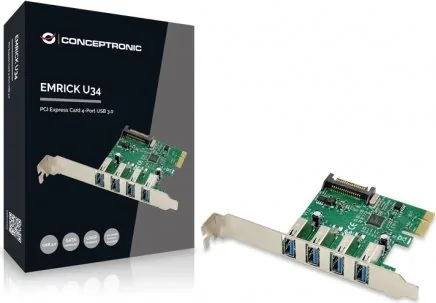
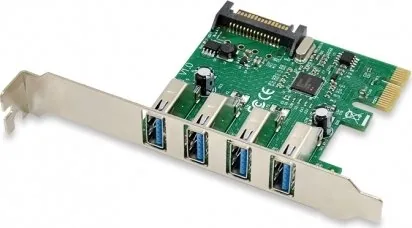
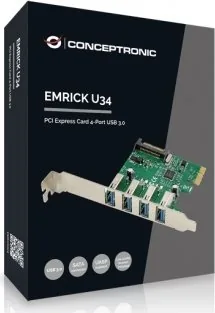
Conceptronic EMRICK02G Manual
PDF manual · 8 Pages
English



Quick check
Incorrect answer, please try again.
Chat with your Conceptronic EMRICK02G manual using AI
Get instant AI answers from your Conceptronic EMRICK02G manual
Ask anything about the Conceptronic EMRICK02G. Answers come from this manual, with the pages they are based on.
Ask a Question
Do you recommend EMRICK02G?
Yes NoFrequently Asked Questions
The card features four distinct USB 3.0 ports for connecting multiple devices simultaneously without performance loss.
Is this answer helpful?
Yes, the card requires a SATA power cable connection from your power supply unit to function correctly.
Is this answer helpful?
Installation is straightforward if you have experience with internal PC hardware. Turn off power and insert card into PCIe slot.
Is this answer helpful?
Yes, it works with Windows but you must install the drivers from the included disc during setup.
Is this answer helpful?
You must restart your computer manually after the driver installation is complete to ensure proper loading.
Is this answer helpful?
It uses a PCI Express 2.0 x1 interface slot on your motherboard for data and expansion.
Is this answer helpful?
Yes, USB 3.0 supports high-speed external hard drives and media devices with fast transfer rates.
Is this answer helpful?
Advantages and Disadvantages
Advantages

- Provides four high-speed USB 3.0 ports for peripherals
- Easy installation into standard PCIe slots on motherboard
- Drivers included on disc for compatibility
- Direct motherboard access improves stability
- Reduces need for external powered hubs
Disadvantages

- Requires SATA power cable from PSU
- Internal installation requires opening computer case
- Front panel ports reduced when used
- Drivers must be manually installed
- Not compatible with laptop systems
Product Specification
External
4x USB-A 3.0
Internal
N/A
Interface
PCIe 2.0 x1
Chipset
VIA VL805
Power Supply
1x 15-Pin SATA Power
Features
UASP
USB Port Label
Left
Product Description
Enhance Your PC Connectivity
Upgrading desktops requires better versatility for modern complex tasks. The Conceptronic 4x USB-A 3.0 card offers high-speed connections to your system infrastructure. This internal component slots directly into the motherboard, freeing front panel ports for other critical uses today. It provides essential expansion capabilities for growing tech needs in the home or office.
With four distinct USB ports, users connect peripherals simultaneously without performance degradation issues arising. Data rates are significantly higher than older standards, making file syncing and large media transfers efficient tasks easily. This expansion card is ideal for creators, gamers, or office workers managing multiple devices daily for success.
Installation is straightforward for those comfortable with internal hardware components within a system. The process requires powering down the system completely and accessing the motherboard safely to prevent damage. Aligning the connector correctly ensures proper communication between the card and the electronic board securely. A securing screw holds the bracket firmly in place on the chassis permanently.
Power is absolutely critical for this functional operation to work. The card connects to a SATA power cable from the power supply unit effectively. Without this external power source, ports will not function reliably at all under load. Once installed, the system detects new hardware automatically without delay. Driver installation ensures compatibility and stability throughout regular daily use.
After installation, restart your operating system immediately to finalize the driver loading process. This critical step guarantees that all features are activated correctly and fully within the environment. System support simplifies the process for a global user base effectively and quickly. You need more ports for peripherals or seek faster speeds for your workflow. This card delivers the required functionality efficiently and reliably for your setup.
Modern peripherals demand bandwidth that legacy ports cannot provide for data. USB 3.0 supports external hard drives, webcams, and high-resolution displays with ease today and tomorrow. Front panel interference issues are solved by internal expansion technology and design. The PCIe interface provides a dedicated lane for data transfer consistently. This prevents network or audio slowdowns consistently and reliably.
Maintenance is minimal once drivers are active on the main system. The system recognizes the card as a standard USB host controller unit properly. This allows plug-and-play functionality for most devices without complex manual configuration. Verify the SATA power connection is secure before closing the case door. Prevent errors or data loss during transfers always and safely.
Compatibility extends across various operating systems when using the provided drivers correctly without fault. Windows users will encounter the new hardware wizard during the installation process initially. The physical design fits standard desktop towers without major fitting issues at all. Most users with an available slot can utilize the product easily and securely immediately. Expanding connectivity improves overall workflow efficiency and productivity significantly in the office environment. You gain direct motherboard access to your hardware components immediately upon completion.
Note: Ensure SATA power is connected before testing the card. Note: Restart PC after driver completion to load modules. Note: Secure bracket screw during install to prevent wobble. Note: Keep case off until fully tested.
Search for 67,706 Manuals online


Type-in Brand or Model
Markus Schmidt
5 months ago
Will this device work on Windows 10 or 11 without installing from the driver CD on the disc?
Manual.ly
5 months ago
Yes. Although the included driver CD may have compatibility issues with newer operating systems, Windows 10 and 11 generally detect the hardware automatically. Users report that the OS installs the correct drivers and completes the setup without needing to run the disc manually. If you encounter issues, visiting the manufacturer support website for the latest drivers is recommended.