


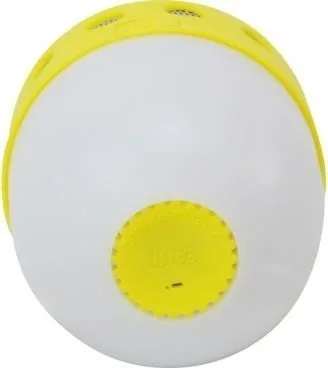
Conceptronic CSPKBTWPHL Manual
PDF manual · 9 Pages
English



Quick check
Incorrect answer, please try again.
Chat with your Conceptronic CSPKBTWPHL manual using AI
Get instant AI answers from your Conceptronic CSPKBTWPHL manual
Ask anything about the Conceptronic CSPKBTWPHL. Answers come from this manual, with the pages they are based on.
Ask a Question
Do you recommend CSPKBTWPHL?
Yes NoFrequently Asked Questions
The package includes the Bluetooth speaker, a USB charging cable, and a multilingual quick installation guide. It is designed to get users started with minimal setup and no extra accessories required.
Is this answer helpful?
Press and hold the main button for about 3 seconds. The same long-press action is used to power the speaker on and off, keeping the control system simple and easy to remember.
Is this answer helpful?
Open the Bluetooth settings on your iPad, tablet, or PC, then select the speaker name from the available devices list. Once paired, it can be used for wireless audio playback.
Is this answer helpful?
Yes. A short press of the control button lets you answer and hang up calls. This makes it convenient for quick hands-free use when connected to a compatible device.
Is this answer helpful?
A quick double press changes the LED between different flashing modes. If you want to turn the light off, hold the button for about 1 second. This gives you control over the visual effect.
Is this answer helpful?
Charge it through a computer USB port or with a mobile phone charger that provides less than 1A current. A red LED stays on while charging and turns off when the battery is fully charged.
Is this answer helpful?
Advantages and Disadvantages
Advantages

- Easy Bluetooth pairing with common devices like tablets and PCs.
- Compact 3W speaker is suitable for personal or desktop listening.
- Useful button controls for calls, power, and LED modes.
- USB charging is simple and works with a computer or low-current phone charger.
Disadvantages

- 3W output is modest and may not satisfy users wanting louder audio.
- Charging is limited to lower-current sources below 1A.
- Controls are basic, so advanced audio features are not included.
- Sound and battery details are minimal, suggesting a simple feature set.
Product Specification
Power
3W Peak
Frequency Range
100Hz-20kHz
Wireless
Bluetooth 2.1
Power Supply
Battery (450mAh), USB
Playback Time
3 hr
Special Features
water-resistant (IPX4)
Dimensions
2.24x3.39x2.24in (WxHxD)
Weight
0.22 lb
Product Description
Conceptronic CSPKBTWPHL Manual: A Compact Bluetooth Speaker for Everyday Use
The Conceptronic CSPKBTWPHL series is a small wireless speaker designed for simple, everyday listening. It combines Bluetooth convenience with a lightweight build, making it an easy choice for desks, bedside tables, travel bags, or casual home use. With a 3W output and a straightforward setup process, it focuses on practical performance rather than complexity.
This speaker is built for quick pairing with an iPad, tablet, or PC through the Bluetooth settings menu. Once connected, it can handle audio playback and even basic call control with a short button press, which adds a useful hands-free touch. The controls are intentionally minimal, so users can turn the unit on or off with a long press, answer or end calls, and switch LED modes with a double press. That simplicity makes it approachable for people who want a no-fuss wireless audio accessory.
Another standout feature is the LED lighting effect. The speaker includes multiple flashing modes, giving it a bit more personality than a plain audio device. If the light is too distracting, it can also be switched off with a longer press. This balance between visual flair and control helps the speaker fit different environments, from a relaxed evening setup to a more lively desktop mood.
Charging is equally practical. The unit can be powered through a computer USB port or a phone charger with a current below 1A. A red LED indicates charging status and turns off once the battery is full. That makes it easy to understand when the speaker is ready to go without checking additional indicators or apps.
Overall, the Conceptronic CSPKBTWPHL is best viewed as a compact Bluetooth speaker for users who value convenience, portability, and easy controls. It may not aim for high-end sound power, but it offers a clear, accessible feature set that suits everyday listening and quick use across multiple devices.
Notes
- Includes the speaker, a USB charging cable, and a quick multilingual guide.
- Designed for Bluetooth pairing with common devices like tablets and PCs.
- LED behavior can be customized or disabled depending on preference.
Search for 67,706 Manuals online


Type-in Brand or Model