
Conceptronic CMULTIRWU2 Manual
PDF manual · 2 Pages
English



Quick check
Incorrect answer, please try again.
Chat with your Conceptronic CMULTIRWU2 manual using AI
Get instant AI answers from your Conceptronic CMULTIRWU2 manual
Ask anything about the Conceptronic CMULTIRWU2. Answers come from this manual, with the pages they are based on.
Ask a Question
Do you recommend CMULTIRWU2?
Yes NoFrequently Asked Questions
No, the card reader is plug and play and installs automatically without additional driver software on most systems.
Is this answer helpful?
It supports Micro SD, SD, MMC, Memory Stick, Compact Flash and various other memory card standards found in digital devices.
Is this answer helpful?
Yes, a mini-USB to USB cable is included in the package for connection to your computer.
Is this answer helpful?
LED indicators on the device show power and connectivity status to confirm the connection is active.
Is this answer helpful?
Yes, each slot is assigned a unique drive letter on your computer for easy identification.
Is this answer helpful?
The device uses a mini-USB connector on the reader and standard USB on the computer side.
Is this answer helpful?
USB card readers are generally compatible with standard operating systems supporting USB mass storage protocols.
Is this answer helpful?
Advantages and Disadvantages
Advantages

- Supports multiple card formats including SD MS and Compact Flash without extra adapters
- Plug and play installation requires no manual driver software to be downloaded
- LED indicators provide immediate visual confirmation of power and connection status
- Each card slot gets a unique drive letter for easy data management
- Compact design saves desk space while maintaining high functionality and speed
Disadvantages

- Uses Mini-USB connector which is less common than standard USB on newer devices
- Maximum transfer speed limited to USB 2.0 standards for some users
- No included power adapter relies on host computer USB port for electricity
- Slots are tight which may make inserting small Micro cards difficult for some
- Does not support the newest high speed USB 3.0 standard for faster throughput
Product Specification
Type
Card Reader
Form Factor
1x external wired
Connection
1x USB 2.0 Mini-B (Socket, 480Mb/s), 1x USB-A 2.0 (Plug via Cable, 480Mb/s)
Card Slots
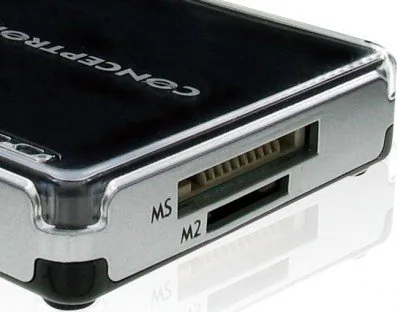
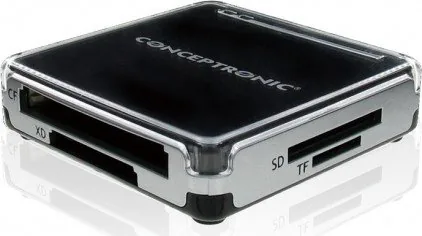
1x microSD, 1x SD Card, 1x xD-Picture Card, 2x Memory Stick, 1x CompactFlash
Media Support
1x microSD (microSD), 1x SD Card (SD Card, MMCplus), 1x xD-Picture Card, 1x Memory Stick (Memory Stick PRO Duo, Memory Stick Duo, Memory Stick PRO), 1x Memory Stick (Memory Stick Micro), 1x CompactFlash (Type I, Type II/Microdrive)
Power Supply
Power supply only via connection
Dimensions
2.36x0.39x2.36in (WxHxD)
Weight
1.41 oz
Housing Color
black, silver
Compatibility
universal
USB Designation
Link
Product Description
Discover the Ultimate Card Reading Solution
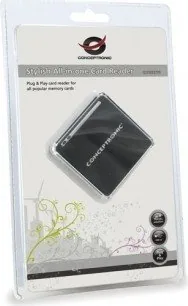
For many users transferring data from various memory cards is a daily task required for work or hobbies. Photography enthusiasts and IT professionals need reliable tools to access data quickly. The Conceptronic All-in-One Multi-Slot Cardreader addresses this need by combining multiple interfaces into a single device. This hub simplifies workflow when dealing with different media formats effectively.
Comprehensive Slot Arrangement
One of the standout features is the array of slots included. Users can insert Micro Memory Stick standard Memory Stick variants including Duo types. SD and SD-HC cards Micro-SD formats and even Compact Flash cards. This versatility means you do not need to carry multiple adapters or readers. Whether working with professional cameras or older devices this reader supports the spectrum of current and previous media standards efficiently.
Seamless Connectivity and Usage
Connection is straightforward using the included USB to Mini-USB cable. The device communicates via USB 2.0 ensuring compatibility with most operating systems globally. Installation is truly plug and play requiring no additional drivers to be manually installed by the user. Once connected the system automatically recognizes the device and loads the necessary protocols. Each card slot is assigned a distinct drive letter allowing you to manage data from different cards simultaneously without confusion or conflict.
Visual Feedback and Reliability
To ensure you know the status of the connection the unit features power and connectivity LED indicators. This visual feedback helps confirm when a card is inserted properly and if the link to your computer is active and healthy. The design prioritizes convenience allowing you to enjoy your workflow without technical interruptions or delays. It is an essential accessory for anyone managing diverse storage formats efficiently in a professional environment today.
Managing digital assets has never been more critical and the speed of access often determines productivity levels significantly. This specific model supports a wide range of media types ensuring compatibility across different generations of memory technology. By avoiding driver installation users save significant time that would otherwise be spent troubleshooting software conflicts. The hardware recognizes cards instantly upon insertion streamlining the process of file transfer for large datasets.
The portable nature of the USB 2.0 Mini-B connector makes it suitable for laptops and desktops alike. It does not occupy excessive space on a desk maintaining a clean workstation environment. Furthermore the automatic installation feature means that even non-technical users can set it up in minutes. Power management is optimized through the LED lights indicating activity clearly to the observer. For professionals requiring quick access to backup data or raw photos this tool is indispensable for their daily tasks.
In conclusion the Conceptronic unit offers a robust solution for modern data management needs consistently. Its multi-slot capability removes the need for cluttered setups and extra cables on your table. The automatic recognition and driver free installation enhance user experience significantly reducing setup friction significantly. Whether for work or personal storage organization this reader delivers reliability and ease of use making it a top choice for computer peripherals in today's connected world of digital media.
Search for 67,706 Manuals online


Type-in Brand or Model
lee58
8 months ago
Does the CF card slot accept Type-II cards without bending the connector pins?
Manual.ly
8 months ago
While the adapter is designed for thicker Type-II cards, the guide mechanism can be sensitive. Please align cards carefully during insertion to prevent pin damage and ensure longevity of the product. If issues persist, manual adjustment may be required.