
Conceptronic ABBY16B Manual
PDF manual · 18 Pages
English



Quick check
Incorrect answer, please try again.
Chat with your Conceptronic ABBY16B manual using AI
Get instant AI answers from your Conceptronic ABBY16B manual
Ask anything about the Conceptronic ABBY16B. Answers come from this manual, with the pages they are based on.
Ask a Question
Do you recommend ABBY16B?
Yes NoFrequently Asked Questions
The Conceptronic ABBY16B is supported on Windows 8.1, Windows 10 and Windows 11 (32/64-bit). It relies on the native Microsoft Bluetooth stack for driver installation and device management.
Is this answer helpful?
In most cases no. After plugging the ABBY16B into a free USB-A port, Windows should automatically recognize and install the default Microsoft driver. If issues occur, visit Conceptronic support or check Windows Update for driver updates.
Is this answer helpful?
The adapter uses Bluetooth 5.3 and supports common profiles including A2DP (audio), HSP (headset), AVRCP (remote control) and HID (keyboards/mice), making it suitable for wireless audio and input devices.
Is this answer helpful?
Typical working distance is up to 20 meters in open conditions, with a transmission rate up to 3.0 Mbps. Actual range and throughput depend on environmental factors like interference, obstacles and paired device capabilities.
Is this answer helpful?
The ABBY16B supports up to five Bluetooth devices concurrently. For setups requiring larger numbers of simultaneous connections or advanced multipoint features, specialized adapters or built-in Bluetooth hardware may be preferable.
Is this answer helpful?
The ABBY16B uses a USB-A 2.0 plug. To use it with USB-C only systems, a passive USB-C to USB-A adapter or hub is typically required; compatibility depends on the adapter and host implementation.
Is this answer helpful?
Do not throw the ABBY16B in household waste. Dispose of it at an electronic recycling point to prevent environmental harm and comply with local e-waste regulations.
Is this answer helpful?
Advantages and Disadvantages
Advantages

- Plug-and-play on Windows 8.1/10/11—no driver installation required in most cases.
- Bluetooth 5.3 brings improved stability, lower latency and better interference handling.
- Compact USB-A form factor makes it portable and unobtrusive on laptops and desktops.
- Supports common profiles (A2DP, HSP, AVRCP, HID) suitable for audio and input devices.
- Wide operating/storage temperature range and CE compliance for reliability.
Disadvantages

- Limited to a maximum of five simultaneous Bluetooth device connections.
- USB-A connector may require an adapter for modern USB-C only systems.
- Modest 3.0 Mbps throughput—not suitable for high-bandwidth Bluetooth applications.
- Working range up to 20 meters can be reduced by walls, interference or obstacles.
- No advanced management software included—relies on the Microsoft Bluetooth stack.
Product Specification
Type
WPAN adapter
Form factor
1x USB stick
Connection
1x USB-A 2.0 (plug)
Connectivity
1x Bluetooth 5.3 (LE, Class 2, EDR, DualMode), 1x transmitter amplifier, 1x antenna (internal)
Data transfer
1x Bluetooth 5.3 (3Mb/s)
Power supply
Power supply only via connection
Dimensions
0.59x0.28x1.18in (WxHxD)
Weight
0.01 lb
Case color
black
Compatibility
universal
USB designation
Link
Product Description
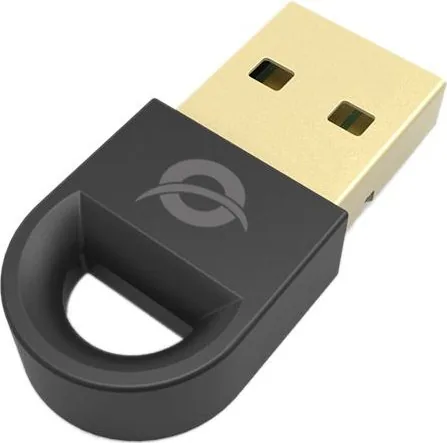
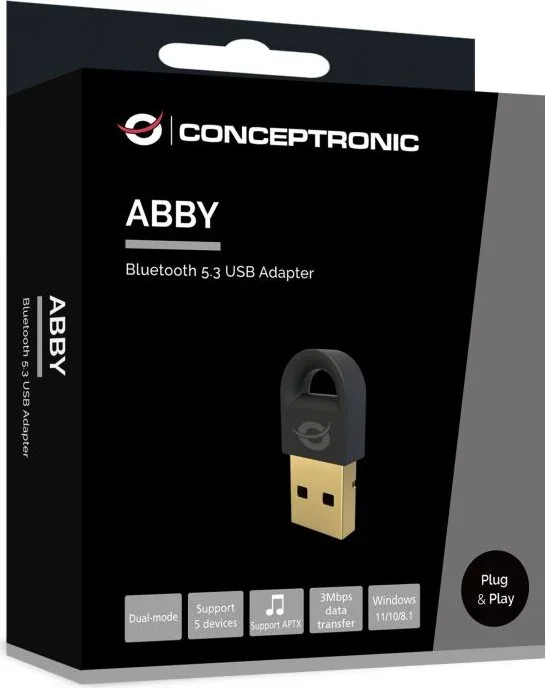
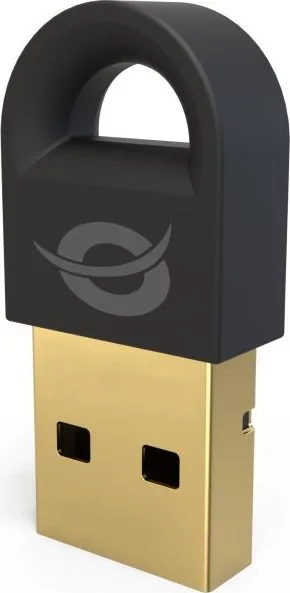
Conceptronic ABBY16B Bluetooth USB Adapter — Compact Bluetooth 5.3 USB-A Dongle
The Conceptronic ABBY16B Bluetooth USB Adapter is a small, plug-and-play USB-A dongle that brings Bluetooth 5.3 connectivity to desktops and laptops. Designed for Windows 8.1, 10 and 11 (32/64-bit), the ABBY16B requires no additional drivers in most cases—simply insert it into a free USB port and let the Microsoft Bluetooth stack handle setup. With support for common Bluetooth profiles such as A2DP, HSP, AVRCP and HID, this adapter is suitable for wireless audio, headsets, remote controls, mice, keyboards and basic data transfer tasks.
Key features and practical use
The ABBY16B operates in the 2.4 GHz band (2402–2480 MHz) with an effective radiated power (EIRP) of 8 dBm and a rated DC 5V supply. It supports up to five simultaneous Bluetooth device connections and achieves transmission speeds up to 3.0 Mbps with an expected working range up to 20 meters under normal conditions. Operating temperatures span -30°C to 45°C, while storage tolerances extend from -45°C to 75°C—making the adapter resilient to a wide range of environments.
Thanks to Bluetooth 5.3, users benefit from improved reliability, better coexistence with other wireless signals and reduced latency compared with older versions. The ABBY16B is ideal for upgrading older PCs without integrated Bluetooth, for quick pairing with wireless speakers and headsets, or for adding simple peripheral connectivity to laptops and compact systems.
Installation and safety
Installation is straightforward: plug the dongle into a USB-A port and allow Windows to recognize and install the device automatically. A Bluetooth icon appears in the system tray once the Microsoft driver is active, giving access to device pairing and settings. Basic safety guidance includes keeping the device dry, avoiding impacts, storing out of children’s reach, and disposing of the adapter at a proper electronic recycling point. Conceptronic declares CE compliance for regulatory conformity.
Notes
- Best used on Windows 8.1/10/11 systems for native plug-and-play experience.
- Works with common Bluetooth profiles (A2DP/HSP/AVRCP/HID) for audio and peripheral support.
- Not intended for advanced Bluetooth networking; designed as a straightforward consumer dongle.
Search for 67,706 Manuals online


Type-in Brand or Model