
CoLiDo 3D DIY Manual
PDF manual · 19 Pages
English



Quick check
Incorrect answer, please try again.
Chat with your CoLiDo 3D DIY manual using AI
Get instant AI answers from your CoLiDo 3D DIY manual
Ask anything about the CoLiDo 3D DIY. Answers come from this manual, with the pages they are based on.
Ask a Question
Do you recommend 3D DIY?
Yes No
Sofia Novak
10 months ago
Is the printer easy to set up right out of the box, and does it arrive well protected?

Manual.ly
10 months ago
Yes. Customers report a fast, straightforward setup so you can start printing quickly. The unit is also packed very securely for shipping, with good protection to help ensure it arrives in great condition.
Frequently Asked Questions
It is best for beginner-friendly 3D printing, small prototypes, educational projects, and learning the basics of FDM printing. Its setup encourages users to understand calibration, slicing, and filament handling rather than relying on automation alone.
Is this answer helpful?
The kit uses Repetier-Host for model handling, slicing, and print control. The workflow also mentions Slic3r for generating G-code, which helps prepare STL models for printing.
Is this answer helpful?
The printer is designed for 1.75 mm PLA filament. The manual highlights PLA temperature ranges around 190–210°C, so using the recommended material and temperature settings is important for stable extrusion.
Is this answer helpful?
Calibration is very important. The nozzle must be set close enough to the platform for the first layer to stick properly, but not so close that it damages the bed. A correct first layer is key to print quality.
Is this answer helpful?
Check whether the filament is loaded correctly, make sure the spool can rotate freely, and confirm the nozzle has reached the proper temperature. If needed, inspect the nozzle for clogs and clean it carefully.
Is this answer helpful?
Yes. The software support includes Windows, Mac OS, and Linux, which makes it easier to set up on a wide range of computers.
Is this answer helpful?
Advantages and Disadvantages
Advantages

- Step-by-step setup and calibration help beginners understand the full printing process.
- Compact 200 x 200 x 170 mm build area is practical for small models and learning projects.
- Supports common 1.75 mm PLA filament, making materials easy to source.
- Repetier-Host integration simplifies slicing, sending jobs, and managing prints.
Disadvantages

- PLA-only support limits material choices for more advanced users.
- Small build volume is not ideal for large or high-part-count projects.
- Manual calibration is required and can take patience to get right.
- The translated instructions may feel confusing in places for first-time users.
Product Specification
Process
Fused Filament Fabrication FFF
Manufacturer's Recommended Materials
0.07in Filament
Print Size
7.87x6.69x7.87in (WxHxD)
Layer Height
0.00in
Interfaces
Micro-USB 2.0, Card reader (SD/SDHC)
Dimensions
20.67x14.49x18.90in (WxHxD)
Weight
12.57 lbs (empty)
Product Description
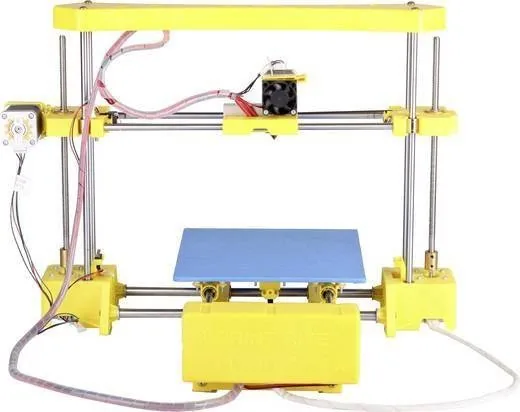
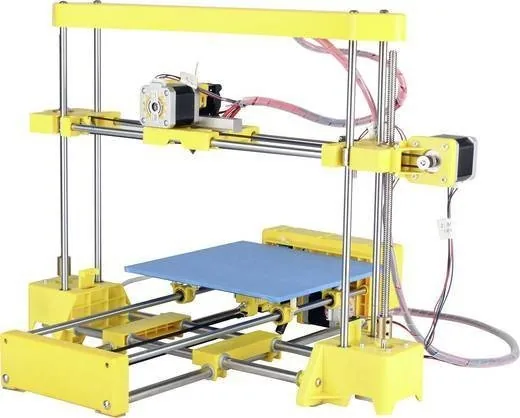
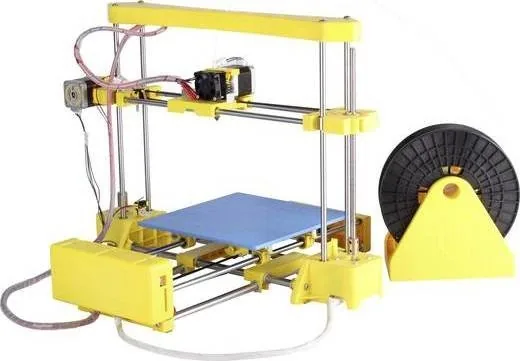
CoLiDo 3D DIY Kit: A Practical Start for Home 3D Printing
The CoLiDo 3D DIY Kit Manual points to a printer designed for hands-on users who want to learn the full 3D printing workflow, from setup to finished parts. Built around fused deposition modeling (FDM), this kit turns PLA filament into real objects layer by layer, making it a solid choice for hobbyists, students, and makers who enjoy understanding how their machine works.
What stands out first is the balanced feature set. The printer offers a compact build volume of 200 x 200 x 170 mm, a 0.4 mm nozzle, and support for 1.75 mm PLA filament, which keeps the experience accessible and predictable. It connects through USB and works with Repetier-Host, so users can load models, slice them, and send print jobs directly from a computer. The kit also emphasizes careful calibration, which is essential for good first-layer adhesion and consistent print quality.
This product feels especially valuable for learners because it does not hide the technical side of printing. Instead, it guides users through safety checks, electrical connection, software installation, platform leveling, filament loading, and basic troubleshooting. That makes it more than just a printer—it becomes an introduction to the full printing process. If you want a machine that teaches you the fundamentals while still producing useful models, the CoLiDo 3D DIY Kit offers a practical path forward.
The build materials and specifications suggest a printer focused on reliable everyday use rather than advanced experimentation. The frame combines steel and engineering plastic, and the machine is intended to run in a normal indoor environment. With its PLA-only approach, it is best suited for clean, simple prints, prototypes, educational samples, and small creative projects.
Notes
- Best results come from careful bed leveling before every serious print.
- PLA filament should be loaded correctly and matched to the recommended nozzle temperature.
- Good ventilation is recommended during printing.
- Repetier-Host makes slicing and sending jobs straightforward for beginners.
Overall, the CoLiDo 3D DIY Kit is a straightforward entry into desktop manufacturing. It rewards patience, careful setup, and a willingness to learn, which is exactly what many first-time 3D printer owners need.
Search for 67,706 Manuals online


Type-in Brand or Model
Jacquline Eichinger
7 months ago
Is this printer quick to set up, and does it produce consistently good print quality?
Manual.ly
7 months ago
Yes. Customers report a fast, straightforward setup and great print results right away. If you follow the included quick-start steps, you should get consistently good output. The product also arrives well packaged, which helps ensure it is ready to use with minimal hassle. For best results, make sure you use compatible settings and media recommended for your specific print needs.