

Free CoLiDo Manuals – Read, Download & Print
1 Manuals
Manuals
Categories

CoLiDo Manuals
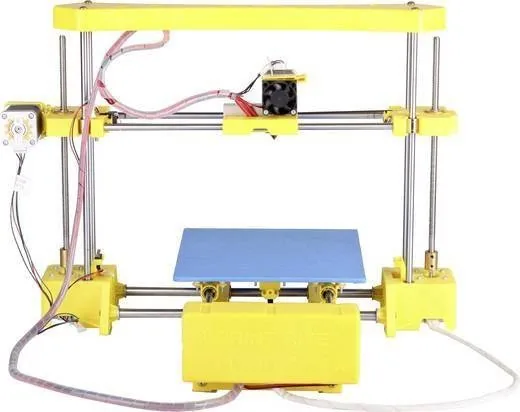
CoLiDo manuals are the primary reference point for anyone using a CoLiDo 3D printer, accessory, or related device. They bring together the practical steps, technical notes, and safety guidance needed to move from unboxing to reliable printing. Whether you are a first-time user, a classroom operator, a workshop technician, or an experienced maker, the manual is the document that explains how the machine should be assembled, configured, maintained, and troubleshooted.
What CoLiDo Manuals Cover
A CoLiDo manual usually acts as more than a simple instruction sheet. It is a compact user guide, setup guide, maintenance handbook, and troubleshooting reference all in one. The exact contents can vary by model, but most manuals focus on the core tasks needed to keep the printer running smoothly and producing consistent results.
Setup and Assembly
Many CoLiDo printers require some level of initial setup. Manuals typically explain how to remove packaging, check included parts, attach external components, and prepare the machine for its first use. This may include installing spools, connecting cables, positioning the build plate, or confirming that moving parts travel freely. Clear assembly instructions help reduce avoidable mistakes during the first hours of ownership.
Safety Guidance
Safety sections are especially important because 3D printers use heated components, moving axes, and in some cases enclosed chambers. CoLiDo manuals generally explain how to avoid burns, prevent electrical issues, and keep ventilation adequate. They may also include advice on keeping hands clear of moving mechanisms, using the printer on a stable surface, and supervising operation when required. These notes are not decorative; they are essential for safe day-to-day use.
Printing Instructions
A good manual explains the complete workflow from preparing a digital model to starting the print. This often includes software preparation, file transfer methods, material loading, temperature settings, bed preparation, and print initiation. If the printer uses proprietary software or a recommended slicer, the manual may also describe basic profile settings and export steps. This helps users avoid confusion and begin printing with sensible defaults.
Maintenance and Care
Routine maintenance is another common topic. Manuals often describe how to clean the build surface, inspect belts, check nozzle condition, lubricate moving parts, and replace consumables. Maintenance guidance is especially valuable because it helps users extend the life of the printer and reduce downtime. A machine that is regularly checked and cleaned usually performs more consistently than one that is left unattended.
Why CoLiDo Manuals Matter
The value of a manual is not only in what it says, but in how it helps users build confidence. 3D printing combines software, mechanics, temperatures, and materials, so even small misunderstandings can lead to failed prints. CoLiDo manuals help reduce guesswork and make the learning process more manageable.
For Beginners
New users benefit most from step-by-step directions. A manual can simplify the first print by explaining which settings matter most, how to load filament correctly, and what signs indicate that calibration is off. Instead of relying on trial and error, beginners can follow a structured path and see results more quickly. This reduces frustration and makes the printer feel approachable.
For Experienced Users
Even advanced users can benefit from manuals because they provide model-specific details. A printer may look similar to another machine, but firmware behavior, bed leveling methods, material support, and interface options can differ. The manual helps experienced operators avoid assumptions and work with the printer as designed.
For Education and Shared Environments
In schools, labs, and makerspaces, a manual is a shared standard. Different people may operate the same machine, and the manual ensures they all follow the same procedure. This improves consistency and helps administrators train new users efficiently. It also lowers the risk of damage caused by improvised methods.
Common Topics Found in CoLiDo Manuals
While the exact layout varies, many CoLiDo manuals share a set of recurring themes that reflect the everyday needs of printer owners.
Build Plate Leveling
Bed leveling is often one of the most important tasks in a 3D printer workflow. Manuals usually explain how to adjust the build plate so the first layer adheres properly. A correctly leveled bed improves adhesion, reduces warping, and lowers the chance of failed prints. Because this step is critical, the instructions are often detailed and accompanied by diagrams or reference values.
Filament Loading and Unloading
Another common subject is material handling. CoLiDo manuals typically show how to load filament, guide it through the extruder, and unload it when changing materials. They may also mention compatible filament types, storage suggestions, and signs of moisture damage or improper feeding. Good filament handling is essential for reliable extrusion and smooth print quality.
Temperature and Speed Settings
Many printing issues come from incorrect temperatures or print speeds. Manuals often provide recommended ranges for the printer and supported materials. They may explain how to adjust nozzle heat, bed temperature, fan behavior, and movement speed depending on the object being printed. These guidelines help users achieve a balance between quality and efficiency.
Software and File Preparation
Most printers depend on slicing software to convert a model into printable instructions. Manuals may describe supported file formats, connection methods, and the basic process of importing, slicing, and exporting a job. In some cases, they also include notes about firmware, drivers, or onboard menu navigation. This makes the printer easier to integrate into a modern workflow.
Troubleshooting in CoLiDo Manuals
One of the most useful parts of any manual is the troubleshooting section. Instead of leaving users to search randomly for answers, the manual points to likely causes and practical fixes.
Poor Adhesion or Warping
If a print does not stick to the build plate, the manual may recommend cleaning the surface, re-leveling the bed, checking the first layer height, or adjusting temperature. Warping can be linked to cooling, enclosure conditions, or material choice, so the troubleshooting guide often helps narrow the issue.
Stringing, Gaps, and Surface Defects
Print quality problems such as stringing, under-extrusion, or rough surfaces are usually tied to temperature, retraction, feed consistency, or nozzle wear. Manuals often provide a logical checklist so users can test one variable at a time instead of changing everything at once.
Mechanical Noise or Movement Problems
If the printer makes unusual sounds or movement becomes uneven, the manual may direct the user to inspect belts, pulleys, rails, or connectors. These issues are often easier to solve when caught early, and the troubleshooting guide helps users identify them before larger problems develop.
Connectivity or File Transfer Issues
Some CoLiDo manuals also address USB, SD card, or network-related issues. If a file does not appear correctly or the printer does not respond as expected, the guide may suggest verifying file format, storage device condition, or firmware compatibility. This practical advice can save time and reduce unnecessary support requests.
How to Use CoLiDo Manuals Effectively
A manual is most useful when treated as an active tool rather than a document to read once and forget. The best results usually come from revisiting the manual at key moments in the printer's life cycle.
Before the First Print
Read the setup and safety sections before powering on the printer. This helps you understand the machine layout, required materials, and any special conditions that apply to your model. First-time preparation often prevents later confusion.
During Calibration
Keep the manual nearby while leveling the bed, loading filament, or running a test print. Small details matter, and the manual helps confirm the correct order of steps. If the printer behaves unexpectedly, refer back to the recommended checks before making major adjustments.
For Routine Maintenance
Set a regular schedule for cleaning and inspection, then use the manual as a checklist. This is especially helpful for printers used frequently or in shared environments. Regular attention can prevent wear from becoming a bigger problem.
When Something Goes Wrong
Instead of guessing, use the troubleshooting section first. Many common issues have straightforward causes, and the manual often points to the fastest path to recovery. This makes repairs more efficient and reduces unnecessary part replacement.
Finding the Right CoLiDo Manual
Because CoLiDo has produced multiple models, it is important to match the manual to the exact printer version. Even small differences in frame design, interface, or firmware can change instructions. When possible, locate the model number, revision, or serial details before downloading or opening the guide. A correct manual saves time and avoids confusion.
Digital copies are especially useful because they are searchable and easy to store with other project files. Many users keep both a downloaded version and a printed reference copy near the printer. This is a practical way to ensure quick access during setup or maintenance.
Why Clear Documentation Builds Better Results
Good manuals improve more than convenience. They support better print quality, safer operation, and longer machine life. They also make 3D printing more accessible to people who are willing to learn but do not want to rely on trial and error. In that sense, CoLiDo manuals are not just instructions; they are part of the product experience itself.
Conclusion
CoLiDo manuals provide the structure needed to use a printer with confidence. They explain how to assemble, operate, maintain, and troubleshoot the machine while reducing uncertainty at every stage. For anyone working with a CoLiDo printer, the manual is one of the most valuable tools available. It turns a complex device into a manageable system and helps users focus on what matters most: making reliable prints with less waste, less frustration, and better results.
Search for 67,706 Manuals online


Type-in Brand or Model