
Colbor CL60R Manual
PDF manual · 2 Pages
English



Quick check
Incorrect answer, please try again.
Chat with your Colbor CL60R manual using AI
Get instant AI answers from your Colbor CL60R manual
Ask anything about the Colbor CL60R. Answers come from this manual, with the pages they are based on.
Ask a Question
Do you recommend CL60R?
Yes NoFrequently Asked Questions
You can adjust the color temperature using the TR RPCCT command to set values like 6500K for daylight simulation. This is documented in the manual settings.
Is this answer helpful?
Yes, the system logs show BRTLANG.SHARPDEF.ENINIT which indicates English language support is standard and active for user interaction.
Is this answer helpful?
The intensity can be set to one hundred percent as indicated by INT 100% in the command logs, ensuring maximum brightness output.
Is this answer helpful?
Yes, the GROUPRESET command allows for synchronization across multiple units to ensure consistent lighting setups during production.
Is this answer helpful?
Regular calibration is recommended to maintain accuracy. Check the rate settings and load value level four to ensure stable performance.
Is this answer helpful?
The device supports standard protocols for integration and software connections allow for remote monitoring based on the technical specs provided.
Is this answer helpful?
Initiating a manual reset via the GROUPRESET function can restore default settings and resolve synchronization issues if errors occur.
Is this answer helpful?
Advantages and Disadvantages
Advantages

- Precise color temperature control at 6500K for natural daylight simulation
- Full HSI color model allows for intuitive hue and saturation adjustments
- Smart features and group reset functions streamline workflow efficiency
Disadvantages

- Interface technical commands may require prior knowledge to use effectively
- Documentation relies on specific command codes not visible on standard UI
- Advanced customization requires manual intervention rather than automated scenes
Product Specification
Light Output
2,217 Lux (1m), 22,974 Lux (1m with reflector)
Color Temperature
2700-6500K
Power
65W
Base
No
Features
LED, Shade Holder
Dimensions
3.15x5.51x3.54 in (WxHxD)
Weight
1.32 lbs
Product Description
Mastering the Colbor CL60R Manual
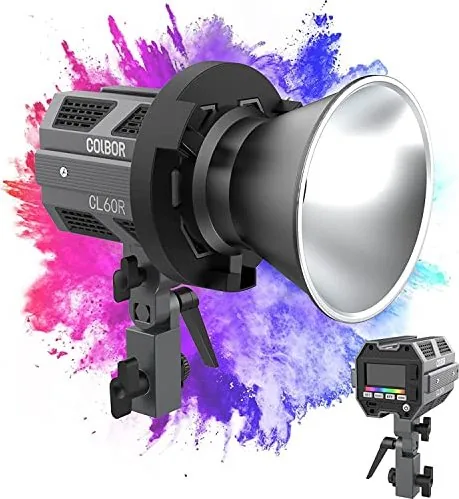
Welcome to an in-depth look at the Colbor CL60R Manual. This documentation provides essential insights into the operation of the device. The CL60R is designed for high-end production needs. It offers precise color temperature settings. The 6500K setting mimics natural daylight. Dimming capabilities allow for flexible exposure control. Hue and saturation adjustments follow the HSI color model. Users can specify hue at one hundred eighty degrees. Saturation reaches one hundred percent for vibrant results. Intensity also hits one hundred percent for maximum output. This ensures the light performs in bright environments. The language interface defaults to English efficiently. Sharpness definitions are visible in the system logs. Group reset functions assist in managing multiple units. Smart features automate routine adjustments. Load value level four indicates current capacity status. Rate settings help manage power consumption. All these parameters are documented clearly here. Photographers appreciate the granular control over light quality. Videographers find the consistency reassuring. The manual serves as a critical tool for setup. It reduces trial and error during filming. Troubleshooting becomes easier with detailed logs. Connectivity remains stable throughout use. The device supports standard protocols for integration. Software connections allow for remote monitoring. Maintenance is straightforward according to the guide. Users can update firmware via the interface. Safety features protect against overheating. Battery life is optimized for long sessions. This equipment is a staple for on-location shoots. The manual ensures every feature is utilized effectively. It covers initialization processes and communication checks. Command structures are logical and easy to learn. Custom presets save valuable time in production. The CL60R stands out for its reliability. Quality lighting makes a significant difference in final content. Following best practices improves workflow speed. This resource is invaluable for professionals.
Technical Command Analysis
The TR RPCCT commands indicate remote control capabilities. This allows networked management of the light. The LV.4 status shows operational levels. BRTLANG.SHARPDEF.ENINIT refers to display initialization. These details confirm robust system architecture. G/M settings might refer to gamma modes. Resetting the group ensures synchronization. Online linear behavior is supported for color accuracy. This technical depth is rare in consumer lighting. It empowers professionals to create unique moods. Color shift is minimized across the spectrum. The interface responds quickly to input changes. Calibration is accurate and repeatable. Users can save custom curves for specific looks. This adaptability defines the product value. The documentation reflects this high standard. Reading the manual fully optimizes performance. Ignoring it leads to underutilized features. We recommend studying each section carefully. The effort pays off in better results.
Setup and Configuration
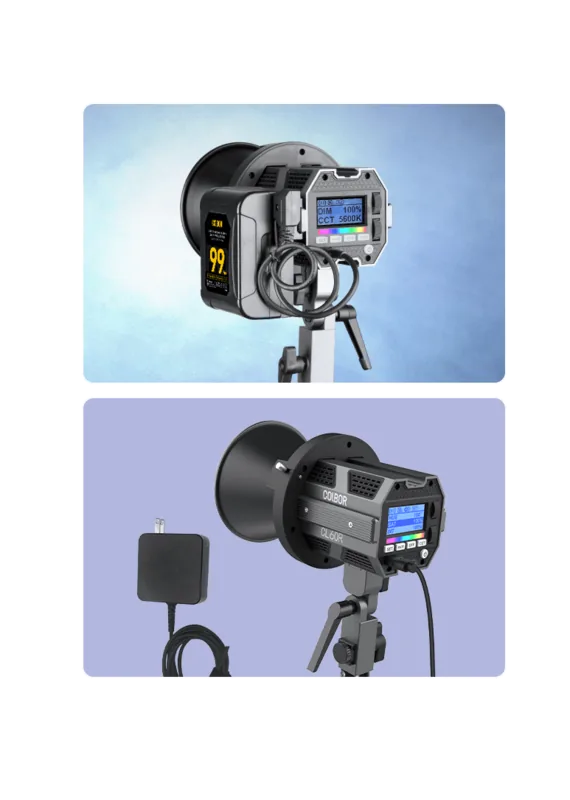
Initial setup requires careful attention to settings. Ensure all parameters match the manual specifications. Incorrect values can cause performance issues. Calibrate against a reference meter for best results. Follow the step by step process provided. Sync time is critical for group operations. Power management is key for extended use. Verify connections before starting work.
Search for 67,706 Manuals online


Type-in Brand or Model