
Colbor CL100-M Manual
PDF manual · 2 Pages
English



Quick check
Incorrect answer, please try again.
Chat with your Colbor CL100-M manual using AI
Get instant AI answers from your Colbor CL100-M manual
Ask anything about the Colbor CL100-M. Answers come from this manual, with the pages they are based on.
Ask a Question
Do you recommend CL100-M?
Yes NoFrequently Asked Questions
Original COLBOR products are entitled to a twelve-month limited warranty service. This period begins on the date of purchase of brand new, unused products by the first end-user. If a defect is found, repair or replacement is provided within this time.
Is this answer helpful?
Select wireless connection in the Settings menu. Connect the power cord and plug it into an electricity supply. The icon on the display shows success if the light pairs. Unpairing is indicated by the icon disappearing.
Is this answer helpful?
No, the product is not waterproof. You must keep corrosive chemicals and liquids away from it. Failure to follow instructions may result in mechanical damage or warranty disqualification.
Is this answer helpful?
The light operates at a standard color temperature range of 5600K. This simulates natural daylight and is suitable for most indoor and outdoor shooting situations requiring balanced lighting.
Is this answer helpful?
There are six groups available ranging from A to F. If a group function is on, products connect together. There is a millisecond delay when operating after a period of time in group mode.
Is this answer helpful?
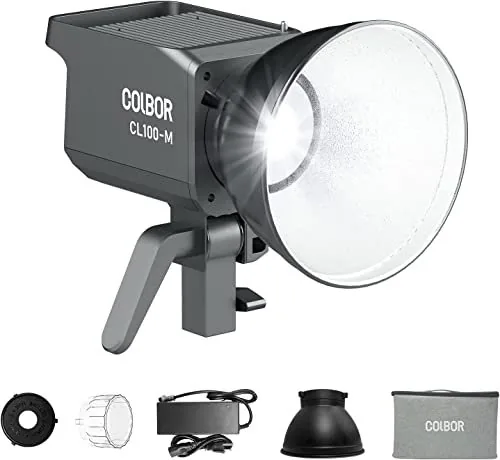
Yes, the package list includes one standard reflector with a Bowens mount. It also includes a COB protective cover, power adapter, power cord, packing bag, and user manual.
Is this answer helpful?
The light working voltage is DC 15-24V at 6.32A. The GX16 3-Pin Connector must be used for the power supply. Do not use damaged cables or adapters.
Is this answer helpful?
Advantages and Disadvantages
Advantages

- High color rendering index of at least 97 for accurate skin tones and colors.
- Bowens mount allows use with a wide variety of standard light modifiers.
- Wireless app control offers convenient remote operation up to ten meters.
- Smart fan mode adjusts speed based on internal temperature to prevent overheating.
- Compact and lightweight design at 1.1kg makes transport easy for field work.
Disadvantages

- Not waterproof so it cannot be used in rain or damp conditions without risk.
- Wireless connection range is limited to 10 meters without repeater function active.
- Fan may produce noise even in Quiet mode if temperature reaches alarm value.
- Removes protective COB cover before use which means it must be stored safely.
- Warranty does not cover damage from dropping or physical impacts on the base.
Product Specification
Light Output
4130 Lux (3.28 ft), 14546 Lux (3.28 ft with Reflector)
Color Temperature
5600K
Power
100W
Socket
No
Features
LED, Shade Holder
Dimensions
4.57 x 7.95 x 4.61 in (WxHxD)
Weight
2.43 lbs
Product Description
Discovering the Colbor CL100-M Experience
Welcome to the world of professional lighting with the Colbor CL100-M. This video light brings versatility and power to your creative projects. When you start following the guidelines found in the Colbor CL100-M Manual resources, you unlock the full potential of this compact powerhouse. The device is designed for photographers and videographers who demand high quality and reliability in their equipment workflow. It serves as a critical tool for achieving studio-grade illumination in various environments.
Core Features and Performance
At the heart of the system is a powerful 100W constant power output. It delivers a consistent color temperature of 5600K, which is ideal for simulating natural daylight conditions. The color rendering index reaches at least 97, ensuring true color representation in your final shots without needing heavy correction. You can adjust brightness from zero to one hundred percent using the intuitive adjustment dial on the side. For creative effects, the unit supports special modes like strobing and pulsing for dynamic video content. This adds a layer of artistic freedom to standard lighting setups.
Control and Connectivity
One of the standout aspects is the wireless capability provided in the unit. You can connect the light to a mobile application for seamless remote adjustments without being near the fixture. The effective distance for the transmitter is up to ten meters normally. If you need more range, the repeater function helps extend control significantly for larger studios. There are also grouping functions allowing you to sync multiple units together for synchronized light setups. This makes controlling a multi-light studio environment much easier and efficient.
Safety and Maintenance
Proper care ensures longevity and consistent performance over time. Keep liquids away from the unit as it is not waterproof and water damage is not covered. Do not block ventilation holes to prevent overheating issues during operation. The device features Smart and Quiet fan modes that manage internal temperatures automatically. If the temperature gets too high, the safety system activates to protect the internals. Always disconnect power from the supply when not in use to ensure safety. Removing the COB protective cover before operation is required for safety and function.
Warranty and Support
Users are entitled to service within specific periods. Original products are covered for twelve months starting from the date of purchase. Any defects found in material or technology are eligible for repair or replacement. Please retain receipts as proof of purchase for warranty claims. Registering your product allows direct contact via email. This support network ensures you have help if issues arise during normal use or production.
Important Notes
Ensure the power adapter is compatible with the DC input. Keep the manual for safety reference. Do not disassemble the unit yourself as that voids the warranty coverage completely.
Search for 67,706 Manuals online


Type-in Brand or Model