
Club 3D SenseVision USB-C Mini Dock Manual
PDF manual · 9 Pages
English



Quick check
Incorrect answer, please try again.
Chat with your Club 3D SenseVision USB-C Mini Dock manual using AI
Get instant AI answers from your Club 3D SenseVision USB-C Mini Dock manual
Ask anything about the Club 3D SenseVision USB-C Mini Dock. Answers come from this manual, with the pages they are based on.
Ask a Question
Do you recommend SenseVision USB-C Mini Dock?
Yes NoFrequently Asked Questions
Yes, the USB Type-C PD port supports charging up to 60 Watts, allowing you to charge compatible laptops while using other ports.
Is this answer helpful?
Yes, it is fully compliant with Apple OS X and works seamlessly with MacBook models that have USB Type-C ports.
Is this answer helpful?
The RJ45 port supports Gigabit Ethernet speeds, adhering to IEEE802.3 and IEEE802.3u standards for reliable connectivity.
Is this answer helpful?
No, the device is plug-and-play and does not require any additional driver installation on Windows or macOS systems.
Is this answer helpful?
Yes, you can connect an Ethernet cable, a USB 3.0 peripheral, and a charging cable simultaneously for multitasking.
Is this answer helpful?
Advantages and Disadvantages
Advantages

- Supports Gigabit Ethernet for reliable high-speed internet connections
- Includes USB 3.0 port with data transfer speeds up to 5Gbps
- Features a folding design to protect the USB-C connector during transport
- Provides Power Delivery charging up to 60 Watts for laptops
- Compatible with both Windows and macOS operating systems
Disadvantages

- Requires separate Ethernet and USB cables for full functionality
- Charging speed limited to 60 Watts which may be insufficient for high-performance gaming laptops
- No built-in HDMI or video output ports for connecting external monitors
- Folding mechanism may accumulate dust over extended periods of use
- Compact size might make the ports slightly difficult to reach on some desks
Product Specification
Type
LAN adapter, USB hub
Form factor
1x external wired (connection cable not detachable)
Connection
1x USB-C 3.0 (connector via cable, 5Gb/s, USB PD 2.0, 5cm cable length)
Interface
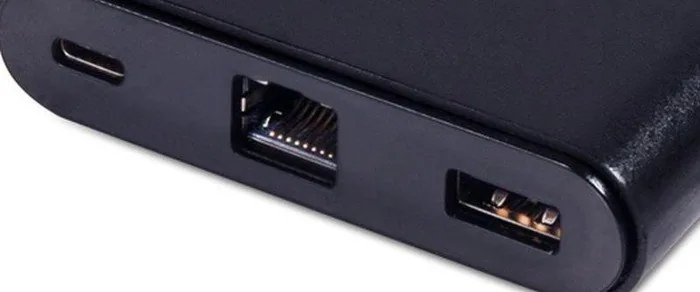
1x RJ-45, 1x USB-A 3.0 (socket)
Transmission
1x RJ-45 (10/100/1000Base-T), 1x USB-A 3.0 (socket, 5Gb/s)
Power supply
Power supply also via connection, mains connection (1x USB-C socket USB PD 2.0, max. 60W, pass-through 20V/3A/60W), external power supply possible but not included
Dimensions
2.36x0.75x3.07in (WxDxH)
Weight
1.8oz
Case color
black
Compatibility
universal
Features
USB hub (1x USB-A 3.0), Wake on LAN
USB spelling
Link
Product Description
Elevate Your Connectivity with the Club 3D SenseVision Multiport Adapter
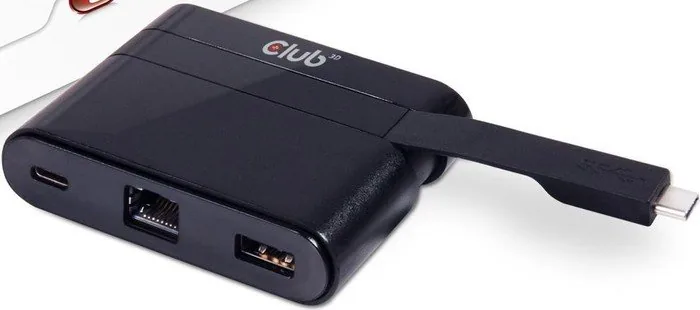
The modern workspace demands flexibility and speed, and the Club 3D SenseVision Multiport Adapter RJ-45 USB-C 3.0 Plug stands ready to meet those needs. This compact device transforms a single USB Type-C port into a versatile hub of connectivity options. Whether you are working from a coffee shop or setting up a home office, this adapter ensures your laptop stays connected to the internet, your peripherals, and power sources simultaneously.
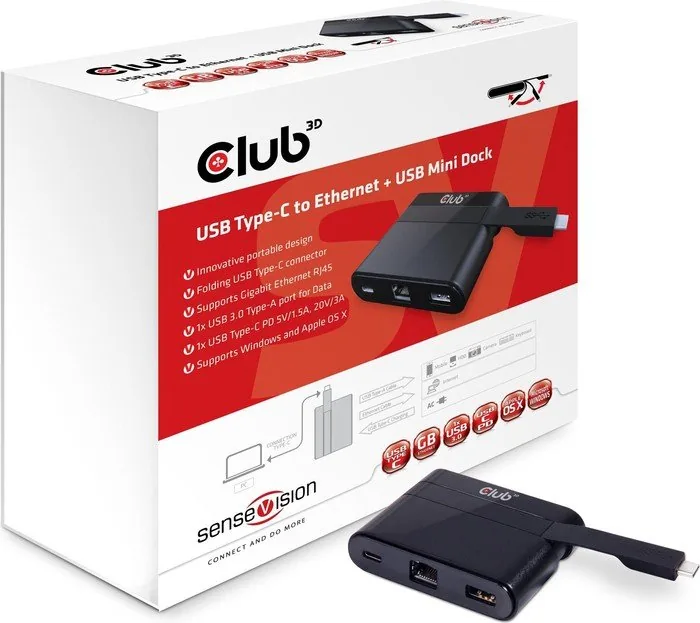
Designed for professionals on the move, the adapter features an innovative folding connector that protects the delicate USB-C pins when not in use. It supports Gigabit Ethernet speeds via its RJ45 port, ensuring stable and fast internet access even in environments where Wi-Fi is unreliable. The inclusion of a USB 3.0 Type-A port allows you to connect external hard drives, mice, or keyboards with transfer speeds reaching up to 5Gbps. Furthermore, the Power Delivery port enables charging for your laptop at speeds up to 60 Watts, keeping your battery topped up while you work.
This mini dock is fully compliant with IEEE802.3 and IEEE802.3u standards, guaranteeing compatibility with a wide range of network equipment. It operates seamlessly across both Microsoft Windows and Apple OS X platforms, making it an ideal choice for diverse tech ecosystems. The plug-and-play functionality means there is no need for complex driver installations; simply connect the cables and start working immediately. By combining networking, data transfer, and charging capabilities into one small package, this adapter simplifies your setup and reduces cable clutter effectively.
Important Notes
Ensure you use high-quality cables for optimal performance. The recommended cables include the CAC-1523 and CAC-1522 models for best results. Always check your laptop specifications to confirm support for USB Power Delivery before relying on the charging function.
Search for 67,706 Manuals online


Type-in Brand or Model