
Club 3D SenseVision CSV-1460 Manual
PDF manual · 12 Pages
English



Quick check
Incorrect answer, please try again.
Chat with your Club 3D SenseVision CSV-1460 manual using AI
Get instant AI answers from your Club 3D SenseVision CSV-1460 manual
Ask anything about the Club 3D SenseVision CSV-1460. Answers come from this manual, with the pages they are based on.
Ask a Question
Do you recommend SenseVision CSV-1460?
Yes NoFrequently Asked Questions
The dock supports dual screens at 3840x2160 @ 60Hz or a single screen at 5120x2880 @ 60Hz.
Is this answer helpful?
Yes, it is compatible with Mac OS Sierra and later versions.
Is this answer helpful?
It features six USB 3.0 downstream ports, one of which supports BC 1.2 quick charging.
Is this answer helpful?
While it supports high refresh rates, it is primarily designed for productivity and multimedia tasks.
Is this answer helpful?
Using specific Club 3D cables like CAC-1073 is recommended for optimal 4K performance.
Is this answer helpful?
Yes, it includes a Gigabit Ethernet port for 10/100/1000Mbps connectivity.
Is this answer helpful?
There are two 3.5mm jacks provided for headphone and microphone connections.
Is this answer helpful?
Advantages and Disadvantages
Advantages

- Supports dual 4K 60Hz displays or single 5K display for high-resolution workflows
- Includes six USB 3.0 ports with one fast-charging port for peripheral convenience
- Built-in Gigabit Ethernet and audio jacks reduce cable clutter significantly
- Compatible with major operating systems including Windows and macOS
Disadvantages

- Requires driver installation prior to initial setup which may delay immediate use
- Performance relies on CPU resources due to DisplayLink compression technology
- Limited to specific USB cable types for best video signal integrity
Product Specification
Compatibility
1x USB-B 3.0
Ports
2x DisplayPort 1.2, 6x USB-A 3.0, 1x Gb LAN, 2x Jack
Power Supply
Power Adapter
Dimensions
7.68x3.15x1.38 in
Weight
14 oz
Product Description
Elevate Your Workspace with the Club 3D SenseVision CSV-1460
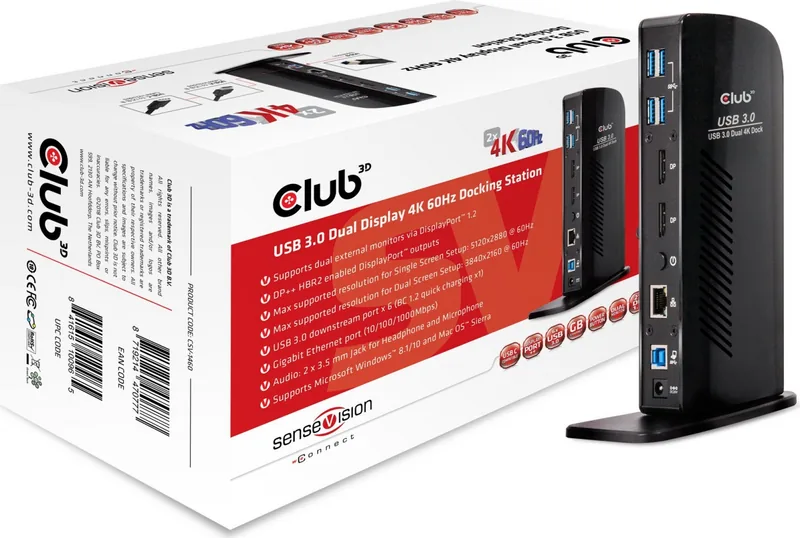
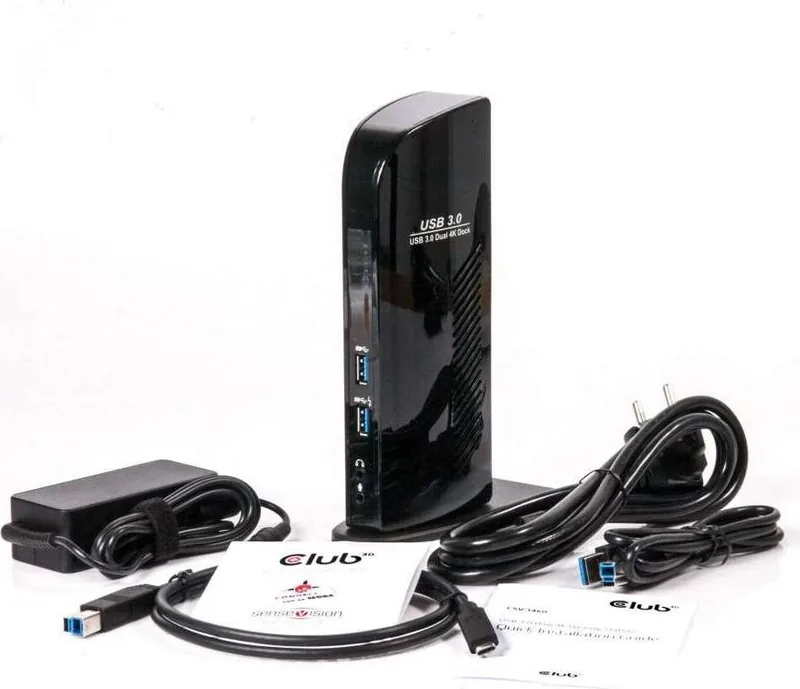
The Club 3D SenseVision CSV-1460 represents a significant leap forward in portable connectivity, designed specifically for professionals who demand high performance and versatility from their mobile setups. This USB 3.0 docking station transforms a single laptop port into a comprehensive hub capable of driving dual external monitors at stunning 4K resolutions. Whether you are editing video, managing complex spreadsheets, or engaging in immersive gaming, this device ensures your screen real estate is maximized without compromising on speed or clarity.
At the heart of this powerful adapter lies the DisplayLink DL-6950 chip, a technology that enables smooth video transmission over standard USB connections. It supports two external displays via DisplayPort 1.2 ports, allowing users to run dual screens at 3840x2160 resolution with a refresh rate of 60Hz. For those preferring a single massive display, the unit can handle an impressive 5120x2880 resolution at 60Hz, delivering crisp visuals perfect for detailed work. The setup process is straightforward; simply install the necessary drivers and connect your preferred USB-C or USB-A cable to the dock.
Beyond video capabilities, the CSV-1460 serves as a central connection point for all your peripherals. It features six USB 3.0 downstream ports, including one dedicated port for BC 1.2 quick charging, ensuring your devices stay powered while connected. Connectivity options extend to Gigabit Ethernet for stable internet access and dual 3.5mm audio jacks for headphones and microphones. This makes it an ideal solution for remote workers and content creators who need a reliable, all-in-one station to replace multiple dongles and adapters.
Key Features and Notes
The device supports both Extended Desktop Mode and Mirror Desktop Mode, offering flexibility in how you utilize your screens. You can enjoy extended productivity across multiple monitors or mirror content for presentations. The system is compatible with Microsoft Windows 8.1, Windows 10, and Mac OS Sierra, making it a versatile choice for diverse operating environments. Users are encouraged to use recommended Club 3D cables like the CAC-1073 or CAC-1163 for optimal performance when connecting up to two 4K displays.
Pros and Cons
Pros
- Supports dual 4K 60Hz displays or single 5K display for high-resolution workflows
- Includes six USB 3.0 ports with one fast-charging port for peripheral convenience
- Built-in Gigabit Ethernet and audio jacks reduce cable clutter significantly
- Compatible with major operating systems including Windows and macOS
Cons
- Requires driver installation prior to initial setup which may delay immediate use
- Performance relies on CPU resources due to DisplayLink compression technology
- Limited to specific USB cable types for best video signal integrity
Frequently Asked Questions
What is the maximum resolution supported by this dock? The dock supports dual screens at 3840x2160 @ 60Hz or a single screen at 5120x2880 @ 60Hz.
Does it work with Mac computers? Yes, it is compatible with Mac OS Sierra and later versions.
How many USB ports does the CSV-1460 have? It features six USB 3.0 downstream ports, one of which supports BC 1.2 quick charging.
Can I use this for gaming? While it supports high refresh rates, it is primarily designed for productivity and multimedia tasks.
Do I need special cables for video output? Using specific Club 3D cables like CAC-1073 is recommended for optimal 4K performance.
Is Ethernet support included? Yes, it includes a Gigabit Ethernet port for 10/100/1000Mbps connectivity.
What audio features are available? There are two 3.5mm jacks provided for headphone and microphone connections.
Search for 67,706 Manuals online


Type-in Brand or Model