
Club 3D CSV-1564W65 Manual
PDF manual · 1 Pages
English


Quick check
Incorrect answer, please try again.
Chat with your Club 3D CSV-1564W65 manual using AI
Get instant AI answers from your Club 3D CSV-1564W65 manual
Ask anything about the Club 3D CSV-1564W65. Answers come from this manual, with the pages they are based on.
Ask a Question
Do you recommend CSV-1564W65?
Yes NoFrequently Asked Questions
The product line includes the CSV-1564, CSV-1564W65, and CSV-1564W100 docking stations, each offering similar core functionalities with slight variations in power specifications.
Is this answer helpful?
You can connect up to three displays simultaneously using the available video outputs, provided your host system supports the required video modes.
Is this answer helpful?
Yes, the dock features a dynamic Power Delivery system that charges your laptop up to 65W through the dedicated red USB-C power cable.
Is this answer helpful?
The package contains the docking station, a power adapter, one USB-C cable for the host connection, and one red USB-C cable specifically for power delivery.
Is this answer helpful?
It is recommended to update your host system drivers to the latest version to ensure full compatibility and stability with the docking station.
Is this answer helpful?
Yes, as long as your monitors support the video input standards provided by the dock, such as HDMI or DisplayPort via adapters if necessary.
Is this answer helpful?
Users are encouraged to visit the official Club 3D website forum for community support and further assistance regarding installation or usage issues.
Is this answer helpful?
Advantages and Disadvantages
Advantages

- Supports triple display output for enhanced multitasking and productivity.
- Provides up to 65W Power Delivery to charge laptops dynamically.
- Includes high-speed USB 3.0 ports for rapid data transfer.
- Simple plug-and-play setup with clear color-coded cables.
- Compact design helps reduce desktop cable clutter effectively.
Disadvantages

- Requires host system to support DisplayPort Alternate Mode.
- Specific power cable colors must be used for correct functionality.
- Limited to 65W charging which may not suit high-power workstations.
- No built-in Ethernet port mentioned in standard configuration.
- Driver updates may be necessary for optimal performance.
Product Specification
Type
LAN adapter, USB hub, card reader, video adapter
Form factor
1x external wired
Connection
1x USB-C 3.0 (female port, 5Gb/s, USB-C with DisplayPort 1.2, USB PD 3.0), 1x USB-C 3.0 (male connector via cable, 5Gb/s, 10.6 inch cable length)
Interface
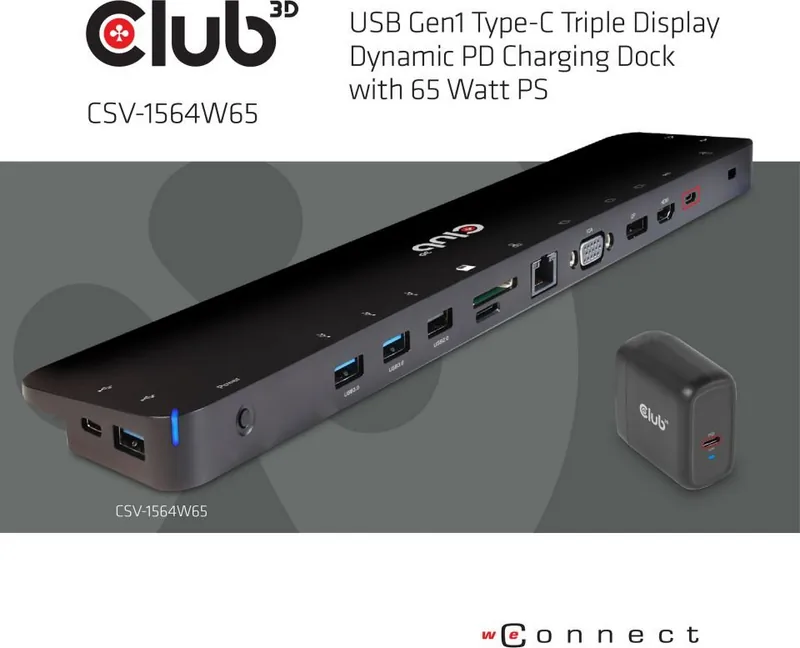
1x RJ-45, 1x USB-C 3.0 (female port), 3x USB-A 3.0 (female ports), 2x USB-A 2.0 (female ports), 1x microSD, 1x SD card, 1x DisplayPort (female port), 1x HDMI (female port), 1x VGA (female port), 1x audio jack (female port, 3.5mm)
Transfer
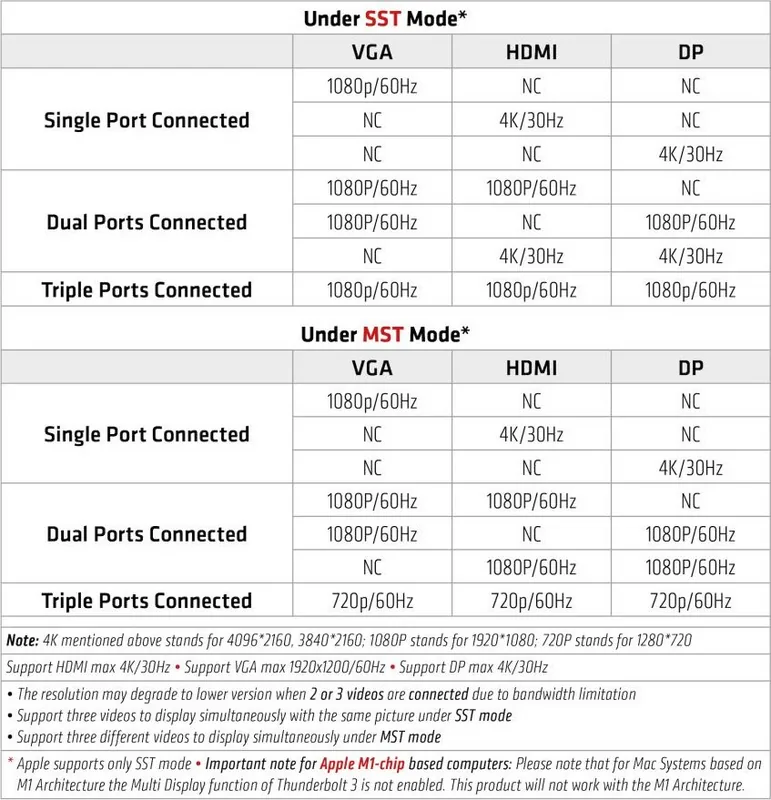
1x RJ-45 (10/100/1000Base-T), 1x USB-C 3.0 (female port, 5Gb/s), 3x USB-A 3.0 (female ports, 5Gb/s), 2x USB-A 2.0 (female ports, 480Mb/s), 1x microSD (microSD), 1x SD card (SD card), 1x DisplayPort (female port, max. 3840x2160@30Hz), 1x HDMI (female port, max. 3840x2160@30Hz), 1x VGA (female port), 1x audio jack (female port, 3.5mm)
Power supply
Power not via connection, AC power input (1x USB-C female port USB PD 3.0, max. 20V/5A/100W, pass-through 20V/5A/100W), external power adapter required and included (65W, 1x USB-C female port USB PD max. 65W)
Dimensions
13.78x0.79x2.95 in (WxDxH)
Weight
8.82 oz
Chassis color
black
Compatibility
universal
Features
security lock slot (Kensington Security Slot)
USB spelling
Link
Product Description
Elevate Your Workspace with the Club 3D Triple Display Dynamic PD Charging Dock
The modern professional demands a seamless connection between their laptop and multiple peripherals. The Club 3D Triple Display Dynamic PD Charging Dock 65W, USB-C 3.0 [Socket] delivers exactly that by transforming a single USB-C port into a comprehensive hub for video, data, and power. This docking station is designed for users who need to expand their connectivity without sacrificing performance or cable management.
At the heart of this device lies the ability to support three distinct displays simultaneously. Whether you are managing complex spreadsheets, coding on multiple monitors, or creating content, having triple display output ensures maximum productivity. The dock utilizes DisplayPort Alternate Mode to deliver high-resolution video signals to your preferred screens. It also features robust USB 3.0 ports for fast data transfer speeds, allowing you to connect external hard drives, printers, and other peripherals instantly.
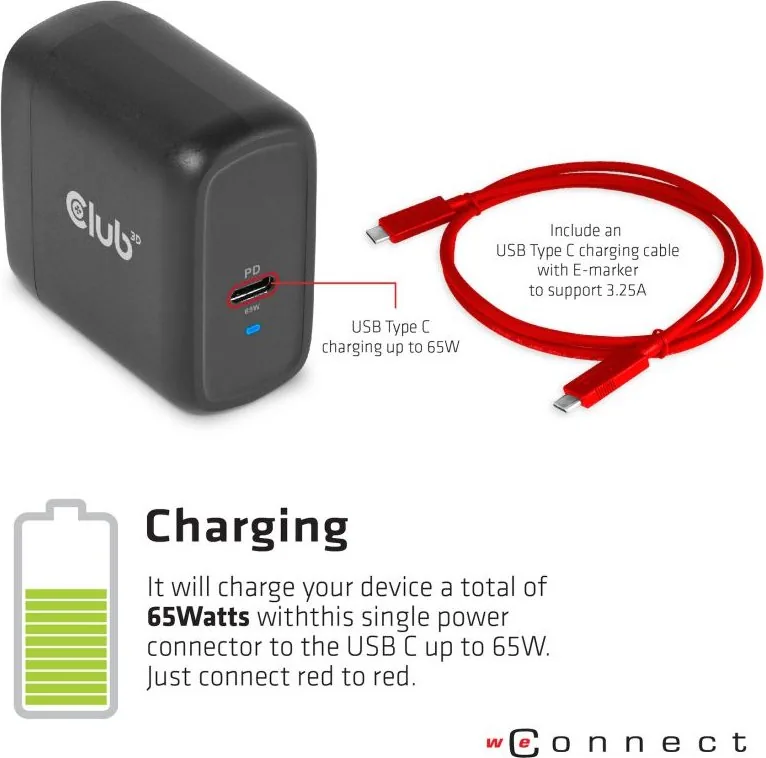
One of the standout features is the dynamic Power Delivery system. With up to 65W of charging capability, this dock can keep your host laptop powered while it runs all connected devices. The setup process is intuitive. You simply connect the black USB-C cable from the dock to your notebook and plug the red USB-C cable into the dedicated power input port. Once the power adapter is connected to a wall outlet, the blue LED indicator confirms that the unit is active. Your laptop will charge automatically without needing a direct connection to the power brick.
The package includes everything needed for immediate deployment. Users receive the docking station itself, a power supply unit, two USB Type-C cables, and a quick installation guide. Before starting, ensure your host system has the latest driver updates and supports DisplayPort Alternate Mode. Following the provided instructions guarantees a smooth experience where you can enjoy a clutter-free desk and efficient workflow immediately after unboxing.
Important Notes
- Ensure your laptop supports DisplayPort Alt Mode for video output.
- Use the specific red cable for powering the dock and charging the laptop.
- Check for physical damage before connecting any components.
- Visit the official forum for additional troubleshooting tips.
Pros and Cons
Pros
- Supports triple display output for enhanced multitasking and productivity.
- Provides up to 65W Power Delivery to charge laptops dynamically.
- Includes high-speed USB 3.0 ports for rapid data transfer.
- Simple plug-and-play setup with clear color-coded cables.
- Compact design helps reduce desktop cable clutter effectively.
Cons
- Requires host system to support DisplayPort Alternate Mode.
- Specific power cable colors must be used for correct functionality.
- Limited to 65W charging which may not suit high-power workstations.
- No built-in Ethernet port mentioned in standard configuration.
- Driver updates may be necessary for optimal performance.
Frequently Asked Questions
What models are included in this product line? The product line includes the CSV-1564, CSV-1564W65, and CSV-1564W100 docking stations, each offering similar core functionalities with slight variations in power specifications.
How many displays can I connect? You can connect up to three displays simultaneously using the available video outputs, provided your host system supports the required video modes.
Does this dock charge my laptop? Yes, the dock features a dynamic Power Delivery system that charges your laptop up to 65W through the dedicated red USB-C power cable.
What cables are included in the box? The package contains the docking station, a power adapter, one USB-C cable for the host connection, and one red USB-C cable specifically for power delivery.
Do I need to install drivers? It is recommended to update your host system drivers to the latest version to ensure full compatibility and stability with the docking station.
Can I use different monitor types? Yes, as long as your monitors support the video input standards provided by the dock, such as HDMI or DisplayPort via adapters if necessary.
Where can I get help if something goes wrong? Users are encouraged to visit the official Club 3D website forum for community support and further assistance regarding installation or usage issues.
Search for 67,706 Manuals online


Type-in Brand or Model