

Club 3D CSV-1562 Manual
PDF manual · 29 Pages
English



Quick check
Incorrect answer, please try again.
Chat with your Club 3D CSV-1562 manual using AI
Get instant AI answers from your Club 3D CSV-1562 manual
Ask anything about the Club 3D CSV-1562. Answers come from this manual, with the pages they are based on.
Ask a Question
Do you recommend CSV-1562?
Yes NoFrequently Asked Questions
Yes, this docking station supports Mac OS operating systems alongside Windows 10. Users must download the specific DisplayLink driver for Mac to install and utilize the features correctly.
Is this answer helpful?
It supports Triple 4K video output. You can connect three video displays simultaneously using the HDMI and DisplayPort connectors for expanded workspace.
Is this answer helpful?
Yes, the docking station supports audio with a 2.1 channel configuration. You can connect speakers or headphones via the 3.5mm jacks on the front panel.
Is this answer helpful?
The device uses USB 3.2 Gen1 technology. This ensures super speed data transmission between your computer and USB peripherals like hard drives or flash drives.
Is this answer helpful?
Yes, it supports Power Delivery charging for notebooks. This allows the dock to charge your laptop while connecting all other USB peripherals and video cables.
Is this answer helpful?
Download the driver from the product page. For Windows, run the installer and restart. For Mac, open the dmg file and install the package from the system utilities.
Is this answer helpful?
Read the manual completely. Keep the equipment away from humidity. If damaged, do not use. Contact a service technician if any issues arise with the unit.
Is this answer helpful?
Advantages and Disadvantages
Advantages

- Supports triple Ultra HD displays simultaneously for better productivity.
- USB 3.2 Gen1 provides super speed data transmission for connected devices.
- Built-in USB 3.2 ports enable fast charging capabilities for peripherals.
- Supports Gigabit Ethernet for stable and fast network connection.
- Power Delivery charging feature supports notebook power needs effectively.
Disadvantages

- Requires specific DisplayLink driver for installation on Windows systems.
- Cannot be powered by USB alone without using the AC adapter.
- Display mode is dependent on system configuration and software settings.
- Installation process is complex for average Mac users without guidance.
- Resolution settings are invalid in mirror mode for specific screens.
Product Specification
Type
LAN Adapter, USB Hub, Video Adapter
Form Factor
1x external cable-connected
Connectivity
1x USB-C 3.0 (Port, 5Gb/s, USB-C with DisplayPort 1.2, USB PD max. 20V/3A/60W), 1x USB-C 3.0 (Plug via Cable, 5Gb/s), 1x USB-A 3.0 (Plug via Adapter, 5Gb/s)
Interfaces
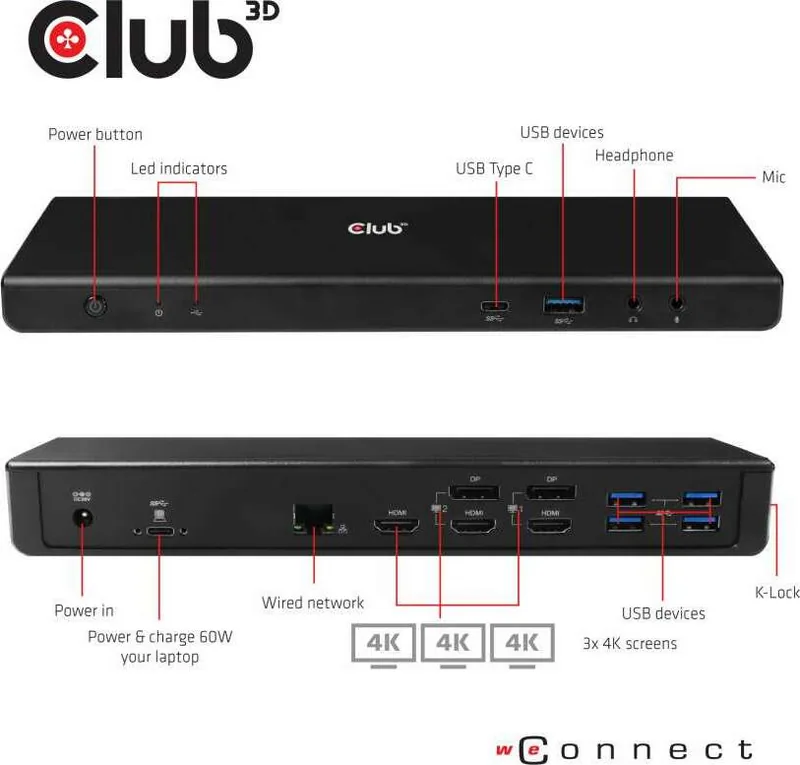
1x RJ-45, 1x USB-C 3.0 (Port), 5x USB-A 3.0 (Port), 1x HDMI 2.0 (Port), 2x HDMI 2.0 (Port) or 2x DisplayPort 1.2 (Port), 2x Audio Jack (Port, 3.5mm)
Transfer
1x RJ-45 (10/100/1000Base-T), 1x USB-C 3.0 (Port, 5Gb/s), 5x USB-A 3.0 (Port, 5Gb/s), 3x HDMI 2.0 (Port, max. 3840x2160@60Hz), 2x DisplayPort 1.2 (Port, max. 3840x2160@60Hz), 2x Audio Jack (Port, 3.5mm)
Power Supply
Power supply not via Connectivity, Power Input (1x Barrel Jack 20V), external power supply required and included (1x Barrel Jack 20V/6.75A/135W)
Dimensions
9.84 x 1.34 x 3.27 in (WxHxD)
Weight
0.88 lbs
Color
Black
Compatibility
Universal
Features
Security Lock (Kensington Security Slot)
USB Naming
Left
Product Description
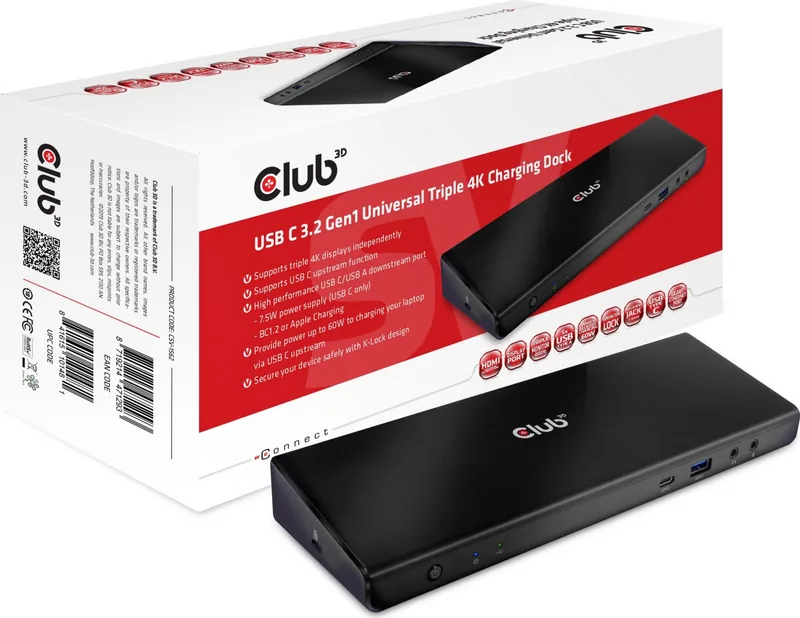
Transform Your Workspace with the Club 3D USB C 3.2 Gen1 Universal Triple 4K, USB-C 3.0 [Port] Charging Dock Manual
Many laptops lack sufficient ports for full productivity setups today. The Club 3D USB C 3.2 Gen1 Universal Triple 4K, USB-C 3.0 [Port] Charging Dock Manual explains how to connect peripherals effectively for work. This hub transforms a single USB-C cable into many connection points for your daily computer needs. Professionals benefit from the ability to link multiple monitors, speakers, and network devices simultaneously. The design significantly reduces cable clutter on your desk for a cleaner workspace appearance.
Video performance is a key feature of this versatile adapter station. It supports multiple Ultra HD displays working at the same time effectively. You can configure the screen to mirror or extend content across three outputs easily. High-quality visuals make this ideal for video editing or checking multiple workspace views. The combination of HDMI and DisplayPort ensures compatibility with various monitor brands available. Power delivery capabilities allow your notebook to charge continuously while you work actively. This eliminates the need for extra power adapters cluttering your power strip area.
Setup requires specific software for Windows and Mac operating systems to function correctly. The manual guides users through the installation of the DisplayLink driver correctly on systems. Utility settings adjust resolution, rotation, and screen arrangement via the system tray icon. Troubleshooting sections help resolve cursor or video playback issues quickly for users. Safety instructions advise keeping the unit dry and powered correctly at all times. Regulatory compliance ensures the equipment meets FCC and CE safety requirements for operation globally.
The package includes the docking station, a USB-C cable, and AC adapter inside. Front access provides quick connections for headphones or USB drives easily. Rear connections manage video and power needs cleanly for the best aesthetics. Audio support supports 2.1 channel output for enhanced sound clarity levels. The housing is crafted from durable plastic to withstand office environments well. Operating temperature ranges define the safe usage conditions for the device effectively. Uninstalling drivers is simple through the control panel when removal is needed later.
This product is an excellent upgrade for your computer setup today reliably. It supports high data speeds through USB 3.2 Gen1 interfaces very well. Ethernet connectivity keeps your internet connection stable and fast for streaming needs. By following the guidelines, you ensure the best experience with your hardware always. Updates to driver software are checked through Display manager settings for improvements often. Many users face challenges connecting multiple monitors to thin laptops easily. This dock solves that problem using advanced DisplayLink technology effectively for displays. The upstream port transmits video signals and data to your computer unit. Downstream ports allow attaching USB peripherals without noticeable latency for users today.
Final Notes
This summary covers the main aspects of the product manual for you. It explains connectivity, power, and software requirements clearly and thoroughly. Keep the manual for future reference as advised in the safety text.
Search for 67,706 Manuals online


Type-in Brand or Model