
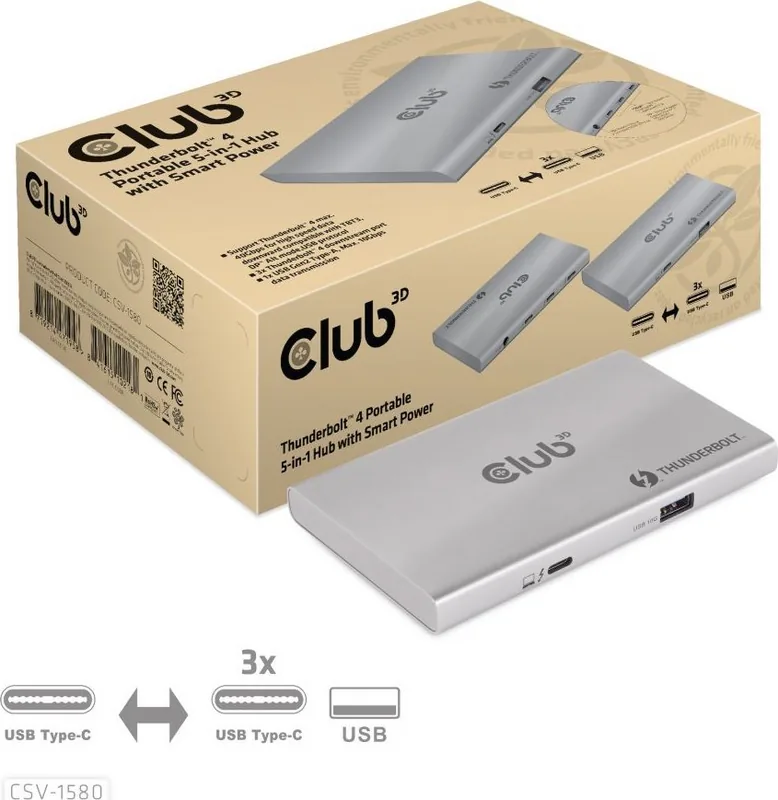
Club 3D 5-in-1 Thunderbolt 4 Hub Manual
PDF manual · 1 Pages
English


Quick check
Incorrect answer, please try again.
Chat with your Club 3D 5-in-1 Thunderbolt 4 Hub manual using AI
Get instant AI answers from your Club 3D 5-in-1 Thunderbolt 4 Hub manual
Ask anything about the Club 3D 5-in-1 Thunderbolt 4 Hub. Answers come from this manual, with the pages they are based on.
Ask a Question
Do you recommend 5-in-1 Thunderbolt 4 Hub?
Yes NoFrequently Asked Questions
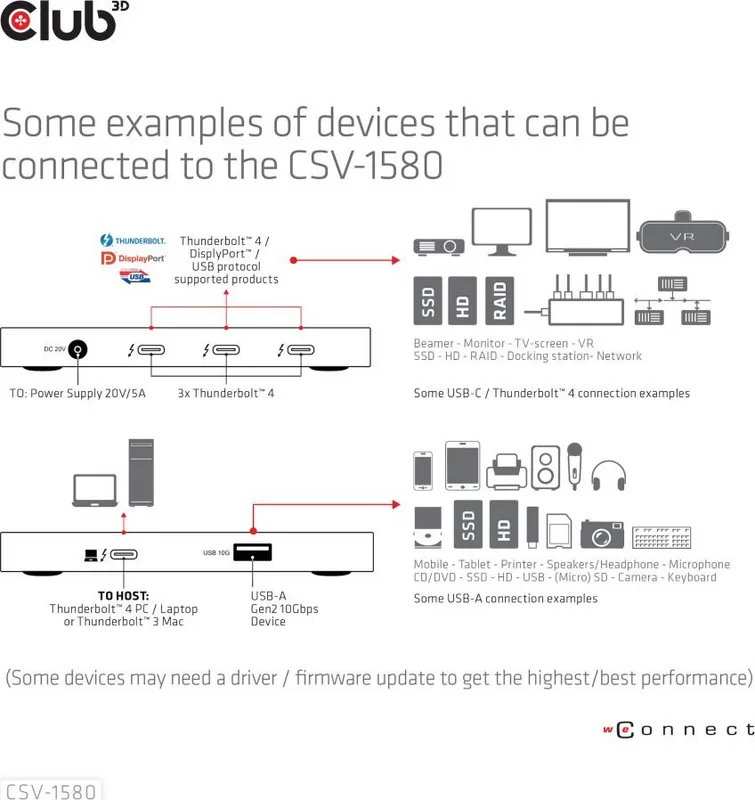
The hub supports Windows 10 or above for Thunderbolt 4 hosts and MacOS 11 or above for Thunderbolt 3 hosts.
Is this answer helpful?
Yes, it supports displays up to 8K resolution at 60Hz using the included USB4 Type-C cable.
Is this answer helpful?
Yes, it includes a 100W power adapter that provides power delivery to keep your laptop charged while in use.
Is this answer helpful?
Thunderbolt 4 cables can be up to 2 meters long, while USB4 cables must not exceed 0.8 meters.
Is this answer helpful?
The hub features three Thunderbolt 4 ports for connecting multiple high-speed devices simultaneously.
Is this answer helpful?
Yes, there is one USB-A Gen2 port available for connecting devices like printers or keyboards at 10Gbps.
Is this answer helpful?
Advantages and Disadvantages
Advantages

- Supports ultra-high resolution displays up to 8K at 60Hz via Thunderbolt 4
- Provides 100W power delivery to keep laptops charged during use
- Includes three Thunderbolt 4 ports for extensive device connectivity
- Features a high-speed USB-A Gen2 port for legacy peripheral support
- Compact portable design ideal for mobile professionals
Disadvantages

- Requires specific host OS versions like Windows 10 or MacOS 11+
- Thunderbolt 4 cables have a strict maximum length limit of 2 meters
- USB4 cables are limited to a shorter maximum length of 0.8 meters
- Some devices may require driver or firmware updates for best performance
- May not be compatible with older Thunderbolt 3 hosts without updates
Product Specification
Type
USB-Hub, Video Adapter
Form Factor
1x external wired
Connection
1x Thunderbolt 4 (Female, 40 Gb/s, USB-C with DisplayPort, USB PD max. 60W), 1x Thunderbolt 4 (Male via cable, 40 Gb/s, 31.5 inch cable length)
Interface
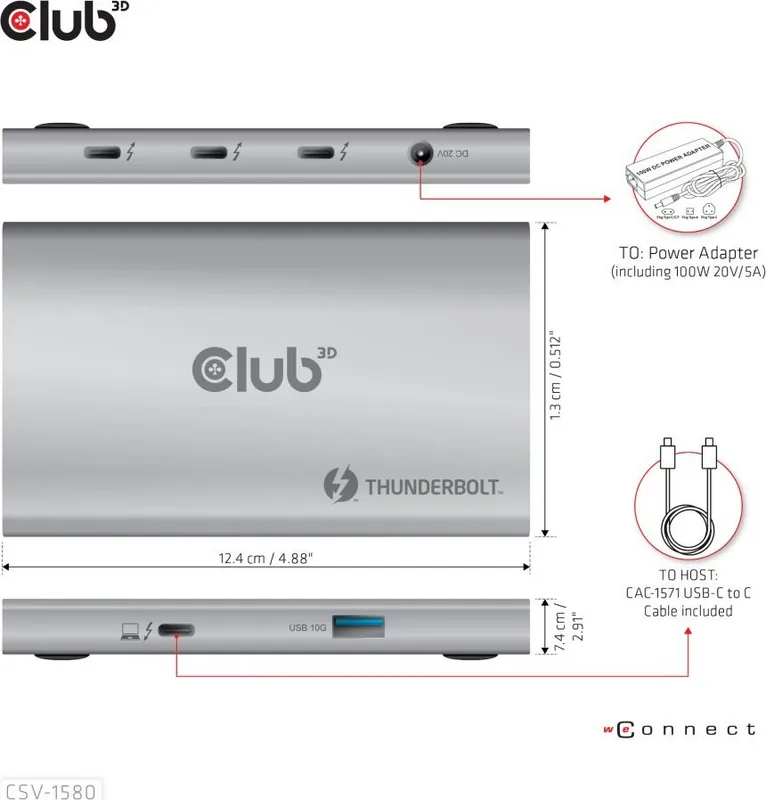
3x Thunderbolt 4 (Female), 1x USB-A 3.1 (Female)
Transfer
3x Thunderbolt 4 (Female, 40 Gb/s, USB-C with DisplayPort, USB PD 3.0 max. 15W, max. 2x 3840x2160@60Hz or 1x 7680x4320@30Hz), 1x USB-A 3.1 (Female, 10 Gb/s, 5V/1.5A)
Power Supply
Power supply not via connection, AC input (1x 20 V/5 A/100 W barrel jack), external power adapter required and included (1x 20 V/5 A/100 W barrel plug, 5.9 ft cable length)
Chipset
Intel Goshen Ridge JHL8440 (Thunderbolt 4)
Dimensions
4.88 x 0.51 x 2.91 inches (WxHxD)
Weight
5.82 oz
Case Color
silver
Compatibility
universal
Features
Metal case, on/off switch
Manufacturer Warranty
1.5 years
USB Spelling
Link
Product Description
Elevate Your Workspace with the Club 3D 5-in-1 Hub Thunderbolt 4
The modern digital workspace demands flexibility and high-speed connectivity. The Club 3D 5-in-1 Hub, Thunderbolt 4 [Buchse] serves as a powerful central hub designed to streamline your workflow. This portable device bridges the gap between your computer and a wide array of peripherals, ensuring you can work efficiently from anywhere.
Designed for both Windows and macOS users, this hub supports Thunderbolt 4 on PCs and Thunderbolt 3 on Macs running MacOS 11 or later. It features three Thunderbolt 4 ports capable of handling data transfer speeds up to 40Gbps. This allows for seamless connection to external displays supporting resolutions up to 8K at 60Hz or 4K at 120Hz. Whether you are editing high-resolution video or transferring large files, the speed is unmatched.
Beyond video and data, the hub includes a USB-A Gen2 port offering 10Gbps speeds for connecting legacy devices like printers, keyboards, mice, and external hard drives. A standout feature is the integrated Smart Power system. The included power adapter delivers 100W of power delivery, ensuring your laptop remains charged while powering connected accessories. This eliminates the need for multiple wall adapters cluttering your desk.
The package includes a high-quality CAC-1571 cable capable of handling the full bandwidth required for 8K video and 100W charging. Users should ensure their cables meet the specific length requirements to maintain performance, with Thunderbolt 4 cables limited to 2 meters and USB4 cables to 0.8 meters. By consolidating connections into one sleek unit, this hub reduces cable clutter and enhances productivity for professionals who rely on robust hardware.
Important Notes
- Always update drivers for optimal resolution support.
- Ensure cables support 40 Gbps for maximum performance.
- Check compatibility with your host operating system version.
Search for 67,706 Manuals online


Type-in Brand or Model