


Cisco Nexus 93108TC-FX Manual
PDF manual · 72 Pages
English



Quick check
Incorrect answer, please try again.
Chat with your Cisco Nexus 93108TC-FX manual using AI
Get instant AI answers from your Cisco Nexus 93108TC-FX manual
Ask anything about the Cisco Nexus 93108TC-FX. Answers come from this manual, with the pages they are based on.
Nexus 93108TC-FX Maintenance Schedule
Clean connectors regularly depending on the environment and if exposed to dust or touched. Use wet or dry cleaning techniques.
Inspect routinely for dust and damage. If suspected, clean and inspect fiber ends under a microscope.
Ask a Question
Do you recommend Nexus 93108TC-FX?
Yes NoFrequently Asked Questions
It is best suited for dense data center leaf deployments that need many 10G copper access ports and a smaller number of high-speed uplinks. It fits structured rack environments where airflow and redundancy matter.
Is this answer helpful?
The switch provides 48 RJ-45 10GBASE-T access ports and 6 QSFP28 uplink ports. That combination supports high-density server connectivity while leaving room for fast fabric aggregation.
Is this answer helpful?
No. The chassis must use the same power supply type throughout. AC, DC, and HVAC/HVDC power supplies should not be mixed in one switch. Matching wattage and airflow direction is also required.
Is this answer helpful?
Confirm that the switch is properly mounted, grounded, and cabled. Also verify that all fan and power modules are installed, share the same airflow direction, and are connected to suitable power sources.
Is this answer helpful?
Yes, the fan modules and power supplies are field-replaceable. The replacement must match the installed airflow direction, and the process should be done carefully to preserve cooling and uptime.
Is this answer helpful?
Use a compatible 19-inch rack or cabinet with enough front and rear clearance for airflow and cabling. The rack should be stable, grounded, and positioned close enough to power sources for safe connection.
Is this answer helpful?
Advantages and Disadvantages
Advantages

- 48 RJ-45 ports support dense 10G copper server connectivity in a compact 1RU chassis.
- Six QSFP28 uplinks offer strong scaling for 40G or 100G fabric connections.
- Redundant, field-replaceable fans and power supplies improve serviceability and uptime.
- Airflow options help the switch fit hot-aisle and cold-aisle data center layouts.
Disadvantages

- All fan and power modules must use the same airflow direction, or the switch may overheat.
- Installation requires careful grounding, rack clearance, and power planning.
- AC, DC, and HVAC/HVDC power supplies cannot be mixed in the same chassis.
- Compatible cables, transceivers, and adapters must be checked before deployment.
Product Specification
Function
Switch, SAN Switch
Type
Standalone, Rackmount (via mounting brackets)
Network ports
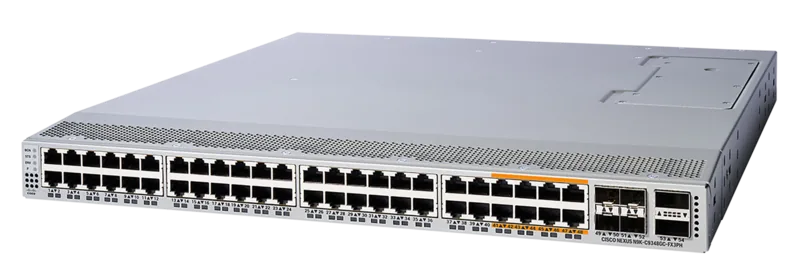
48x RJ-45, 6x QSFP28
Speeds
48x RJ-45 (100/1000/10GBase-T), 6x QSFP28 (10G/40G/100Gb/s)
PoE
N/A
Backplane
2.16Tb/s, 850Mp/s, 40MB packet buffer, 512k MAC addresses
Officially supported standards
802.1AX, 802.1D, 802.1Q, 802.1AE, 802.1p, 802.3ab, 802.3ae, IGMP
Configuration
Web interface, Console, serial (RJ-45, USB-A 2.0, rear), Network (SFP+, RJ-45, dedicated, 10/100/1000Base-T, rear)
Cooling
active, 4x fans (1.57in, 1 hot-plug each)
Dimensions (WxHxD)
17.28x1.73x22.48in, 1U
Weight
17.42 lb
Color
silver
Special features
Metal housing, removable mounting brackets, firmware updates possible, redundant power supply (redundant power input), 2x hot-plug capable power supply
Manufacturer warranty
one year
Note
For this device, "link aggregation" was officially specified with the obsolete standard IEEE802.3ad. Since 2008, the function is no longer managed by the IEEE "Working Group 3" (IEEE 802.3, CSMA/CD - Ethernet), but by "Working Group 1" (IEEE 802.1, High Level Interface - Internetworking) and technically defined unchanged via IEEE 802.1AX.
Product Description
Cisco Nexus 9300-FX MACsec Rackmount 10G Managed Switch, 48x RJ-45, 6x QSFP28
The Cisco Nexus 9300-FX MACsec Rackmount 10G Managed Switch, 48x RJ-45, 6x QSFP28 Manual points to a platform built for dense data center leaf deployments, where reliable access switching and fast uplinks need to work together. In a compact 1RU chassis, the switch combines forty-eight 10GBASE-T RJ-45 ports for server-facing connections with six QSFP28 uplinks for high-speed aggregation.
What stands out is its balance of flexibility and discipline. The design supports hot-aisle and cold-aisle planning, interchangeable fan modules, and redundant power supplies, so teams can adapt the hardware to the rack layout without sacrificing serviceability. That makes it a practical choice for structured environments where uptime, airflow control, and cable management matter as much as raw port density.
This switch family is aimed at installations that need clear operating rules. The chassis must be grounded, power sources should be planned carefully, and all fans and power modules must share the same airflow direction. Those requirements may seem strict, but they help maintain stable cooling and reduce the chance of shutdowns under load. Optional console and management connections also make first-time setup and ongoing troubleshooting much easier.
For teams planning a network refresh, the appeal is straightforward: many copper access links without giving up uplink bandwidth. The 48 RJ-45 ports simplify server connectivity, while the six QSFP28 ports leave room for 40G or 100G uplinks depending on the fabric design. In practice, that combination supports scalable leaf-spine topologies and helps keep the rack footprint efficient.
The MACsec-oriented positioning adds another layer of value for organizations that care about link protection and operational control. Paired with Cisco-style fabric workflows, the switch fits neatly into a modern data center strategy where security, performance, and maintainability all need to move together.
Notes
- Match airflow direction before powering on.
- Use supported transceivers, cables, and power options.
- Keep the rack grounded and leave enough clearance for cabling and service access.
- Verify LEDs, fans, and power supplies after startup.
Search for 67,706 Manuals online


Type-in Brand or Model