
Chieftec UNC-409S-B Manual
PDF manual · 10 Pages
English



Quick check
Incorrect answer, please try again.
Chat with your Chieftec UNC-409S-B manual using AI
Get instant AI answers from your Chieftec UNC-409S-B manual
Ask anything about the Chieftec UNC-409S-B. Answers come from this manual, with the pages they are based on.
Ask a Question
Do you recommend UNC-409S-B?
Yes NoFrequently Asked Questions
This chassis fully supports ATX motherboards within its 4U form factor design. You can install standard desktop boards without issues.
Is this answer helpful?
The total depth measures only 482mm which is considered short for a rackmount enclosure allowing tighter cabinet spacing.
Is this answer helpful?
Yes, there are two USB 3.1 ports located on the front panel for convenient peripheral connection without reaching back.
Is this answer helpful?
Absolutely, there is an optional cage that allows for the installation of 2.5-inch SSDs alongside traditional hard drives.
Is this answer helpful?
The frame uses 1.2mm thick SECC steel which ensures robust protection for your sensitive electronic components inside.
Is this answer helpful?
Cooling fans are listed as optionally available. You typically buy them separately to install the 120mm and 80mm models.
Is this answer helpful?
Yes, the compact design and reliable build make it excellent for home servers needing efficient space usage.
Is this answer helpful?
Advantages and Disadvantages
Advantages

- Compact 482mm depth saves valuable rack space while fitting ATX boards
- Constructed from 1.2mm thick SECC steel for high durability
- Front panel features two USB 3.1 ports for quick data access
- Flexible drive bay configuration supports various storage sizes
- Dedicated mounting spots for front 120mm and rear 80mm cooling fans
Disadvantages

- Optional cooling fans require separate purchase for full setup
- Limited internal height compared to larger tower cases
- Requires specific rack screws for proper wall mounting installation
- Drive cage disassembly takes time during initial setup phase
- May need additional cable management tools for clean wiring
Product Specification
External Drive Bays
3x 5.25", 1x 3.5"
Internal Drive Bays
2x 3.5", 3x 2.5"
I/O Ports
2x USB-A 3.0 (5Gb/s)
PCI Slots
7
Fan (Front)
2x 4.72" (optional)
Fan (Rear)
2x 3.15" (optional)
Fan (Center)
N/A
Fan (Other)
N/A
Motherboard Support
Up to ATX (12"x9.6")
Supported Motherboards
MicroATX (9.6"x9.6"), ATX (12"x9.6")
Power Supply Position
Rear (Vertical)
CPU Cooler Height
Up to max 5.51" Height
Graphics Cards
Up to max 13.78"
Color
Black, Gray Interior
Dimensions (WxHxD)
18.98x6.99x18.90in
Volume
41.07 L
Weight
26.90 lbs
Features
Front Door
USB Orientation
Left
Product Description
Introduction to Efficient Rack Solutions
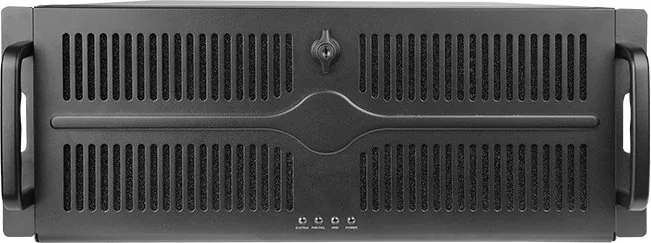
The Chieftec UNC-409S-B stands out as a versatile option for anyone building a compact server environment. Space is often at a premium in data centers or home labs. This chassis offers a depth of merely 482mm while still supporting full-size ATX motherboards effectively. Such a design allows you to pack more equipment into a standard rack width without sacrificing internal capacity.
Robust Construction Standards
Durability is essential for hardware that runs continuously. The frame is built from 1.2mm thick SECC steel providing significant rigidity. This material choice protects internal components from vibrations and accidental impacts during maintenance. The structural integrity serves as a reliable foundation for years of operation. You do not have to worry about the chassis flexing under the weight of multiple drives or heavy cards.
Cooling and Connectivity Features
Thermal management plays a crucial role in system longevity. The front panel area accepts two 120mm fans to push cool air through the unit. Rear ventilation can be enhanced with two 80mm fans if necessary. These options are sold separately allowing you to tailor airflow to your specific needs. Modern workflows demand speed so the front IO panel includes two USB 3.1 ports for rapid file transfer. This eliminates the need to reach behind the server constantly.
Drive Bay Versatility
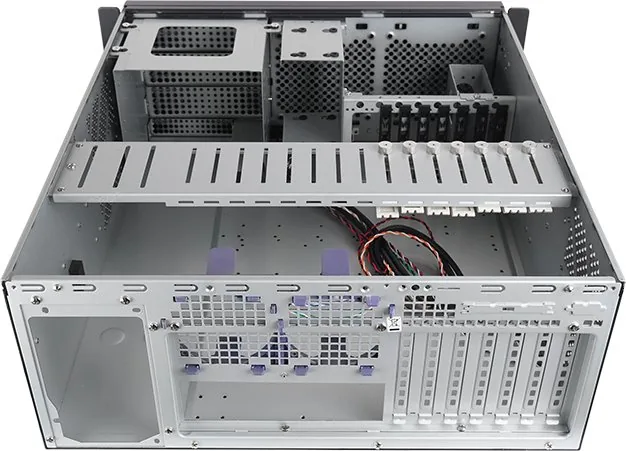
Storage flexibility is another strong suit of this enclosure. The layout accommodates various form factors seamlessly. You can mount 5.25-inch devices such as optical drives in the top cage. Below that lies space for 3.5-inch hard disk drives or legacy floppy drives. An optional cage permits the addition of 2.5-inch solid state drives for faster boot times. Installation is straightforward once you understand the disassembly process for specific covers.
Assembly and Maintenance Ease
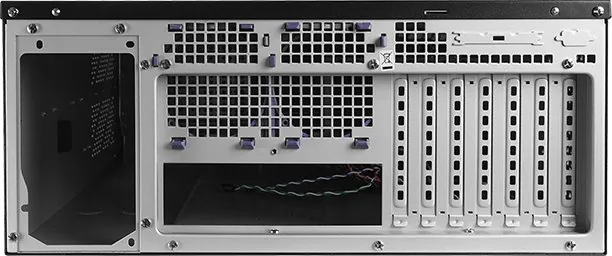
Building inside this frame is intuitive for those with technical experience. Steps include motherboard placement, fan bracket adjustments, and power supply fixing. The design allows replacement of interface card brackets easily. Top cover removal provides access to internal cages for drive swaps. Regular filter cleaning helps maintain optimal temperatures over time. This focus on serviceability extends the useful life of the hardware significantly.
Final Thoughts on Reliability
For professionals seeking a balance between size and capability this unit excels. It simplifies the integration of desktop parts into a rack setting. The build quality inspires confidence in daily tasks. Whether managing files or running complex applications this case holds up well. The combination of secure mounting points and accessible ports makes administration simple. You can trust this equipment to perform consistently when deployed correctly.
*Notes: Ensure adequate clearance for cables behind the unit. Always check compatibility with your specific PSU model before purchase.
Search for 67,706 Manuals online


Type-in Brand or Model