

Cambridge Audio TV2 (v2) Manual
PDF manual · 1 Pages
English


Quick check
Incorrect answer, please try again.
Chat with your Cambridge Audio TV2 (v2) manual using AI
Get instant AI answers from your Cambridge Audio TV2 (v2) manual
Ask anything about the Cambridge Audio TV2 (v2). Answers come from this manual, with the pages they are based on.
Ask a Question
Do you recommend TV2 (v2)?
Yes No
Cortney Reilly
5 months ago
Is this soundbar really the best option under 400 EUR, and does it have good bass quality?

Manual.ly
5 months ago
Yes, many users consider this soundbar one of the best options under 400 EUR due to its high dynamic range, excellent speech clarity, and extremely dry, clean bass. The Bluetooth connection is also easy to set up and works flawlessly.
Sophie Laurent
7 months ago
Does the price at Media Markt offer a good deal compared to other retailers?
Frequently Asked Questions
The TV must have a base no wider than 550mm and no deeper than 300mm, weighing no more than 30kg.
Is this answer helpful?
The unit stores up to eight paired devices in memory, allowing quick switching between sources.
Is this answer helpful?
Yes, it powers down after 20 minutes of silence to save energy and turns back on when sound is detected.
Is this answer helpful?
Absolutely. You can program the TV2 to learn commands from your existing TV remote via the control panel.
Is this answer helpful?
An Optical connection is recommended first for the best quality, followed by ARC, RCA, or AUX options.
Is this answer helpful?
Advantages and Disadvantages
Advantages

- Four specialized sound modes optimize audio for TV, Music, Film, and Voice content
- Seamless Bluetooth pairing supports up to eight connected devices wirelessly
- Auto Power On and Off features save energy and provide convenient operation
- Remote learning capability allows direct control of volume and power from one remote
Disadvantages

- Requires specific TV base dimensions which may limit compatibility with larger stands
- Limited to decoding only LPCM 2.0 format signals without multi-channel support
- AUX input priority mutes RCA connection when both are potentially used
- Optical connection is required for best quality as other methods may reduce fidelity
Product Specification
Type
Soundbase
Channels
2.1
Power
100W Peak
HDR
No
Video Inputs
1x HDMI Out
Audio Inputs
1x Digital Audio In (optical), 1x Stereo Line In (RCA), 1x AUX In (3.5mm jack)
Wireless
Bluetooth 4.0, aptX
Color
Black
Dimensions
21.7x3.9x13.4 in (WxDxH)
Consists of
Soundbase
Product Description
Elevate Your Home Entertainment with the Cambridge Audio TV2 (v2)
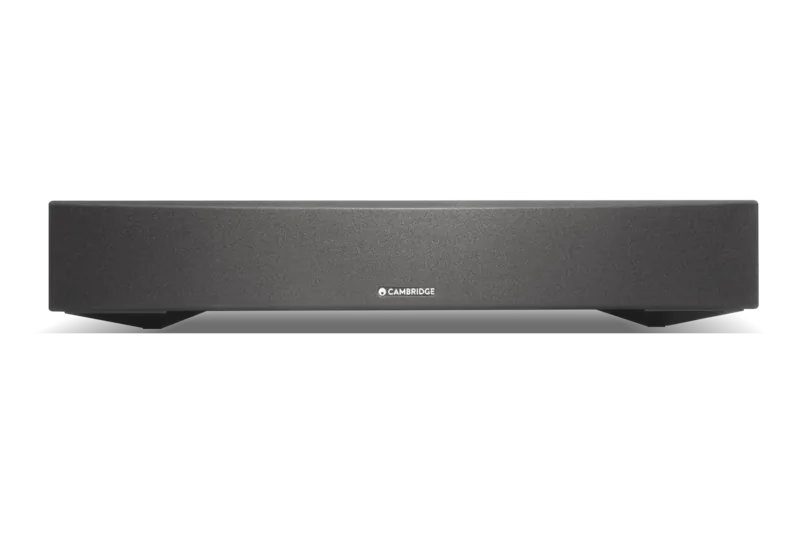
Transform your living room into a cinematic haven with the Cambridge Audio TV2 (v2), a dedicated sound plinth designed to sit perfectly beneath your television. This sleek unit is not merely an accessory but a powerful audio enhancement tool that breathes new life into flat-screen soundbars and TVs that often struggle with dialogue clarity and bass depth. The design philosophy centers on simplicity and integration, ensuring the device blends seamlessly into your entertainment setup while delivering professional-grade audio performance.
The heart of the TV2 lies in its versatility. It features four distinct sound modes tailored to different content types: TV mode for improved speech intelligibility, Music mode for stereo richness, Film mode for immersive movie experiences, and Voice mode specifically engineered to make every word crystal clear. Whether you are binge-watching a drama or listening to high-fidelity music videos, the unit adapts to your needs instantly. Connectivity is equally robust, prioritizing Optical inputs for the highest quality digital signal, followed by ARC, RCA, or AUX connections for older setups. For modern wireless streaming, built-in Bluetooth allows you to pair up to eight devices, including phones, tablets, and computers, directly to the speaker system.
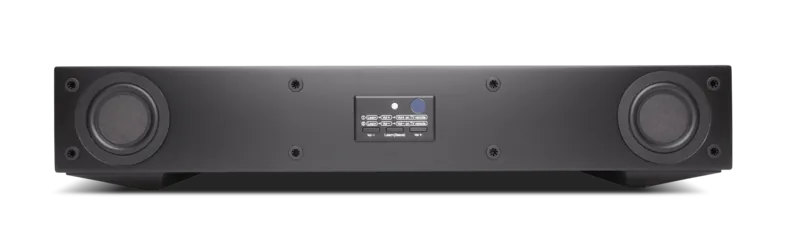
Smart features enhance the user experience significantly. The Auto Power On function detects when your television turns on and activates the sound plinth automatically, while the Auto Power Down feature conserves energy by switching off after twenty minutes of silence. A standout capability is the learning remote function; simply remove the fabric grille and use your existing TV remote to control volume and power directly through the TV2 interface, eliminating the need for multiple remotes cluttering your coffee table. Please note that the unit supports LPCM 2.0 signals only, so ensure your source settings match this requirement for optimal decoding.
Important Notes
- Ensure your TV base does not exceed 550mm in width or 300mm in depth to fit securely under the unit.
- If the TV base is too large, the TV2 can be placed on a lower shelf of a TV rack.
- When using the 3.5mm AUX input, the RCA input will be muted.
- Maximum power consumption is 120W across a voltage range of 100-240V AC.
Search for 67,706 Manuals online


Type-in Brand or Model
Jennifer Schröter
9 months ago
Does the Bluetooth connection work reliably and is the soundbar easy to set up? Also, is the sound good for clear speech and clean bass for under 400 EUR?
Manual.ly
9 months ago
Yes. Reviewers report that the Bluetooth function connects reliably and runs without noticeable dropouts, and that setup is straightforward. Typically, you just pair the soundbar with your TV or phone via Bluetooth and then select the sound output settings on your TV. For audio quality, users highlight a high dynamic range, very good speech intelligibility, and dry, clean bass rather than bloated low end. If you want the best results, place the soundbar centered under the TV and avoid blocking the front speaker area. Also, make sure the TV is set to the correct audio output and, if available, update the soundbar firmware for the latest stability improvements.