
Cambridge Audio Evo CD Manual
PDF manual · 17 Pages
English



Quick check
Incorrect answer, please try again.
Chat with your Cambridge Audio Evo CD manual using AI
Get instant AI answers from your Cambridge Audio Evo CD manual
Ask anything about the Cambridge Audio Evo CD. Answers come from this manual, with the pages they are based on.
Ask a Question
Do you recommend Evo CD?
Yes NoFrequently Asked Questions
No, the EVO CD was designed only for the EVO 75 and 150 range. It will not work with any other products, Cambridge Audio or otherwise. It requires the dedicated connection cable.
Is this answer helpful?
No, the EVO CD does not come with a remote control included. You must use the EVO remote control supplied with the EVO 75/150. Note that there is no IR sensor in the CD unit.
Is this answer helpful?
It supports CD-DA, CD-R, CD-RW, and the CD layer of hybrid SACDs. It can also play MQA CDs. It does not play SACD, MP3 or WMA discs directly.
Is this answer helpful?
The firmware version of the EVO CD will always be the same as the connected EVO 75/150. As long as it is connected, the firmware updates in sync automatically.
Is this answer helpful?
The EVO CD uses the MusicBrainz database to retrieve cover artwork and track information. If an album is not in the database, it will not display. You can contribute to the database online.
Is this answer helpful?
The EVO CD does not have a volume control of its own. You must control the volume via your connected EVO 75/150 amplifier unit.
Is this answer helpful?
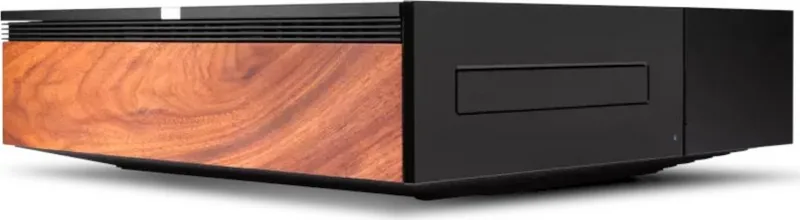
The supplied wooden side panels are made from real wood. As no two pieces of wood are exactly the same, it is a likelihood that they may not exactly match your other unit.
Is this answer helpful?
Advantages and Disadvantages
Advantages

- Gapless playback support for seamless listening
- MQA CD support for high-resolution audio
- Dedicated EVO link ensures maximum data integrity
- Real wood side panels add warmth to setup
- MusicBrainz database integration for metadata
Disadvantages

- Only works with EVO 75/150 amplifiers
- No IR sensor located on the CD unit
- Remote control not included in the box
- Cannot be used with other amplifiers
- No volume control on the CD player
Product Specification
Type
Add-on
Compatible with
Cambridge Audio Evo 75, Evo 150
Product Description
Cambridge Audio Evo CD Review
Elevate Your Music Collection
The Cambridge Audio Evo CD represents a significant step forward for audiophiles who value traditional media formats alongside modern streaming capabilities. This sleek unit is designed specifically to integrate seamlessly into the EVO ecosystem. It serves as a high-fidelity disc player that complements the EVO 75 and 150 amplifiers perfectly. Many users appreciate the attention to detail found when referencing the Cambridge Audio Evo CD Manual during setup to ensure optimal performance.
Connectivity and Setup
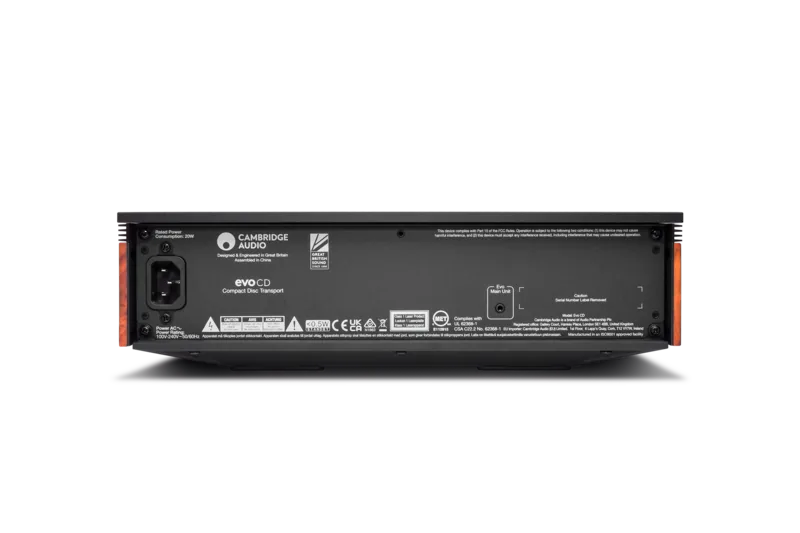
A key feature is the dedicated linking system. The unit does not connect via standard audio inputs or optical cables. Instead, it utilizes a proprietary EVO connection cable that ensures maximum data integrity. This design choice simplifies installation but strictly limits compatibility to the EVO range. You must ensure your amplifier is updated to firmware version v132-b-004 or later for full functionality. It is crucial to avoid placing the CD player too close to the side vents of the amplifier where Wi-Fi and Bluetooth antennas reside.
Media Playback Options
Users can enjoy gapless playback for lossless listening sessions. The player supports standard CD-DA discs as well as recordable CD-R and rewritable CD-RW formats. It also handles the CD layer of hybrid SACD discs. For those interested in high-resolution audio, MQA CDs are fully supported to extract layered detail. The device utilizes the MusicBrainz database to fetch cover art and track information automatically when connected to the internet via the main controller.
Design Considerations
The chassis includes replaceable side panels made from real wood. This adds warmth and style to any rack setup. However, natural variations in grain may occur between units, so exact color matching might vary slightly over time. The front panel features simple controls for loading and ejecting discs. It lacks an IR sensor, so remote commands must be directed at the central amplifier unit. The remote control itself is not included with the CD player.
Technical Specifications
The unit operates on standard AC power with low standby consumption. It weighs roughly 5 kg, providing stability against vibration. The jitter is kept below 140 pico seconds for clean signal transmission. Total power consumption is capped at 20 watts during high load. Dimensions fit standard rack widths at 317 mm.
Troubleshooting and Tips
If the unit shows no power, check the mains lead and fuse. If discs are skipped, ensure the surface is clean and stable. Hum or noise usually indicates poor cable connections. There is no volume control on the CD player itself. Users must adjust levels on the amplifier unit. This centralizes control for a cleaner interface. Keep the disc tray closed when not in use to avoid dirt getting into the mechanism.
Search for 67,706 Manuals online


Type-in Brand or Model