
Cambridge Audio CXN100 Manual
PDF manual · 41 Pages
English



Quick check
Incorrect answer, please try again.
Chat with your Cambridge Audio CXN100 manual using AI
Get instant AI answers from your Cambridge Audio CXN100 manual
Ask anything about the Cambridge Audio CXN100. Answers come from this manual, with the pages they are based on.
Ask a Question
Do you recommend CXN100?
Yes NoFrequently Asked Questions
The CXN100 is a network music player and digital audio source component. It streams music from online services, network libraries, USB storage, computers, Bluetooth devices, and connected digital sources, then sends audio to an amplifier, active speakers, or external DAC.
Is this answer helpful?
The player supports Spotify Connect, TIDAL, Qobuz, Deezer, Internet Radio, Chromecast built-in, AirPlay 2, and Roon Ready operation. Availability can depend on service subscriptions, app versions, firmware, and regional support.
Is this answer helpful?
No. The CXN100 does not include its own remote control. It is designed to be controlled through the StreamMagic app and front-panel controls. A Cambridge Audio CX series 2 remote is compatible if physical remote operation is preferred.
Is this answer helpful?
Yes, when Pre-amp mode is enabled. This allows volume adjustment for the analogue RCA and balanced XLR outputs using the front dial, StreamMagic app, or compatible remote. Pre-amp mode does not control volume through the digital outputs.
Is this answer helpful?
Yes. The USB-B USB Audio input connects to PC and Mac computers. Macs do not need an additional driver. Windows PCs require the Cambridge Audio USB 2.0 driver for Class 2 USB audio before connection.
Is this answer helpful?
Supported formats include WAV, FLAC, AIFF, ALAC, WMA, MP3, AAC, HE AAC, AAC+, OGG Vorbis, and DSD. USB drives must use FAT32, exFAT, NTFS, or Ext4 formatting. DRM-protected tracks are not supported.
Is this answer helpful?
Advantages and Disadvantages
Advantages

- Extensive streaming support includes Spotify Connect, TIDAL, Qobuz, Deezer, AirPlay 2, Chromecast built-in, Internet Radio, Bluetooth, and Roon Ready.
- ESS ES9028Q2M DAC, balanced XLR outputs, RCA outputs, digital inputs, and digital outputs provide strong system flexibility.
- Supports high-resolution PCM up to 768kHz, native DSD up to DSD512, and MQA playback.
- StreamMagic app centralizes setup, updates, source management, Internet Radio presets, and playback control.
- USB Audio and USB media playback make it easy to use computers, flash drives, SSDs, and supported hard drives.
Disadvantages

- No dedicated remote control is supplied; a compatible CX series 2 remote must be purchased separately.
- Many streaming features and USB media browsing depend on the StreamMagic app and an active network connection.
- Windows USB Class 2 audio requires installation of a Cambridge Audio driver.
- Wireless setup requires both supplied antennas, and network extenders or captive portals may cause reliability issues.
- USB drive compatibility is not guaranteed for every HDD or SSD, and larger drives may need external power.
Product Specification
Type
Streaming player
D/A converter
32-bit/768 kHz
Tuner
Internet radio
Audio formats
AAC, AAC+, AIFF, ALAC, DSD512, FLAC, MP3, MQA, OGG/Vorbis, WAV, WMA
Streaming clients
Amazon Music, Apple AirPlay 2, Apple Music, Deezer, Google Cast, Qobuz, Roon, Spotify, Tidal
Audio connections
Digital audio in (coaxial), Digital audio in (optical), Digital audio out (coaxial), Digital audio out (optical), stereo line out (RCA), stereo line out (XLR)
Other connections
1 x USB-A, 1 x USB-B, RJ-45
Wireless
Bluetooth, aptX, aptX HD, Wi-Fi 5 (WLAN 802.11a/b/g/n/ac)
Color
gray
Dimensions
16.93 x 3.35 x 12.01 in (W x H x D)
Weight
7.83 lb
Product Description
Cambridge Audio CXN100 - Read, Download & Print Free
The Cambridge Audio CXN100 is a versatile network music player designed for listeners who want high-quality digital playback alongside modern streaming convenience. Built around the ESS ES9028Q2M digital-to-analogue converter, it supports detailed, low-noise sound from a broad range of music sources. Whether you use streaming platforms, a local music library, computer audio, or digital inputs from other equipment, the CXN100 is built to act as a central source component in a serious hi-fi system.
Streaming and network playback
With Cambridge Audio's StreamMagic platform, the CXN100 brings together Internet Radio, Spotify Connect, TIDAL, Qobuz, Deezer, Chromecast built-in, AirPlay 2, Bluetooth, and Roon Ready compatibility. The StreamMagic app provides setup, source selection, playback control, presets, and settings from a phone or tablet. Users can save up to 99 Internet Radio presets and access music held on networked computers or NAS drives through UPnP.
Wired Ethernet and dual-band Wi-Fi support provide flexible installation options. For demanding high-resolution playback, Ethernet is the preferred connection, especially with content at higher sample rates. Keeping the player connected to a network also enables firmware updates that improve compatibility, features, and security over time.
Connections for a complete hi-fi setup
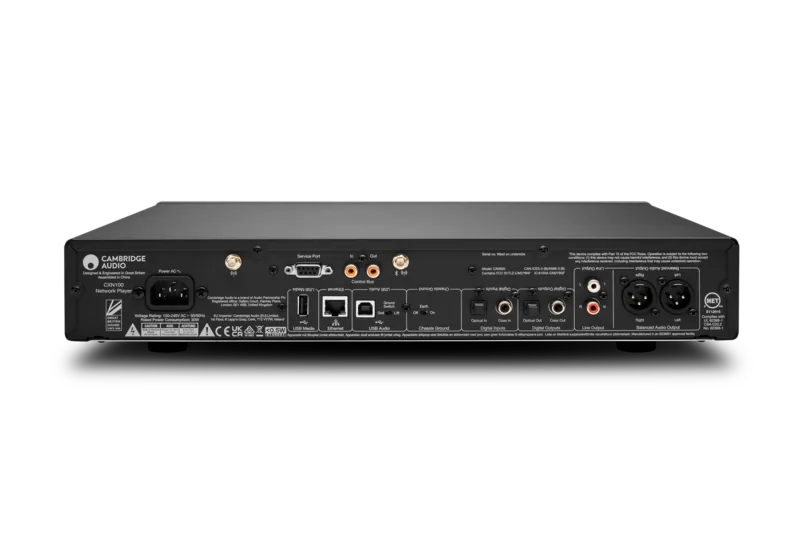
The CXN100 offers fixed or variable RCA line outputs plus balanced XLR outputs for compatible amplifiers. Pre-amp mode allows the analogue output level to be adjusted from the front-panel dial or StreamMagic app, making the unit suitable for direct connection to active speakers or a power amplifier. Coaxial and optical digital inputs accommodate external sources, while matching digital outputs can feed an external DAC.
A USB-B input supports PC and Mac audio, and the rear USB media port accepts compatible flash drives, SSDs, and hard drives. Local playback includes WAV, FLAC, AIFF, ALAC, MP3, AAC, OGG Vorbis, WMA, and native DSD up to DSD512. MQA playback is also supported, with display indicators showing MQA and MQA Studio status.
Everyday usability
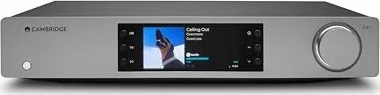
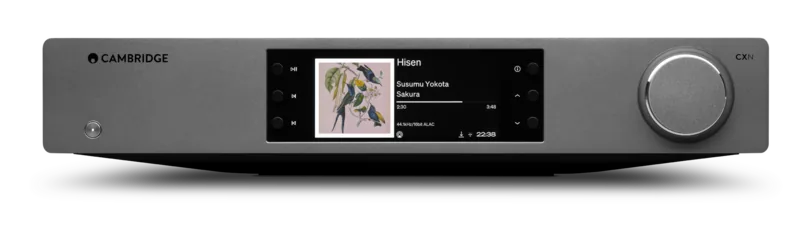
The color front display shows artwork, track details, format information, progress, clock, source, and network status. Physical controls provide power, play/pause, track skip, source selection, display information, and volume when pre-amp mode is active. Although a remote is not included, the CX series 2 remote is compatible, while app control remains the main way to explore services and settings.
Notes
- Connect both supplied antennas when using Wi-Fi; one is also needed for Bluetooth.
- USB hard drives may require their own power supply and must use a supported format.
- All outputs can remain active simultaneously for multi-device connections.
Search for 67,706 Manuals online


Type-in Brand or Model
Lukas Werner
4 months ago
Is this streamer a worthwhile upgrade over the previous CXN (V2), and is setup with a music server straightforward?
Manual.ly
4 months ago
Reviewers report a clearly audible improvement over the previous model, with more precise and detailed sound. Setup and connecting a music server were described as very easy. MQA playback through Tidal was also seen as a useful benefit. The lack of a supplied remote may not be an issue if you control playback through the Cambridge StreamMagic app or a universal remote.