
Cambridge Audio CXC Manual
PDF manual · 20 Pages
English



Quick check
Incorrect answer, please try again.
Chat with your Cambridge Audio CXC manual using AI
Get instant AI answers from your Cambridge Audio CXC manual
Ask anything about the Cambridge Audio CXC. Answers come from this manual, with the pages they are based on.
Ask a Question
Do you recommend CXC?
Yes NoFrequently Asked Questions
The CXC supports standard audio CDs (CD-DA) and properly authored CD-R and CD-RW discs containing correct TOC information. It does not play SACD, MP3, WMA, or other data-format discs.
Is this answer helpful?
The CXC is a CD transport designed to output pristine digital data to an external DAC or an amplifier with a high-quality internal DAC. This architecture lets you select the digital-to-analog conversion stage that best suits your system’s sound.
Is this answer helpful?
Yes. Both the S/PDIF coaxial and TOSLINK optical outputs are active simultaneously, allowing you to feed two devices at once for A/B listening or different components in a system.
Is this answer helpful?
Auto Power Down (APD) automatically places the CXC into standby after a selectable interval (30, 60, 120 minutes, or Off). If connected via Control Bus to other CX devices, APD on one device can trigger standby across all linked devices; disable APD on each device to prevent this behavior.
Is this answer helpful?
Check that the disc is loaded label-side up, ensure it’s not badly scratched or dirty, and confirm it’s a supported CD-DA formatted disc. Also verify the tray is fully closed and the unit has power.
Is this answer helpful?
Use S/PDIF coaxial with a high-quality 75-ohm digital RCA cable for shorter runs and potentially lower jitter. Use TOSLINK optical for longer distances or where electrical isolation is desired; choose audio-grade cables for best results.
Is this answer helpful?
Hold the front-panel Stop button for five seconds to enter the setup menu. Navigate with Skip/Scan, select with Play, and exit sub-menus with Stop. Note the setup menu cannot be accessed during disc playback.
Is this answer helpful?
Advantages and Disadvantages
Advantages

- Pure digital transport—no onboard DAC, ensuring you can use a preferred external DAC for sound signature control.
- Both S/PDIF coaxial and TOSLINK optical outputs active simultaneously for easy A/B comparisons or multiple-system feeding.
- Solid build and simple, intuitive controls with a clear display and remote that duplicates front-panel functions.
- Low standby power consumption (<0.5W) and configurable Auto Power Down for energy savings.
- Control Bus integration allows synchronized power on/off with other CX series components.
Disadvantages

- No analog outputs—requires an external DAC or compatible amplifier to convert digital audio to analog.
- Cannot play SACD, MP3, WMA or other data-formatted discs—limited strictly to CD-DA and properly authored CD-R/CD-RW.
- Tray-loading mechanism vulnerable to dust if left open; avoid forcing or inserting non-disc items.
- Mains voltage selector intended for service personnel — improper handling could risk damage.
- Limited feature set compared with transport/DAC combos—focused on transport duties only.
Product Specification
Audio formats
CD-Audio, CD-R/RW
Tuner
no
Audio connections
Digital Audio Out (coaxial), Digital Audio Out (optical)
Special features
Remote control
Dimensions
16.93x3.35x12.40in (WxHxD)
Weight
10.36lbs
Product Description
Cambridge Audio CXC: Precision CD Transport for Pure Digital Playback
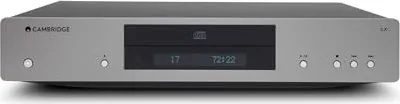
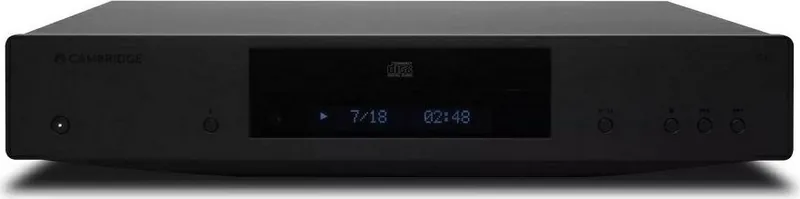
The Cambridge Audio CXC is a dedicated CD transport engineered to deliver the cleanest possible digital audio output for systems using external DACs or integrated amplifiers with built-in digital-to-analog converters. Designed for audiophiles who prefer to keep digital-to-analog conversion separate from transport, the CXC reads CD audio with a robust S3 servo mechanism and outputs pristine digital signals via both S/PDIF coaxial and TOSLINK optical connections.
With a compact, well-built chassis, the CXC offers a simple but refined user experience: a clear front-panel display, essential transport controls, and reliable disc handling. The tray-based loader accepts standard CD, CD-R, and CD-RW media that contain proper CD-DA format and TOC information. Playback features include play/pause, stop, skip/scan, repeat (track/all), and random modes, while the display informs you of track count, elapsed time, and playback mode.
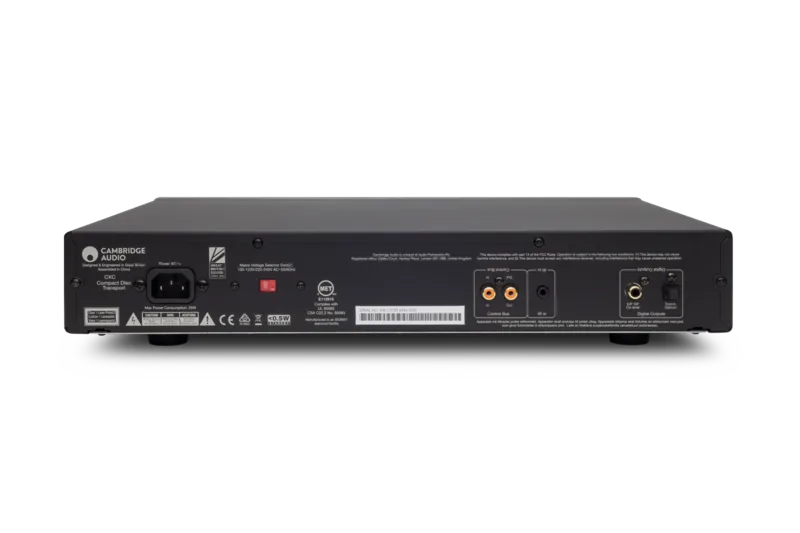
Connectivity focuses on digital output quality and system integration. The rear panel includes both optical and coaxial digital outputs (both active simultaneously), an IR input for remote repeater systems, and a Control Bus pair for synchronized power and basic control across Cambridge’s CX series components. A mains voltage selector and low standby consumption (<0.5W) underline the practical engineering choices for home hi-fi use.
The bundled remote replicates the front panel controls and adds display brightness options (Bright, Dim, Off). The setup menu allows adjustments for Auto Play and Auto Power Down (APD) with configurable APD intervals (Off, 30, 60, 120 minutes). The CXC ships with essential accessories: remote with AAA batteries, country-specific power cord, orange Control Bus cable, safety guide, and quickstart guide.
Operational notes emphasize correct disc orientation, avoiding multiple discs in the tray, and keeping the tray closed when not in use to prevent dust ingress. Troubleshooting guidance covers common issues like power, disc readability, skipping, hum, and remote failures, while technical specs highlight a compact footprint (85 x 430 x 315 mm), 4.3 kg weight, <140 pS total correlated jitter, and 25W maximum power consumption.
Whether paired with Cambridge Audio CXA amplifiers, CXN network players, or third-party DACs like the DacMagic 200M, the CXC provides a neutral, reliable digital front end that prioritizes accurate data delivery for the downstream converter of your choice.
Notes
- Both digital outputs are active simultaneously, enabling parallel connections to different DACs for comparison listening.
- Use a quality 75-ohm coaxial cable for S/PDIF and a high-quality audio-grade TOSLINK for optical.
- APD and Control Bus interaction may put all connected devices into standby; disable APD on devices if unwanted.
Search for 67,706 Manuals online


Type-in Brand or Model