

Free Brydge Manuals – Read, Download & Print
1 Manuals
Manuals
Categories

Free Brydge Manuals - Read, Download & Print
Introduction to Brydge Documentation Resources
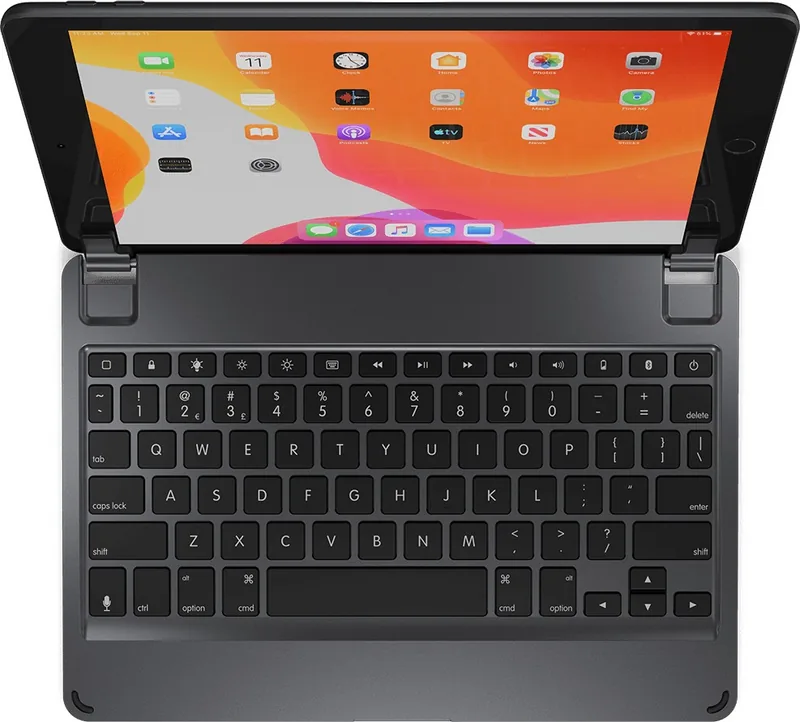
Brydge has established itself as a leading manufacturer of premium keyboard cases and accessories for tablets, particularly the iPad Pro line. Their devices are renowned for combining the portability of a tablet with the productivity of a full-sized laptop keyboard. However, to get the most out of these sophisticated hardware solutions, users often require detailed guidance on setup, features, troubleshooting, and maintenance. This is where free Brydge manuals become an essential resource. Whether you are a new owner setting up your device for the first time or an experienced user looking to optimize performance, having access to comprehensive documentation is crucial. The availability of free manuals that can be read online, downloaded for offline use, and printed for physical reference ensures that every user can find the information they need in their preferred format.
The importance of these manuals cannot be overstated. Modern technology integrates complex Bluetooth connectivity, multi-device pairing, and specific gesture controls that may not be immediately intuitive. Without clear instructions, users might struggle to connect their Brydge keyboard to multiple iPads simultaneously or fail to utilize advanced shortcut keys effectively. By providing easy access to these documents, Brydge empowers its community to maximize the utility of their investment. These resources serve as the primary bridge between the hardware capabilities and the user's ability to leverage them fully.
Understanding the Value of Accessible Documentation
In the digital age, the convenience of accessing information instantly is paramount. Free Brydge manuals eliminate the friction often associated with finding support materials. Instead of searching through various forums or contacting customer support for basic queries, users can directly access the official documentation. This accessibility supports a self-sufficient approach to problem-solving. For instance, if a user encounters a connection issue, the manual provides step-by-step troubleshooting guides that address common causes such as battery levels, Bluetooth interference, or software conflicts. This immediate access reduces downtime and frustration, allowing users to return to their tasks quickly.
Furthermore, the ability to download these manuals offers significant advantages for users who travel frequently or work in environments with limited internet connectivity. A downloaded PDF file can be stored on a smartphone, tablet, or laptop, ensuring that critical information is always available regardless of network status. This feature is particularly beneficial for professionals who rely on their Brydge keyboards for business presentations, remote work sessions, or field operations where reliable Wi-Fi might not be guaranteed. Having a local copy of the manual means that setup procedures, warranty information, and technical specifications are just a few clicks away.
Printing the manuals adds another layer of utility, catering to those who prefer physical references. Some users find it easier to follow instructions when they can see them on paper rather than scrolling through a screen. Printing allows for highlighting key sections, adding personal notes, or creating a quick-reference guide that can be placed next to the workstation. For educational settings or training sessions involving Brydge products, printed manuals provide a tangible resource that instructors can distribute to students or trainees. This flexibility in viewing formats ensures that the documentation meets the diverse needs of the user base.
Key Features Covered in Brydge Manuals
The content within Brydge manuals is extensive and covers a wide array of topics designed to enhance the user experience. One of the primary areas of focus is the initial setup process. Detailed instructions guide users through unboxing, charging the keyboard, and establishing the initial Bluetooth connection with their iPad. These guides often include visual aids or numbered steps to ensure clarity during the pairing process. Users will also find information on how to switch between different connected devices, a feature that is central to the productivity workflow Brydge aims to enable.
Another critical section of the manuals addresses the functionality of the trackpad and gesture controls. Unlike standard external keyboards, many Brydge models include a precision trackpad that supports multi-touch gestures. The documentation explains how to perform actions such as swiping to navigate, pinching to zoom, and using three-finger gestures for window management. Understanding these gestures is essential for replicating the native iPad experience and maintaining a seamless workflow. The manuals also detail the layout of the function keys, explaining what each key does and how to customize certain shortcuts for specific applications.
Battery management and power consumption are also thoroughly covered. Users learn about the estimated battery life, how to check the remaining charge, and best practices for charging and storing the device to prolong its lifespan. Troubleshooting sections are comprehensive, addressing issues like unresponsive keys, connectivity drops, or sync problems. These sections often provide diagnostic steps and solutions ranging from simple resets to more advanced software updates. Additionally, the manuals contain important safety information, care and cleaning instructions, and warranty details, ensuring that users maintain their devices properly and understand their coverage rights.
How to Access and Utilize the Manual Resources
Accessing free Brydge manuals is straightforward and designed to be user-friendly. Typically, these resources are hosted on the official Brydge website or dedicated support portals. Users can navigate to the support section, select their specific device model, and locate the documentation tab. From there, options to view the manual in a web browser, download it as a PDF, or print it are clearly presented. The search functionality on these sites allows users to quickly find manuals for older models or specific product lines, ensuring that even legacy devices have accessible support materials.
Once accessed, utilizing the manual effectively involves understanding its structure. Most manuals are organized into chapters based on topic, such as Getting Started, Features, Troubleshooting, and Specifications. Using the table of contents or the search function within the PDF viewer can help users jump directly to the relevant section. For example, if a user wants to know how to pair the keyboard with a second iPad, they can search for "pairing" or look under the connectivity chapter. It is also recommended to bookmark the manual page for future reference or save the downloaded file to a dedicated folder on the computer for easy retrieval.
For those who prefer a hands-on approach, printing the manual can be done by selecting the print option in the document viewer. Users should consider adjusting the print settings to ensure that text and diagrams are legible. Printing only specific pages, such as the troubleshooting guide or quick start sheet, can save paper while still providing necessary information. Engaging with the manual actively, whether by reading it cover-to-cover upon purchase or referencing it as needed, significantly enhances the overall ownership experience. By taking advantage of these freely available resources, Brydge users can ensure their devices operate at peak performance and enjoy all the features that make Brydge a top choice for mobile productivity.
Conclusion: Maximizing Your Investment
In summary, the availability of free Brydge manuals for reading, downloading, and printing represents a significant value proposition for users of these high-quality accessories. These documents serve as the definitive guide for setup, operation, and maintenance, bridging the gap between complex hardware features and user proficiency. By leveraging these resources, users can troubleshoot issues independently, master advanced gestures, and extend the longevity of their devices. Whether accessed digitally on the go or kept as a physical reference at a desk, the manuals are an integral part of the Brydge ecosystem. Embracing these tools allows users to fully realize the potential of their Brydge keyboards, transforming them from simple input devices into powerful productivity hubs. As technology continues to evolve, having reliable documentation remains a cornerstone of a satisfying user experience, and Brydge stands committed to providing this support to its global community.
Search for 67,732 Manuals online


Type-in Brand or Model