
Bresser Weather Station with Plant Watering Indicator Manual
PDF manual · 32 Pages
English



Quick check
Incorrect answer, please try again.
Chat with your Bresser Weather Station with Plant Watering Indicator manual using AI
Get instant AI answers from your Bresser Weather Station with Plant Watering Indicator manual
Ask anything about the Bresser Weather Station with Plant Watering Indicator. Answers come from this manual, with the pages they are based on.
Weather Station with Plant Watering Indicator Maintenance Schedule
Always clean and dry the two metal pins on the bottom of the probe before use or when moving to a different pot.
Remove batteries from the unit if it has not been used for a long time to prevent damage.
Ask a Question
Do you recommend Weather Station with Plant Watering Indicator?
Yes NoFrequently Asked Questions
It tracks weather and plant conditions at the same time. The unit measures indoor temperature, outdoor air temperature, soil moisture, and soil temperature while also offering a clock, alarm, and watering alert.
Is this answer helpful?
When the soil reaches the driest level, the sensor can beep once per minute to remind you to water. The alert can be turned on or off, and it pauses during nighttime hours.
Is this answer helpful?
Yes. The system supports multiple wireless channels, so you can connect up to five remote sensors. This is useful if you want to monitor different pots, beds, or plant zones.
Is this answer helpful?
No. The forecast is based on air-pressure changes and gives a short-term estimate for the next 12 to 24 hours. It is helpful for planning, but it is not perfectly accurate.
Is this answer helpful?
The main unit uses two AA batteries, and the remote sensor uses one CR2450 battery. Correct battery placement is important, and weak batteries should be replaced as a full set.
Is this answer helpful?
Insert the probe carefully into the soil, usually halfway between the plant stem and the pot edge. Do not push it beyond the marked depth, and clean the metal pins before use.
Is this answer helpful?
Yes. The Bresser Weather Station and Watering Alert Digital Wireless Weather Station Manual explains battery installation, channel pairing, probe placement, alarm settings, and maintenance steps. It is especially helpful for first-time setup.
Is this answer helpful?
Advantages and Disadvantages
Advantages

- Combines weather tracking and plant care in one compact device.
- Wireless sensors make setup flexible across multiple locations.
- Soil moisture alerts help prevent overwatering and underwatering.
- Shows indoor temperature, outdoor temperature, and short-term forecast.
Disadvantages

- Soil readings can vary depending on soil type and density.
- Updates are not instant; moisture changes may take around 10 minutes.
- The watering alert is only a guide, not a universal plant rule.
- Sensors need careful placement and regular cleaning for best accuracy.
Product Specification
Type
digital
Temperature
outdoor
Humidity
no
Weather forecast
Symbols
Other displays
Time, Soil moisture
Placement
Tabletop device
Power supply
2x AA battery (Base station), 1x CR2450 button cell (Sensor)
Color
silver
Package contents
1 outdoor sensor
Product Description
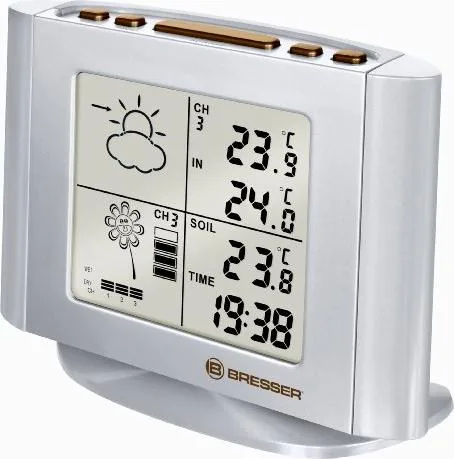
Bresser Weather Station and Watering Alert Digital Wireless Weather Station
The Bresser Weather Station and Watering Alert Digital Wireless Weather Station is a practical companion for anyone who wants better control over home weather tracking and plant care. It combines the convenience of a digital weather station with a soil-monitoring system, making it useful for gardeners, plant lovers, and anyone who likes to keep an eye on changing conditions indoors and outdoors.
At its core, this unit focuses on three essential measurements for plants: soil moisture, soil temperature, and air temperature. The remote sensor can be placed directly into the soil, where it checks moisture levels and provides a simple four-step reading from dry to wet. The display also supports a watering alert, helping users know when plants may need attention before stress becomes visible. For people managing several pots or garden spots, the ability to connect multiple sensors adds real value.
Beyond plant care, the station works as a compact home weather tool. It shows indoor temperature, outdoor air temperature, a digital clock, and a daily alarm. The weather forecast feature uses air-pressure changes to estimate short-term conditions, giving a quick look at whether the coming hours may be sunny, cloudy, rainy, or stormy. This makes it a useful desk or shelf device for everyday planning.
The Bresser Weather Station and Watering Alert Digital Wireless Weather Station Manual explains setup, sensor placement, battery installation, and maintenance in detail. That guidance matters because the accuracy of soil readings depends on correct probe depth, soil type, and regular cleaning of the metal pins. The system is wireless, runs on batteries, and is designed for easy use without complicated installation.
Overall, this product is a smart mix of weather awareness and plant support. It helps users water more thoughtfully, understand temperature trends, and monitor conditions across multiple areas. For anyone looking to simplify routine plant care while adding a reliable weather display to the home, this Bresser station offers a balanced and surprisingly versatile solution.
Notes
- Best suited for potted plants, indoor growing, and small garden monitoring.
- Soil readings are helpful references, but plant type and soil conditions still matter.
- Regular sensor cleaning improves long-term performance.
- Multiple channels make it easier to monitor more than one plant area.
Search for 67,706 Manuals online


Type-in Brand or Model
et_aspernatur
10 months ago
The manual seems incomplete. Does the included sensor also measure outside temperature, or is it only for watering? Where can I find this in the documentation?
Manual.ly
10 months ago
Yes, the included sensor supports more than watering. In addition to its watering-related function, it also reads the outdoor temperature. The short or missing references in the printed manual can make this easy to overlook. Please check the sensor label/markings and the temperature display settings on the control unit or app menu (look for options like "Outdoor" or "Outside Temperature"). If you still cannot locate the exact section, contact our support team with your device model and order number and we can provide the complete manual or the correct instruction pages for your version.