
Bresser Tuya Smart Thermo-Hygrometer Manual
PDF manual · 88 Pages
English



Quick check
Incorrect answer, please try again.
Chat with your Bresser Tuya Smart Thermo-Hygrometer manual using AI
Get instant AI answers from your Bresser Tuya Smart Thermo-Hygrometer manual
Ask anything about the Bresser Tuya Smart Thermo-Hygrometer. Answers come from this manual, with the pages they are based on.
Tuya Smart Thermo-Hygrometer Maintenance Schedule
When the low battery icon is displayed on the LCD, replace with a new complete set of recommended batteries. Do not mix brands or capacities.
Disconnect power and remove batteries before cleaning. Use only a dry cloth to wipe the exterior; do not use any cleaning fluids to avoid damaging electronics.
Ask a Question
Do you recommend Tuya Smart Thermo-Hygrometer?
Yes NoFrequently Asked Questions
Yes, the console comes with one sensor but supports up to seven additional wireless thermo-hygro sensors. You can add them by setting a unique channel number on each new sensor and syncing them with the console.
Is this answer helpful?
No, the Bresser Smart Home set only connects to 2.4GHz Wi-Fi networks. Ensure your router broadcasts a 2.4GHz signal or has a separate SSID for it to connect successfully.
Is this answer helpful?
To reset the console, press the [RESET] key once. For a factory hard reset that removes all data, hold the [RESET] key for six seconds. If issues persist, remove the backup battery and unplug the power adapter before restarting.
Is this answer helpful?
Yes, you can use the BresserSmart app to create automation rules. If the temperature drops below a set point, the system can trigger compatible smart plugs or switches to turn on your heater automatically.
Is this answer helpful?
If the signal is lost, the console will show a weak signal icon. If the connection is not restored within 15 minutes, the reading will disappear. After 48 hours without a signal, it will permanently show an error code until batteries are replaced and the sensor is re-paired.
Is this answer helpful?
Calibration is optional but recommended if you notice discrepancies. You can adjust the offset for temperature and humidity directly through the console buttons or via the app settings under the calibration menu.
Is this answer helpful?
Advantages and Disadvantages
Advantages

- Supports up to 7 wireless sensors for multi-room monitoring
- Integrates with Tuya and BresserSmart apps for remote access
- Enables automation to control other smart home devices like heaters and fans
- Features a clear LCD display with trend indicators and max/min records
- Includes firmware update capability via Wi-Fi
Disadvantages

- Requires a 2.4GHz Wi-Fi network and does not support 5GHz
- Wireless sensors require manual resynchronization after battery changes
- Comfort indication is unavailable below 0°C or above 60°C
- Firmware updates carry a small risk of failure requiring reinstallation
- Alarm function must be manually activated after setting the time
Product Specification
Type
Set
Standard
WLAN
Function
Temperature, Humidity
Topology
Star
Dimensions
5.12x4.37x1.06 in (Base Station), 4.41x2.36x1.42 in (Sensor)
Features
Outdoor, battery-powered (2x AA), Display, controllable via app, voice assistant (Amazon Alexa, Google Assistant)
Set includes
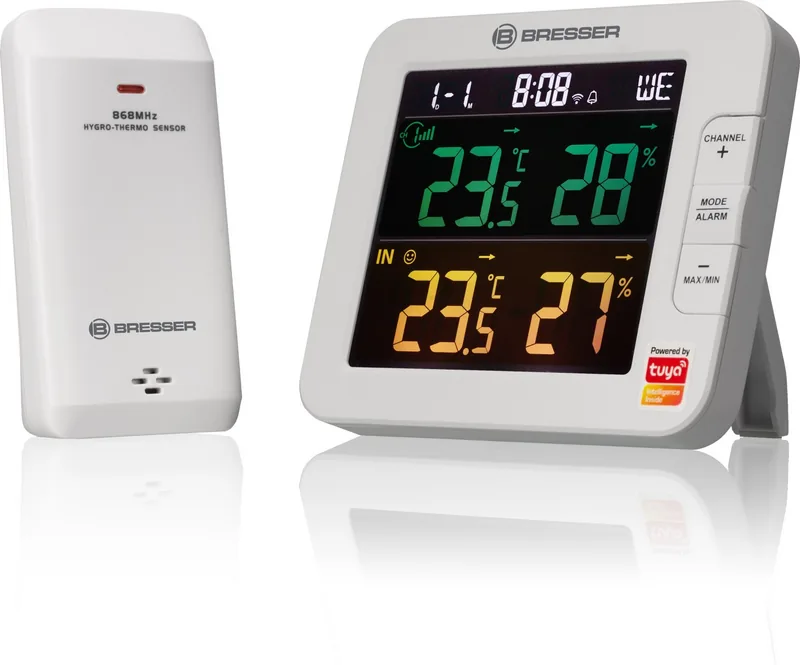
1x Thermo-Hygrometer radio transmitter, 1x Base Station
Product Description
Discover the Bresser Smart Home 7-Kanal Tuya Thermo-Hygrometer Set
The Bresser Smart Home 7-Kanal Tuya Thermo-Hygrometer Set is a comprehensive solution for monitoring your home environment with precision and ease. This advanced weather station features a built-in Wi-Fi module that connects seamlessly to the Tuya IoT platform, allowing you to control and monitor your indoor climate from anywhere using the BresserSmart app. The set includes a main console equipped with a clear, colorful LCD display and one wireless thermo-hygro sensor right out of the box.
What truly sets this system apart is its scalability. While it comes with one sensor, the console supports up to seven additional wireless sensors. This allows you to place units in different rooms, basements, or greenhouses to get a complete picture of your home's temperature and humidity levels. The console automatically syncs data from all connected channels, displaying readings, maximums, minimums, and trends on its bright screen.
Integration is at the heart of this device. Through the BresserSmart app, available for both Android and iOS, users can view real-time data, check historical graphs, and set custom high or low alarms for temperature and humidity. Beyond simple monitoring, the system enables automation. You can create trigger conditions based on environmental data to control other smart devices like heaters, humidifiers, dehumidifiers, or fans. For example, if humidity rises above a certain threshold, the system can automatically turn on a dehumidifier.
Installation is straightforward. The wireless sensors are battery-powered and can be wall-mounted or placed on a table. Once powered, they pair quickly with the console. The console itself requires a standard power adapter and a backup battery to retain time settings and calibration data during power outages. With support for 2.4GHz Wi-Fi networks and firmware updates over the air, this device ensures your smart home setup remains current and reliable. It is an ideal choice for anyone looking to enhance their home comfort and energy efficiency through intelligent climate control.
Search for 67,706 Manuals online


Type-in Brand or Model