
Bresser Professional Rain Gauge Manual
PDF manual · 32 Pages
English



Quick check
Incorrect answer, please try again.
Chat with your Bresser Professional Rain Gauge manual using AI
Get instant AI answers from your Bresser Professional Rain Gauge manual
Ask anything about the Bresser Professional Rain Gauge. Answers come from this manual, with the pages they are based on.
Professional Rain Gauge Maintenance Schedule
Always replace weak or empty batteries with a new complete set of batteries at full capacity. Remove batteries if the unit is not used for a long time.
Press the RESET button on the sensor immediately after every battery change to re-establish connection.
Free maintenance reminders
Timed to your purchase date. Always free, unsubscribe anytime.
Ask a Question
Do you recommend Professional Rain Gauge?
Yes NoFrequently Asked Questions
It measures rainfall and also displays indoor temperature, outdoor temperature, and indoor humidity. The system is designed to give a fuller picture of local weather conditions, not just precipitation totals.
Is this answer helpful?
Yes. You can check current rain rate, hourly totals, daily totals, weekly totals, monthly totals, and yearly totals. This makes it easier to compare short-term rain events with longer seasonal patterns.
Is this answer helpful?
The SINCE function shows the total rainfall collected from a custom starting point. It is useful when you want to track rainfall after a reset, from the start of a project, or from a specific weather event.
Is this answer helpful?
Yes, it can search for the radio time signal automatically after startup. If the signal is not received, the time can be set manually using the clock controls.
Is this answer helpful?
The base station uses 2 AA batteries, and the rain sensor uses 4 AA batteries. The batteries are not included, so they must be purchased separately before setup.
Is this answer helpful?
The sensor is built for outdoor use, but it should still be mounted in a suitable place. It should be positioned horizontally and protected from direct sunlight, heavy splash, and snow buildup.
Is this answer helpful?
Advantages and Disadvantages
Advantages

- Measures rainfall across multiple time spans, from the last hour to the full year.
- Includes a radio-controlled clock, alarm, and snooze function for daily convenience.
- Shows indoor temperature, outdoor temperature, and indoor humidity in one display.
- Offers histogram trends, max/min memory, and a SINCE total for custom tracking.
Disadvantages

- Requires multiple AA batteries, and they are not included in the package.
- The outdoor sensor must be mounted carefully for accurate readings and signal stability.
- Radio reception and transmission range can be affected by buildings and interference.
- Yearly rainfall mode does not include a graphical histogram view.
Product Specification
Type
digital
Temperature
indoor and outdoor
Humidity
indoor
Forecast technology
Barometer
Other displays
Time (radio clock), Date, Day of the week, Rainfall amount, Battery level indicator, stored min./max. values
Alarms
programmable weather warnings (temperature, humidity, frost), programmable temperature alarm, wake-up time
Outdoor temperature measuring range
-40°F to +140°F
Placement
Tabletop device, wall mounting possible
Power supply
6x AA battery
Color
black
Scope of delivery
1 indoor sensor, 1 rain sensor
Product Description
Bresser Professional Digital Rain Gauge
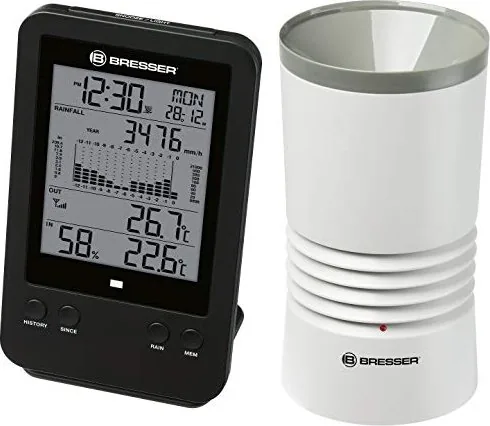
The Bresser Professional Digital Rain Gauge is a compact and capable weather monitoring tool for anyone who wants more than a basic rain counter. Built as a wireless rain gauge and home weather display, it brings together rainfall tracking, indoor comfort readings, and timekeeping in one practical unit. For gardeners, weather enthusiasts, and households that need reliable precipitation data, it offers a clear and easy way to follow changing conditions.
Smart rainfall tracking made simple
At the heart of this system is a remote rain sensor that measures precipitation continuously and sends the data to the base station. Users can view rainfall in millimeters or inches and switch between several useful display modes, including current rain rate, hourly accumulation, daily totals, weekly totals, monthly totals, and yearly totals. The Bresser Professional Digital Rain Gauge Manual highlights how flexible the measurement history is, making it easy to review weather patterns over time.
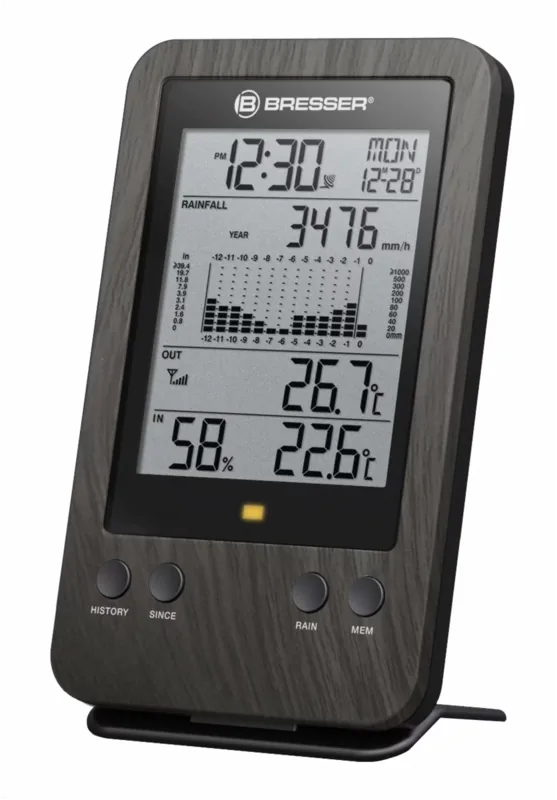
One of the most helpful features is the SINCE function, which records the total rainfall from a chosen starting point. That makes it ideal for comparing storms, tracking rainfall after a reset, or watching seasonal changes in a more personalized way. A graphical histogram adds another layer of convenience by turning raw data into an easy-to-read visual trend.
More than just rainfall data
This device also works as a small weather station. It shows indoor and outdoor temperature, indoor humidity, and offers max/min memory for key values. There is also a frost alert, which can be useful during cold months when temperatures drop unexpectedly. The built-in radio-controlled clock adds everyday practicality, while the alarm and snooze functions make the unit useful on a nightstand or in a workspace.
Setup is designed to be straightforward: install the batteries, place the sensor in a suitable outdoor location, and let the base station search for the radio signal. The display is backlit for easier reading, and the menu structure supports quick switching between measurement views and alert settings.
Notes
- Position the sensor horizontally and away from direct rain splash or snow buildup.
- Keep the transmitter and base station within a reasonable range for stable signal reception.
- The system is most valuable when used regularly to compare rainfall over days, weeks, and seasons.
- The rain gauge is especially useful for gardens, small farms, and home weather monitoring projects.
Search for 67,706 Manuals online


Type-in Brand or Model
Lena Weber
10 months ago
Is the user manual really that limited? I saw reviews saying the documentation, like the history section, is very sparse. Will I get a complete guide or a downloadable PDF with details?
Manual.ly
10 months ago
We try to provide a complete user guide for every product. If a particular topic (for example, the history or usage notes) seems missing or unclear, you should receive the latest version of the manual. In many cases, a detailed PDF is available on the product page or can be sent directly after purchase. If you share your order number or the product model, support can confirm the correct document version and provide the full manual or the specific pages you need. You can also tell us which section is lacking and we will help with a clear explanation or a corrected file.