
Bresser National Geographic Weather Station Manual
PDF manual · 64 Pages
English



Quick check
Incorrect answer, please try again.
Chat with your Bresser National Geographic Weather Station manual using AI
Get instant AI answers from your Bresser National Geographic Weather Station manual
Ask anything about the Bresser National Geographic Weather Station. Answers come from this manual, with the pages they are based on.
Ask a Question
Do you recommend National Geographic Weather Station?
Yes NoFrequently Asked Questions
Insert batteries into both units, set the sensor to the desired channel (CH1–CH3) using its CH button, then set the base to the same channel. Place both units close together during initial pairing and wait a few minutes for readings to appear.
Is this answer helpful?
Automatic DCF reception typically completes within about 3–8 minutes after power-up. If no signal is received, press the DOWN button for ~2 seconds to retry or set the time manually via the SET button.
Is this answer helpful?
Yes. Use the UP button to cycle through current, MAX (highest), and MIN (lowest) stored values. MAX/MIN values auto-reset daily at 00:00; hold UP for ~2 seconds on MAX or MIN to clear stored records immediately.
Is this answer helpful?
Enter temperature alarm settings by holding DOWN for ~2 seconds, then configure ON/OFF, upper limit, and lower limit. When limits are exceeded, the alarm beeps ~3 seconds and repeats every minute until the temperature returns. Disable it by setting Temperature Alarm to OFF.
Is this answer helpful?
Mount the sensor within the effective transmission range and away from direct sunlight, heavy rain, or snow. Sheltered, ventilated positions yield more accurate outdoor temperature readings and improve signal reliability.
Is this answer helpful?
The base station supports up to three remote sensors of the same type. Assign each sensor to a different channel (CH1–CH3); press CH on the base to cycle through channel readings displayed on screen.
Is this answer helpful?
Use AAA (1.5 V) batteries: base requires 2x AAA, sensor requires 2x AAA (or as specified). Replace weak batteries with a full set, avoid mixing brands or capacities, and when changing batteries replace both base and sensor batteries in sequence to maintain the radio connection.
Is this answer helpful?
Advantages and Disadvantages
Advantages

- Wireless outdoor sensor with support for up to three channels for multi-point monitoring.
- DCF radio-controlled clock with automatic time sync (3–8 minutes) and manual override.
- 12-hour graphical weather trend, plus indoor humidity, indoor/outdoor temperature, and min/max recall.
- Alarm with snooze and configurable outdoor temperature alarm (frost warning) with adjustable thresholds.
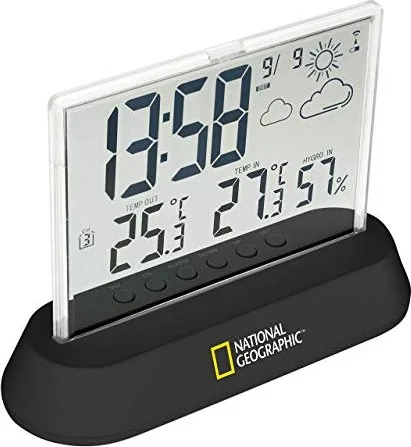
- Compact, battery-powered design (AAA) with semi-transparent display and simple back-side controls.
Disadvantages

- Range and reception depend on building materials and interference; placement may require adjustment.
- Outdoor sensor is weatherproof but should be sheltered from direct sun, rain, or snow for accurate readings.
- Batteries not included; regular replacement required and simultaneous battery swaps recommended to maintain pairing.
- Limited to basic forecasting symbols (sunny, partly cloudy, cloudy, rain) rather than detailed meteorological data.
- No integrated power adapter option on base (battery operation primary), which may require frequent battery changes.
Product Specification
Type
digital
Temperature
inside and outside
Humidity
inside and outside
Weather forecast
Symbols
Forecast technology
Barometer
Other displays
Time (radio clock), Date, stored min./max. values, Battery level indicator
Alarms
programmable temperature alarm, wake-up time, snooze function
Connectable outdoor sensors
up to 3 (range max. 98.43 ft)
Outdoor temperature measurement range
-4°F to +140°F
Placement
Table device, wall mounting possible
Power supply
2x AAA battery, 2x AAA battery
Color
black
Package contents
1 outdoor sensor
Product Description
Bresser National Geographic Funkwetterstation Digital — Overview and Manual Highlights
The Bresser National Geographic Funkwetterstation Digital is a compact, feature-rich weather station designed for home use. It combines a semi-transparent display base unit with a wireless outdoor sensor (one included, up to three supported) to present indoor temperature, indoor humidity, outdoor temperature, and a 12-hour graphical weather trend. The receiver supports DCF radio-controlled time reception, automatic or manual time setting, and a readable date/time display in 12- or 24-hour format.
Setup is straightforward: install AAA batteries in both base and sensor, match sensor and base channels (CH1–CH3), and position units within effective wireless range. The base displays indoor readings immediately and receives outdoor sensor data within a few minutes. The station supports Celsius or Fahrenheit selection and provides highest/lowest recorded values with a manual recall and daily automatic reset at midnight.
Practical features include an alarm with snooze (SNZ) function, an outdoor temperature alarm (frost warning) with adjustable high/low thresholds, and easy-to-use controls on the back of the base unit. The weather trend indicator graphically forecasts conditions for the next 12 hours (sunny, partly cloudy, cloudy, rain) based on measured data. The sensor is weatherproof but should be sheltered from direct sunlight, rain, and snow for best accuracy.
Technical highlights: the base runs on 2x AAA batteries and supports up to three remote thermo-sensors; the remote transmits at 433 MHz with power under 10 mW and uses 2x AAA batteries. The base measures 140×105×50 mm and weighs about 117 g without batteries; the sensor measures 60×96×27 mm and weighs about 52 g. The product includes multilingual documentation, safety guidance, disposal instructions, and declarations of conformity (CE and UKCA).
Installation and use tips: place base and sensor close together for initial pairing, ensure identical channel settings, and avoid interference sources or thick building materials that reduce transmission range. For battery changes, remove and replace batteries in both units in the recommended sequence to reestablish the radio link.
Notes:
- Supports up to three wireless sensors (one included).
- Automatic DCF time sync typically completes in 3–8 minutes; manual time setting is available.
- Temperature alarm beeps approx. 3 seconds and repeats every minute until the temperature returns within limits.
Quick summary
A user-friendly, battery-powered home weather station with wireless outdoor sensing, DCF timekeeping, alarm/snooze features, 12-hour trend display, and support for multiple sensors — suitable for everyday indoor/outdoor climate monitoring and simple weather forecasting.
Search for 67,706 Manuals online


Type-in Brand or Model