
Bresser MeteoTrend Colour Manual
PDF manual · 12 Pages
English



Quick check
Incorrect answer, please try again.
Chat with your Bresser MeteoTrend Colour manual using AI
Get instant AI answers from your Bresser MeteoTrend Colour manual
Ask anything about the Bresser MeteoTrend Colour. Answers come from this manual, with the pages they are based on.
MeteoTrend Colour Maintenance Schedule
Always replace weak or empty batteries with a new, complete set. Change batteries in the main unit and all remote units simultaneously to re-establish connection.
Disconnect the device from the power supply by pulling the power plug before starting any work on maintenance and cleaning.
Ask a Question
Do you recommend MeteoTrend Colour?
Yes NoFrequently Asked Questions
After powering on, the device searches for the radio signal. This process typically takes between three to eight minutes to complete successfully.
Is this answer helpful?
Yes, the device supports both units. You can switch between Celsius and Fahrenheit using the dedicated button on the control panel.
Is this answer helpful?
The pre-alarm activates when the outdoor temperature drops below 3 degrees Celsius, alerting you to potential freezing conditions.
Is this answer helpful?
Yes, the remote sensor is weatherproof and designed for outdoor use, though it should be kept away from direct sunlight and heavy rain.
Is this answer helpful?
You can permanently delete all saved values by pressing and holding the MEM button for approximately three seconds while viewing those stats.
Is this answer helpful?
If automatic syncing fails, you must manually set the time by holding the MODE button and adjusting the digits using the UP and DOWN buttons.
Is this answer helpful?
Advantages and Disadvantages
Advantages

- Graphical 12-hour weather trend display for easy forecasting
- Radio-controlled clock with automatic DCF signal synchronization
- Outdoor frost warning alarm alerts you to freezing temperatures
- Records and displays highest and lowest temperature values
- Colorful background screen improves visibility and aesthetics
Disadvantages

- Remote sensor requires separate AAA batteries not included in box
- Signal range may be reduced by thick walls or electronic interference
- Weather trend is predictive and does not guarantee actual future conditions
- No humidity or barometric pressure readings included in standard model
- Manual time setting required if radio signal reception fails initially
Product Specification
Type
digital
Temperature
indoor and outdoor
Humidity
indoor and outdoor
Weather Forecast
symbols
Forecasting Technology
barometer
Other Displays
time (radio clock), date, battery level indicator, stored min/max values
Alarms
weather warnings (frost), temperature alarm, wake time, snooze function
Connectable Outdoor Sensors
up to 1 (range max. 98.42 ft)
Placement
desktop device, wall mounting possible
Power Supply
mains operation, 2x AA battery
Color
black
Package Contents
1 outdoor sensor
Product Description
Discover the Bresser Meteotrend Color Digital Weather Station Black
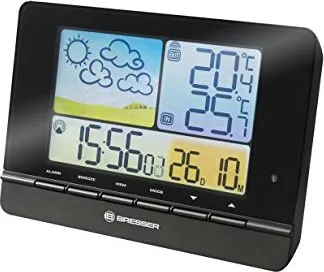
Stay informed about your local climate with the Bresser Meteotrend Color Digital Weather Station Black. This sophisticated device combines precise meteorological data with a user-friendly interface, making it an essential addition to any home or office. The unit features a vibrant colored display that not only shows current indoor and outdoor temperatures but also provides a graphical representation of the weather trend for the next twelve hours.
The station operates using a remote sensor placed outdoors, which transmits data wirelessly to the main base unit. This allows you to monitor temperature fluctuations in both environments simultaneously. The base unit includes a radio-controlled clock that automatically synchronizes with DCF signals, ensuring accurate timekeeping without manual adjustments. Users can set alarms for specific events, such as frost warnings when outdoor temperatures drop below freezing, adding a layer of safety and convenience.
Designed for versatility, the weather station supports both Celsius and Fahrenheit scales. It records the highest and lowest temperature values reached, helping users track daily variations over time. The device comes with a fold-out stand for desktop placement or mounting clips for wall installation. Powering the system is straightforward, utilizing a DC adapter for the base and AAA batteries for the remote sensor. The colorful background of the screen enhances readability, displaying symbols for sunny, cloudy, rainy, or snowy conditions based on pressure and temperature trends.
Safety is a priority, with clear instructions provided regarding electrical usage and battery handling. The product is built to withstand normal household use while remaining sensitive enough to detect subtle atmospheric changes. Whether you are a gardening enthusiast tracking frost risks or simply curious about the forecast, this Bresser model delivers reliable performance with its intuitive design and comprehensive feature set.
Search for 67,706 Manuals online


Type-in Brand or Model