
Bresser Meteo Temp Manual
PDF manual · 40 Pages
English



Quick check
Incorrect answer, please try again.
Chat with your Bresser Meteo Temp manual using AI
Get instant AI answers from your Bresser Meteo Temp manual
Ask anything about the Bresser Meteo Temp. Answers come from this manual, with the pages they are based on.
Meteo Temp Maintenance Schedule
Always replace weak or empty batteries with a new, complete set of full capacity. Use only recommended AAA batteries.
Remove batteries from the device if it is not to be used for a longer period of time to prevent damage.
Ask a Question
Do you recommend Meteo Temp?
Yes NoFrequently Asked Questions
Press and hold the SET button for about four seconds to enter time setting mode. Use the UP or DOWN buttons to adjust the blinking digits for year, month, day, and time. Press SET again to confirm each step and save the final settings.
Is this answer helpful?
The frost warning icon appears and blinks continuously when the outdoor temperature measured by the remote sensor drops below 3 degrees Celsius or 37 degrees Fahrenheit. It disappears once the temperature rises above 6 degrees Celsius.
Is this answer helpful?
No, you should always use batteries of the same brand, type, and capacity. Mixing batteries can lead to poor performance, leakage, or connection failures between the units.
Is this answer helpful?
After installing the batteries in the remote sensor, the base station typically receives the first measurement readings within approximately three minutes, provided the devices are within effective range.
Is this answer helpful?
Remove all batteries from both the base station and the sensor, then reinsert them in the correct order. If one device uses a mains adapter, disconnect it briefly during the battery change to ensure the radio link resets properly.
Is this answer helpful?
While the sensor is weatherproof, it should not be placed in areas with direct rainfall, snow, or intense sunlight. Proper positioning away from these elements ensures longevity and accurate readings.
Is this answer helpful?
Advantages and Disadvantages
Advantages

- Automatic time synchronization via DCF radio signal ensures high accuracy without manual adjustment.
- Dual-sensor capability provides simultaneous indoor and outdoor temperature monitoring.
- Predictive weather trend indicators offer visual forecasts for the next 12-24 hours.
- Frost warning system alerts users when temperatures drop below safe levels for plants or pipes.
- Simple installation process using standard AAA batteries for both units.
Disadvantages

- Wireless range can be significantly reduced by thick walls or electronic interference.
- Outdoor sensor must be shielded from direct sunlight and precipitation despite being weatherproof.
- Battery replacement requires removing power from both units to reset the connection.
- No humidity or barometric pressure display included in the basic model configuration.
- Manual time setting process involves multiple steps if automatic signal fails.
Product Specification
Type
digital
Temperature
indoor and outdoor
Humidity
indoor and outdoor
Weather Forecast
1-day symbols
Forecasting Method
barometer
Alarms
weather warnings (humidity, frost)
Connectable Outdoor Sensors
up to 1 (max range 98.4 ft)
Outdoor Temperature Range
-40°F to +158°F
Installation
desktop unit, wall mounting possible
Power Supply
2x AAA battery, 2x AAA battery
Package Contents
1 outdoor sensor
Product Description
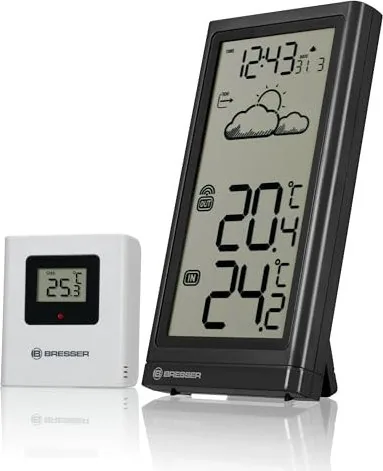
Bresser Meteo Temp Digital Weather Station Manual: Your Guide to Precision
The Bresser Meteo Temp Digital Weather Station is a sophisticated device designed to bring professional-grade meteorological data directly into your home. By combining indoor and outdoor monitoring capabilities, this station offers users a comprehensive view of their immediate environment. The core of the system lies in its dual functionality, featuring a main base station for interior readings and a wireless remote sensor that captures precise outdoor conditions. This seamless integration allows homeowners to track temperature fluctuations, humidity trends, and weather patterns without leaving their living room.
Understanding the full potential of your device requires familiarity with its operational nuances, which are detailed in the official manual. The system utilizes DCF radio-controlled signals to automatically synchronize the time and date, ensuring accuracy without manual intervention. When the signal is received, the display instantly updates, showing the current time alongside real-time temperature data from both the internal and external sensors. For those who prefer control, the manual also outlines straightforward procedures for manual time setting if radio reception is unavailable due to location or interference.
One of the standout features highlighted in the documentation is the intelligent weather trend analysis. The station calculates future weather patterns based on pressure changes over the last 12 to 24 hours. These predictions are visualized through clear graphical icons on the LCD screen, ranging from sunny and partly cloudy to rainy or snowy conditions. Additionally, the device includes a frost warning system that activates when outdoor temperatures drop below 3 degrees Celsius, providing an early alert to prevent potential damage to plants or pipes. The unit supports both Celsius and Fahrenheit scales, making it accessible to a global audience.
Installation is designed for simplicity, requiring only standard AAA batteries for both the base station and the sensor. However, optimal performance depends on proper placement. Users are advised to keep the receiver and transmitter close together initially to establish a strong connection, while also avoiding direct sunlight or heavy rain for the outdoor sensor. The manual emphasizes the importance of correct battery polarity and warns against mixing old and new batteries to ensure consistent power delivery. With a robust design and user-friendly interface, the Bresser Meteo Temp stands as a reliable tool for weather enthusiasts and practical homeowners alike.
Search for 67,706 Manuals online


Type-in Brand or Model