
Bresser Explorer 6 Manual
PDF manual · 44 Pages
English



Quick check
Incorrect answer, please try again.
Chat with your Bresser Explorer 6 manual using AI
Get instant AI answers from your Bresser Explorer 6 manual
Ask anything about the Bresser Explorer 6. Answers come from this manual, with the pages they are based on.
Explorer 6 Maintenance Schedule
Turn off the camera. Clean the protective case after each use with clear, clean water and dry it thoroughly to avoid damage.
Use only a soft, lint-free cloth (e.g., microfibre) and gentle pressure to clean eyepieces or lenses to avoid scratching them.
Ask a Question
Do you recommend Explorer 6?
Yes NoFrequently Asked Questions
Yes, the camera is waterproof up to 10 meters when used with the included protective housing. It is suitable for swimming and shallow diving but should not be used beyond this depth.
Is this answer helpful?
The camera supports Micro SD cards up to 128 GB. For best performance, use a Class 10 SDHC card or higher and format it before use.
Is this answer helpful?
Yes, by enabling Car Mode and connecting it to a 5V 1A car charger, the camera will automatically start recording when the engine starts and stop when the engine turns off.
Is this answer helpful?
Yes, it features Electronic Image Stabilization (EIS) using a 6-axis gyroscope to reduce shake, though it does not support EIS during specific high-frame-rate modes like 1080P 60fps.
Is this answer helpful?
Download the iSmart DV app from the App Store or Google Play. Turn on Wi-Fi on the camera by holding the button, then connect your phone to the camera's network using the default password.
Is this answer helpful?
Videos are saved in the .MOV format. Photos are saved as .JPG files. The camera supports various resolutions including 4K, 2.7K, 1080P, and 720P.
Is this answer helpful?
Advantages and Disadvantages
Advantages

- Supports 4K video recording at 30fps and 60fps for high-resolution footage
- Waterproof up to 10 meters with included protective housing
- Built-in Wi-Fi allows remote control via the iSmart DV mobile app
- Electronic Image Stabilization reduces shake during fast movements
- Includes multiple mounting options for helmets, bikes, and surfaces
Disadvantages

- Micro SD card is not included in the package
- HDMI cable required for TV playback is sold separately
- Audio may be missing when playing back 4K files through some card readers
- Camera can become warm during extended 4K recording sessions
- Zoom function is only available in photo mode, not video mode
Product Specification
Effective Megapixel
12.0 MP
Sensor
CMOS
Video Function
MOV, 3840x2160@60p (16:9), 1920x1080@120p (16:9)
Photo Resolution
JPEG
Viewing Angle
170 degrees
Image Stabilizer
Electronic
Digital Zoom
No
Display
2 inch LCD
Waterproof
Up to 33 ft
Expandable Storage
microSD/microSDHC/microSDXC
Connectivity
USB 2.0, HDMI
Wireless
Wi-Fi
Power Supply
Li-Ion Battery (1050mAh, removable)
Color
Black
Dimensions
2.48x1.81x1.30 in (WxHxD)
Weight
3.35 oz
Product Description
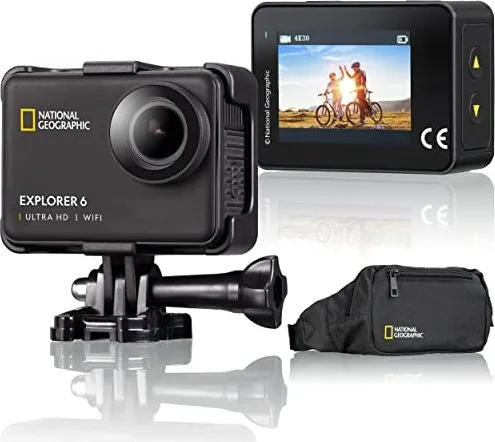
Capture Every Moment with the Bresser Explorer 6 Action Camera
The Bresser Explorer 6 Action Camera is designed for adventurers who demand high-quality visuals without compromising on durability. This compact device features a 170-degree wide-angle lens that captures expansive landscapes and fast-paced action in stunning detail. With support for 4K video at 30 or 60 frames per second, users can record crisp footage suitable for professional editing or social media sharing.
Built to withstand the elements, the camera comes with a waterproof housing that allows for underwater exploration up to ten meters deep. Whether you are cycling down a mountain trail, snorkeling in clear blue waters, or simply documenting your daily life, this camera adapts to your environment. The integrated Electronic Image Stabilization (EIS) ensures smooth footage even during shaky movements, making it ideal for handheld recording.
Connectivity is seamless with built-in Wi-Fi capabilities. By downloading the iSmart DV app, you can control the camera remotely from your smartphone, view live previews, and instantly share content. The device includes a versatile mounting system compatible with helmets, bicycles, and belts, ensuring you never miss an angle. A rechargeable battery provides reliable power for hours of recording, while the user-friendly interface allows for quick adjustments to exposure, white balance, and shooting modes like time-lapse and slow motion.
The package includes essential accessories such as a USB charging cable, a tripod adapter, and multiple mounting brackets. While the Micro SD card is not included, the camera supports cards up to 128 GB, offering ample space for extended adventures. With its robust build and advanced features, the Bresser Explorer 6 stands out as a reliable companion for capturing life's most exciting moments.
Search for 67,706 Manuals online


Type-in Brand or Model