
Bresser CO2 Monitor INV Manual
PDF manual · 44 Pages
English



Quick check
Incorrect answer, please try again.
Chat with your Bresser CO2 Monitor INV manual using AI
Get instant AI answers from your Bresser CO2 Monitor INV manual
Ask anything about the Bresser CO2 Monitor INV. Answers come from this manual, with the pages they are based on.
Ask a Question
Do you recommend CO2 Monitor INV?
Yes NoFrequently Asked Questions
Ensure the device is off and in an area with normal outdoor air (approx 400ppm). Press the power button along with the Celsius/Fahrenheit buttons simultaneously. Release the power button first, then the other buttons. Wait about six minutes until the screen shows a '1'. If it shows '0', the calibration failed.
Is this answer helpful?
PPM stands for parts per million and indicates the concentration of carbon dioxide in the air. Levels between 350 and 1000 ppm are ideal for ventilated rooms. Values above 1000 ppm suggest poor ventilation, while levels exceeding 5000 ppm pose immediate health risks.
Is this answer helpful?
Yes. The device has a manual recording mode. You can take the unit to a specific location, press the REC button to start logging, and press it again to stop. Later, connect the device to a computer via USB to download the stored data.
Is this answer helpful?
A low battery icon appears on the display when the charge is running low. The device uses a built-in 3.7V lithium battery which can be recharged via the micro USB port using the provided AC adapter or a computer USB port.
Is this answer helpful?
The alarm activates when CO2 levels reach your set threshold. Once active, you can silence the sound by pressing the left button. Pressing the left button again will reactivate the alarm tone. The sensitivity threshold itself is adjustable in the settings menu.
Is this answer helpful?
The device reacts within one second of any change in CO2 concentration. This rapid response ensures you receive timely warnings if air quality deteriorates suddenly in your workspace or home.
Is this answer helpful?
Advantages and Disadvantages
Advantages

- Measures CO2, temperature, and humidity simultaneously
- Large LCD display shows all key metrics clearly
- Built-in data logger stores thousands of readings
- Customizable alarm settings for safety alerts
- Includes software for easy data analysis on PC
Disadvantages

- Requires calibration in a stable 400ppm environment
- Buttons are unresponsive during the 30-second preheat phase
- Manual data saving required before changing parameters to avoid overwrite
- Does not support Wi-Fi connectivity for remote access
- Charging requires a separate AC adapter connection
Product Specification
Type
digital
Temperature
indoor
Humidity
indoor
Weather Forecast
no
Other Displays
stored min/max temperature, stored min/max humidity, stored min/max values
Alarms
programmable weather warnings (humidity, CO2)
Placement
desktop unit, wall mounting possible
Power Supply
mains power
Color
white
Package Contents
power plug, software
Product Description
Enhance Your Indoor Air Quality with the Bresser CO2 Measuring Device
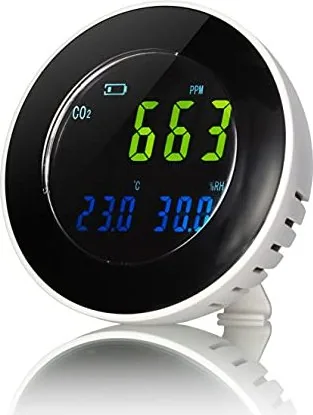
Maintaining healthy indoor air is crucial for productivity and well-being. The Bresser CO2 Measuring Device with Data Logger Temperature Station Digital White offers a comprehensive solution for monitoring your environment. This sleek digital unit tracks carbon dioxide levels, temperature, and humidity in real-time, ensuring you always know the state of your air.
The device features a clear LCD display that presents critical data at a glance. It measures CO2 concentrations ranging from 0 to 9999 PPM with high precision. When levels rise above safe thresholds, the built-in alarm alerts you immediately. Whether placed on a desk using the included stand or mounted securely on a wall, this monitor adapts to any space. Its compact design and white finish blend seamlessly into modern offices or homes.
For those who need historical data, the integrated data logger stores up to 12700 readings. You can transfer this information to a computer via the included micro USB cable and specialized software. This allows for detailed analysis of air quality trends over time. The device also supports manual or immediate recording modes, giving you flexibility in how you gather data. Calibration is straightforward, allowing users to reset the sensor to standard outdoor levels for accurate future measurements.
Important Notes
- Always keep packaging materials away from children to prevent choking hazards.
- Do not expose the device to extreme heat to avoid fire risks.
- Use only a dry cloth for cleaning; liquids can damage internal electronics.
- The factory default alarm setting is 2000 PPM but is fully customizable.
- A two-year warranty covers manufacturing defects from the date of purchase.
Search for 67,706 Manuals online


Type-in Brand or Model