
Bresser ClimaTrend Hygro Quadro Manual
PDF manual · 32 Pages
English



Quick check
Incorrect answer, please try again.
Chat with your Bresser ClimaTrend Hygro Quadro manual using AI
Get instant AI answers from your Bresser ClimaTrend Hygro Quadro manual
Ask anything about the Bresser ClimaTrend Hygro Quadro. Answers come from this manual, with the pages they are based on.
Ask a Question
Do you recommend ClimaTrend Hygro Quadro?
Yes NoFrequently Asked Questions
The system supports up to three wireless outdoor sensors, each assigned to a separate channel (Channel 1, 2, or 3). Set each sensor to a unique channel using the channel switch on the sensor.
Is this answer helpful?
The main unit requires 3x AAA (LR03) batteries; each outdoor sensor uses 2x AAA (LR03). For first-time setup or battery replacement, insert batteries into the main unit first, then insert batteries into the outdoor sensor(s).
Is this answer helpful?
Select the desired channel on the main unit, press and hold ALARM/SET for 3 seconds, then adjust HI/LO limits with CHANNEL/+ or MIN/MAX/-. Press and hold ALARM/SET to activate/deactivate the selected alarm; the alarm symbol appears or disappears when changed.
Is this answer helpful?
The comfort-level icon classifies conditions based on temperature and humidity ranges (e.g., COM for comfortable: 20–28°C and 40–70% humidity; WET for >65% humidity; DRY for <45% humidity), helping you assess indoor climate at a glance.
Is this answer helpful?
Press the MIN/MAX button to cycle to MAX and MIN historical values for the selected channel. To clear stored extremes for that channel, press and hold the MIN/MAX button while viewing the respective MAX or MIN value.
Is this answer helpful?
Check batteries in the outdoor sensor and main unit, ensure sensors are on different channels, reduce interference or obstructions, and use the CHANNEL/+ button held for 3 seconds to force a re-scan/reinitialization.
Is this answer helpful?
Remove batteries before cleaning and wipe the exterior with a dry cloth only. Dispose of electronic components per local e-waste regulations; do not discard the device in household trash.
Is this answer helpful?
Advantages and Disadvantages
Advantages

- Supports up to three outdoor sensors for multi-location monitoring.
- Adjustable high/low temperature and humidity alarms per channel.
- Clear display with trend indicators, comfort icons, and min/max memory.
- Manual force-reception lets you reinitialize wireless links on demand.
- Battery-powered and mountable or tabletop for flexible placement.
Disadvantages

- Requires multiple AAA batteries (main + sensors) which may need frequent replacement.
- No AC power option; dependent on battery life for continuous operation.
- Wireless range may be affected by interference or obstructions.
- Interface relies on small buttons—can be fiddly for some users.
- Limited advanced features (no smartphone app or data logging beyond min/max).
Product Specification
Type
digital
Temperature
indoor and outdoor
Humidity
indoor and outdoor
Weather forecast
Symbols
Forecast technology
Barometer
Other displays
stored min/max values
Alarms
programmable weather warnings (humidity), programmable temperature alarm
Connectable outdoor sensors
up to 3 (range max. 98.43 ft)
Outdoor temperature measuring range
-4°F to +140°F
Mounting
Tabletop device, wall mounting possible
Power supply
3x AAA battery, 2x AAA battery
Scope of delivery
3 outdoor sensors
Product Description
Bresser Temeo Hygro Quadro Wireless Weather Station Digital
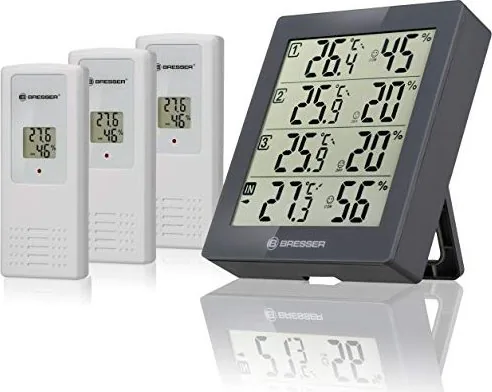
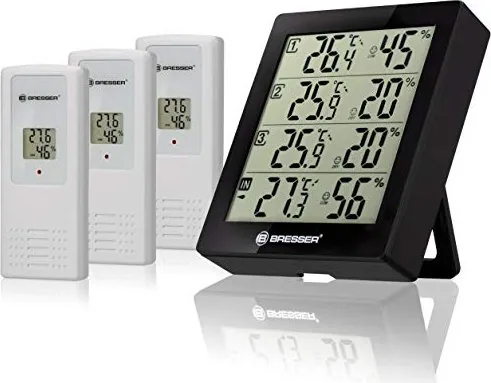
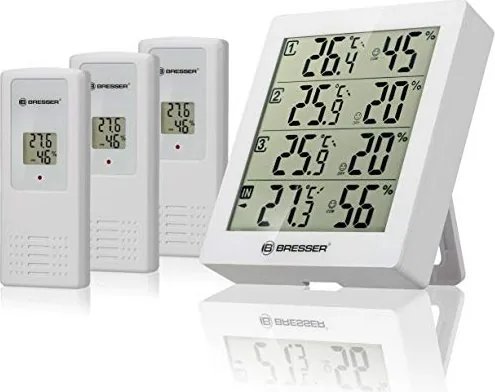
The Bresser Temeo Hygro Quadro is a compact, multi-sensor wireless weather station designed for home or small office use. It pairs a main indoor console with up to three wireless outdoor sensors to monitor temperature and humidity across multiple locations. The main unit displays indoor and outdoor readings, temperature trend arrows, comfort-level icons, and min/max memory. The outdoor sensors transmit data wirelessly and support channel selection and °C/°F switching. The system includes audible alarms for high/low temperature and humidity thresholds, adjustable per channel, and an easy-to-use button layout for channel selection, alarm setting, and min/max recall. Battery-powered and portable, the station offers wall-mount or tabletop placement for flexible installation.
Key features and how it helps
The station automatically scans and receives data from configured outdoor sensors, indicating reception and battery status. Users can manually force a radio reception scan to reinitialize connections. The display clearly separates internal and external measurements, with dedicated symbols for alarm status and comfort levels (COM/WET/DRY). Alarm configuration supports distinct high and low limits for temperature and humidity on each channel; alarms can be toggled and silenced at the console. Built-in min/max memory provides historical extremes since the last reset, and a button combination toggles between Celsius and Fahrenheit. The device emphasizes simple maintenance: only dry-cloth cleaning, recommended battery types (AAA/LR03), and disposal guidance for electronics.
Practical use scenarios
The Hygro Quadro is useful for monitoring multiple zones—such as a living room, greenhouse, and garage—or tracking conditions at entrances and patios. Gardeners, hobbyists, and homeowners benefit from alarms that warn about frost risk or excessive humidity. The wireless outdoor sensors allow flexible placement while the main unit remains indoors for convenient overview and adjustments.
Notes
- Always insert batteries into the main unit before outdoor sensors to ensure proper initialization.
- Use only recommended AAA/LR03 batteries and replace all batteries as a set to avoid damage.
- Clean only with a dry cloth and remove batteries before long-term storage.
- Dispose of electronic components according to local regulations; do not throw in household trash.
Search for 67,706 Manuals online


Type-in Brand or Model