
Bresser ClimaTemp TB Manual
PDF manual · 44 Pages
English



Quick check
Incorrect answer, please try again.
Chat with your Bresser ClimaTemp TB manual using AI
Get instant AI answers from your Bresser ClimaTemp TB manual
Ask anything about the Bresser ClimaTemp TB. Answers come from this manual, with the pages they are based on.
Ask a Question
Do you recommend ClimaTemp TB?
Yes NoFrequently Asked Questions
You can set the time automatically by waiting for the radio signal which takes three to eight minutes. Alternatively, press the MODE button for three seconds to enter settings mode, then use UP/DOWN buttons to adjust hours, minutes, and date manually. Confirm settings with the MODE button to save.
Is this answer helpful?
The device requires five AAA or LR03 batteries rated at 1.5V each. These are used for both the base station and the wireless sensor. They are not included in the delivery package so you must provide them separately to start operation.
Is this answer helpful?
Yes, you can toggle between Celsius and Fahrenheit easily. Press the UP/CF button while in normal display mode to switch the temperature unit setting instantly for both indoor and outdoor readings.
Is this answer helpful?
Yes, the screen displays moon phases for the northern hemisphere. It indicates new moon, waxing crescent, full moon, and others accurately based on the sunlit side moving from right to left.
Is this answer helpful?
The regular warranty period is two years and starts from the day of purchase. An extended voluntary warranty may be available if you register on the manufacturer's website according to the terms listed on the gift box or official site.
Is this answer helpful?
To reset all settings, locate the RESET button on the wireless sensor or base station housing. Press it firmly to restore factory defaults. Ensure batteries are reinserted correctly after resetting to re-establish the radio link.
Is this answer helpful?
Yes, there is a snooze function. When the alarm sounds, press the SNZ/LIGHT button to activate snooze. It will sound again after the preset interval between three to twenty minutes depending on your configuration.
Is this answer helpful?
Advantages and Disadvantages
Advantages

- Provides simultaneous reading of indoor and outdoor temperature and humidity levels with high accuracy for home monitoring.
- Includes graphical weather forecast prediction based on barometric pressure trends over a twenty-four-hour period.
- Features customizable HI/LO temperature alarms for both indoor and outdoor zones to alert users of extreme conditions.
- Supports up to three wireless sensor channels allowing flexibility in placement and multi-room coverage options.
Disadvantages

- Standard AAA batteries are required for both units but are not included in the package upon initial purchase.
- Signal range can be significantly reduced by thick building materials or interference from other radio transmitters.
- Requires strict adherence to safety instructions regarding battery polarity to prevent voltage damage to electronics.
Product Specification
Type
Digital
Temperature
Indoor and Outdoor
Humidity
Indoor and Outdoor
Weather Forecast
Symbols for 12h
Forecasting Method
Barometric
Other Indications
Time (Radio Clock), Date, Day of Week, Moon Phases
Alarms
Wake Time, Snooze Function
Connectable External Sensors
up to 3 (Range max. 98.43 ft)
Outdoor Temperature Measurement Range
-40°F to +158°F
Placement
Tabletop Device, Wall Mount Possible
Power Supply
Mains Power, 5x AAA Battery
Color
Black
Package Contents
1 External Sensor
Product Description
Experience Precision Home Climate Monitoring
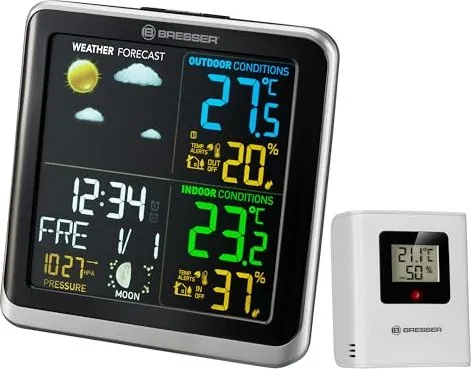
Keeping track of your indoor and outdoor environment has never been more intuitive. The Bresser ClimaTemp TB Digital Wireless Weather Station offers comprehensive data right at your fingertips. This device combines functionality with modern aesthetics, making it a perfect addition to any living space. Whether you are interested in seasonal changes or just want to monitor room comfort levels, this unit delivers accurate readings consistently. It serves as a vital tool for homeowners seeking better climate awareness within their personal sanctuaries.
Comprehensive Data Display
One of the standout features is the detailed screen interface. Users can view current temperature, humidity, and barometric pressure simultaneously. The system provides graphical forecasts for the next twenty-four hours based on pressure trends. Trend indicators show whether air pressure is rising, stable, or falling over the coming hour. Additionally, it tracks moon phases relevant to the northern hemisphere visually. For those who need alerts, maximum and minimum temperature thresholds can be programmed for both interior and exterior zones. You will find guidance similar to what is outlined in the Bresser ClimaTemp TB Digital Wireless Weather Station Manual when setting these preferences. Safety precautions ensure the device operates securely without risk of electrical hazards.
Wireless Connectivity
The wireless sensor allows flexible placement away from moisture or heat sources outside. Connecting to the base station is straightforward once channels are aligned correctly on the slider. It is important to note that building materials may affect signal strength significantly. If reception issues occur, adjusting positions slightly often resolves the problem without needing additional hardware. Powering the devices requires standard AAA batteries, which must be inserted with correct polarity to avoid voltage damage. Always remove weak batteries immediately upon noticing low performance.
Customization and Alerts
Alarm functions allow users to receive notifications for extreme temperatures effectively. Two separate wake-up alarms are configurable via the mode button. Time setting is either automatic through radio signals or manually adjusted for convenience. Changing between Celsius and Fahrenheit is simple with dedicated keys. The snooze function ensures interruptions during sleep cycles are manageable. Channel selection lets users monitor up to three distinct sensors if needed. Ultimately, mastering these controls enhances daily utility and peace of mind regarding local weather conditions. Regular maintenance keeps the electronics safe from dust and impact damage.
Maintenance and Warranty
Proper disposal of electronic waste is crucial according to environmental regulations. Batteries should never be thrown in household trash due to chemical pollutants. The manufacturer offers a two-year warranty period starting from purchase. Registration might extend this term voluntarily on their website. Following safety instructions prevents risks such as electric shock or choking hazards associated with small parts. General safety is paramount when operating electrical devices near children. Keep packaging materials away to prevent suffocation hazards. Small parts within the unit pose a choking risk for younger family members. Never disassemble the housing yourself as this voids safety compliance and warranty terms. Immersion in water is strictly prohibited to prevent short circuits. Avoid exposure to impacts or vibration that could damage internal components. Enjoy reliable performance by adhering to recommended usage guidelines for optimal longevity. Consult service centers for any repairs rather than attempting self-disassembly.
Search for 67,706 Manuals online


Type-in Brand or Model