
Bresser ClimaTemp Hygro Indicator Manual
PDF manual · 44 Pages
English



Quick check
Incorrect answer, please try again.
Chat with your Bresser ClimaTemp Hygro Indicator manual using AI
Get instant AI answers from your Bresser ClimaTemp Hygro Indicator manual
Ask anything about the Bresser ClimaTemp Hygro Indicator. Answers come from this manual, with the pages they are based on.
ClimaTemp Hygro Indicator Maintenance Schedule
Remove batteries from the unit before cleaning to avoid electric shock.
Wipe the outside of the device using only a dry cloth. Do not use cleaning fluids.
Ask a Question
Do you recommend ClimaTemp Hygro Indicator?
Yes NoFrequently Asked Questions
The regular guarantee period is 5 years beginning on the day of purchase.
Is this answer helpful?
You must use a single CR2032 3.0V button cell battery for power supply.
Is this answer helpful?
Indoor temperature ranges from 0 to 50 degrees Celsius with specific tolerances.
Is this answer helpful?
No, do not immerse the unit in water and only use a dry cloth for cleaning.
Is this answer helpful?
They represent three different comfort levels based on humidity and temperature readings.
Is this answer helpful?
Advantages and Disadvantages
Advantages

- Five-year warranty provides long-term security for the purchaser.
- Dual mounting options allow for wall or table placement.
- Visual comfort level icons simplify climate status interpretation.
- Low power consumption uses a standard CR2032 battery.
- Wide measurement range covers typical indoor environments.
Disadvantages

- Battery requires periodic replacement for continuous operation.
- Limited to indoor monitoring only for safety reasons.
- No wireless connectivity mentioned for remote data access.
- Tolerance levels may vary slightly from professional instruments.
- Display lacks backlight described in the provided text.
Product Specification
Type
digital
Temperature
Indoor
Humidity
Indoor
Weather Forecast
No
Mounting
Desktop, Wall Mounting Possible
Product Description
Enhance Home Climate Control Today
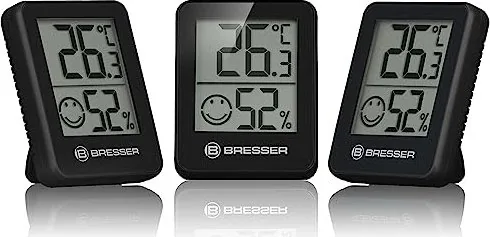
Maintaining the optimal environment inside your home is crucial for overall health and comfort. The Bresser Temeo Hygro Indicator Temperature Station Digital Manual provides essential guidance for users looking to monitor their indoor conditions effectively. This device offers a straightforward solution for tracking temperature and humidity levels in real time, ensuring your space remains healthy for everyone in the household.
Key Features and Functionality
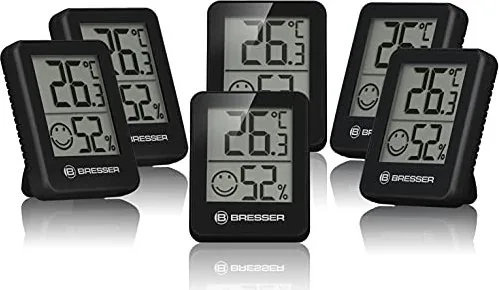
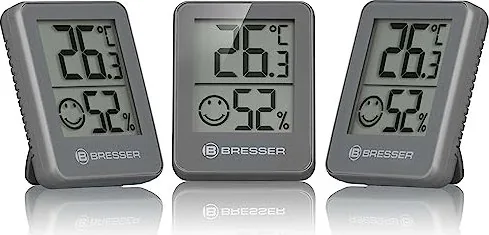
Using a compact and modern design, the unit fits seamlessly into any room setup. It supports both wall-mounting recesses and a convenient table stand, giving you flexibility in how you observe data throughout the day. The digital display clearly presents indoor humidity and temperature readings with high visibility. A standout feature is the comfort level indicator, which uses three specific icons to show if conditions are dry, too moist, or within the ideal range. This visual aid helps you adjust your environment quickly without complex manual analysis or calculations.
Usage and Maintenance
To get started, simply install the recommended CR2032 button cell battery with the correct polarity. Once powered, the station begins displaying the current interior measurement information automatically. Cleaning the exterior is safe with a dry cloth, ensuring no moisture damages the sensitive internal electronics. Always remove the batteries if the device will not be used for an extended period to prevent potential leakage damage.
Safety First Regarding Operation
Safety warnings are prominent for choking hazards, electric shocks, and fire risks associated with batteries. Keep packaging away from children and do not immerse the unit in water as this will cause malfunction. If the device malfunctions, contact your dealer rather than attempting a repair yourself which might void the warranty. The manufacturer offers a robust 5-year warranty starting from the day of purchase, ensuring long-term reliability for your monitoring needs.
Environmental Responsibility
Proper disposal is required for electronic devices at the end of their life. Do not throw the unit in household garbage bins. Follow local regulations for waste electrical and electronic equipment to ensure an environmentally friendly end-of-life process in compliance with EU directives. This device adheres to strict EU directives regarding conformity and safety standards for household appliances.
Measurement Accuracy
The device measures indoor temperature ranges from 0 to 50 degrees Celsius with a tolerance of plus or minus 1.5 degrees. Humidity levels are tracked between 10 to 99 percent with a specific tolerance of plus or minus 5 percent. These specs guarantee reliable data for managing your HVAC systems or ventilation needs.
Comfort Level Indicators Explained
The system displays icons for low humidity with high heat, high humidity with low heat, or ideal conditions. This helps you maintain a balanced home atmosphere. Specific thresholds include humidity below 40 percent with heat above 20 degrees Celsius. Alternatively, high humidity above 70 percent signals discomfort. Ideal conditions sit between 40 percent and 70 percent humidity alongside temperatures between 20 and 27 degrees Celsius.
Search for 67,706 Manuals online


Type-in Brand or Model