
Boya BY-WM3 Manual
PDF manual · 27 Pages
English



Quick check
Incorrect answer, please try again.
Chat with your Boya BY-WM3 manual using AI
Get instant AI answers from your Boya BY-WM3 manual
Ask anything about the Boya BY-WM3. Answers come from this manual, with the pages they are based on.
Ask a Question
Do you recommend BY-WM3?
Yes NoFrequently Asked Questions
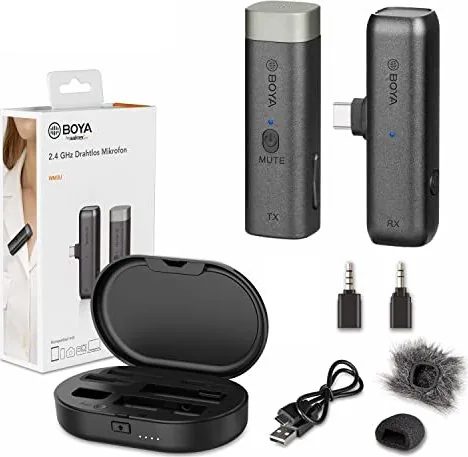
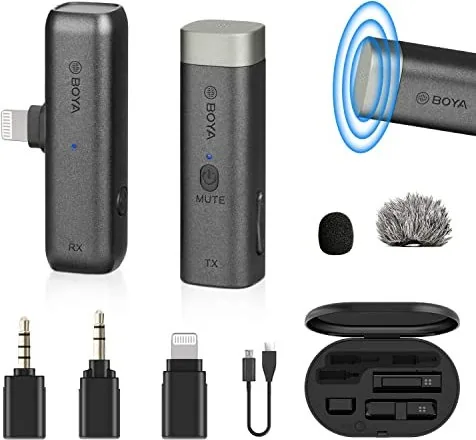
The BY-WM3 is compatible with smartphones, tablets, DSLR cameras, consumer camcorders and PCs. The kit includes TRS, TRRS and either Lightning or Type-C adapters (depending on model) to match your device’s audio input.
Is this answer helpful?
Pairing can be automatic via the charging case (place units in the case, close and reopen the lid), manual by pressing the pair buttons on each unit, or one-touch pairing using the case pair button. When paired successfully the indicators show a solid blue light.
Is this answer helpful?
Typical runtimes are around 4.5 hours for the transmitter (two cycles with the case indicated) and 8 hours for the receiver in some specs; charging times are about 2 hours for the transmitter/receiver and roughly 2 hours to recharge the case. Actual runtimes vary with use and model.
Is this answer helpful?
Do not touch or cover the transmitter’s microphone head while recording, keep the unit away from high-voltage equipment and strong EM sources, use the supplied adapters, and use the foam/fur windscreens outdoors to reduce wind noise.
Is this answer helpful?
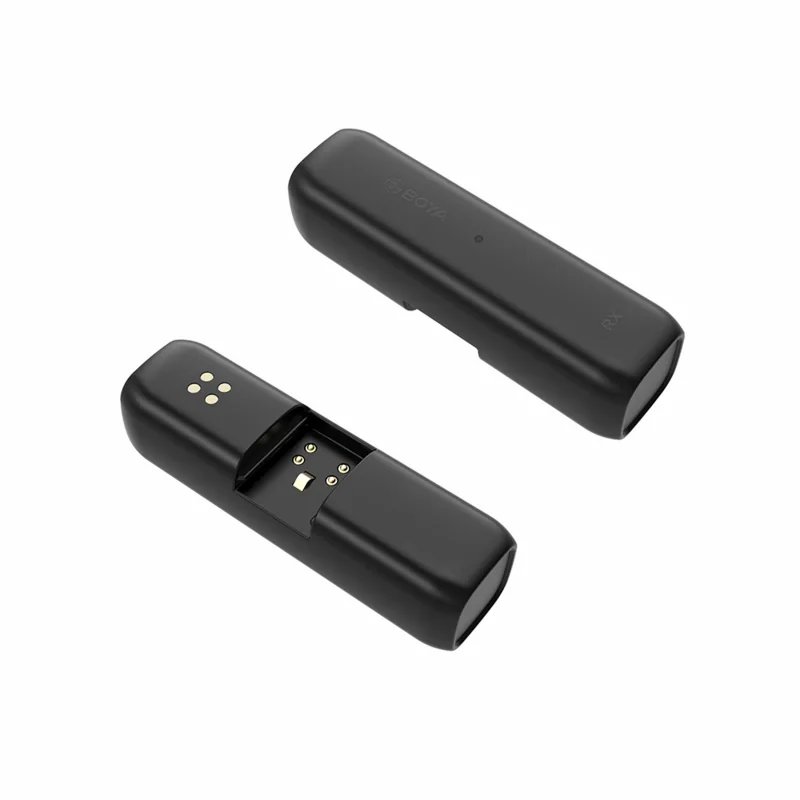
The charging case LEDs show charge and pairing states: white/blue/red LED patterns indicate charging, fully charged, pairing, low battery and error states. Ensure devices are properly seated in the case so charging contacts engage and indicators behave correctly.
Is this answer helpful?
Yes. With its omnidirectional mic, clear frequency response and low distortion, the BY-WM3 is well-suited for vlogs, interviews and run-and-gun content. For critical broadcast-level applications you may prefer higher-end, longer-range systems.
Is this answer helpful?
Use caution: do not expose units to moisture, extreme heat or humidity, and keep them away from children. If the device is damaged or emits burning smells, stop use and seek professional service rather than attempting self-repair.
Is this answer helpful?
Advantages and Disadvantages
Advantages

- Portable charging case that stores and recharges transmitter and receiver for longer field use.
- Multiple adapters (TRS/TRRS/Lightning/Type-C) ensure compatibility with cameras, phones, and tablets.
- Fast one-touch pairing and auto-pair via case get you recording quickly.
- Good audio specs: 20Hz–20kHz response, <0.1% distortion, 48kHz sampling, ≥75 dB SNR.
- Lightweight transmitters and receiver with mute and on-device volume controls for quick adjustments.
Disadvantages

- Operating range (~20 m) can be reduced significantly by obstacles, metal or crowds.
- Small mic capsules are sensitive to handling noise—avoid touching during recording.
- Limited TX/RX battery runtimes per charge compared with some pro systems.
- Reliance on supplied adapters for optimal compatibility; third-party adapters may cause issues.
- Not recommended for use near high-voltage equipment or strong electromagnetic sources.
Product Specification
Type
Lavalier microphone
Design
digital (16bit/48kHz)
Polar pattern
Omnidirectional
Frequency range
20Hz-20kHz (+-3dB)
Signal-to-noise ratio (SNR)
75dB
Power supply
Battery, USB-C
Scope of delivery
1x Transmitter, 1x Receiver, Charging case, Windshield
Special features
Switch, Wireless
Color
black
Dimensions
1.65x0.71x0.61in (Transmitter), 2.13x0.61x0.61in (Receiver)
Weight
0.39oz (Transmitter), 0.35oz (Receiver)
Product Description
Boya BY-WM3 Manual
The Boya BY-WM3 is a compact 2.4 GHz wireless microphone system designed for vloggers, content creators, and video enthusiasts who need simple, reliable audio capture across smartphones, tablets, DSLRs, camcorders and PCs. The kit centers on a clip-on miniature transmitter and a compact receiver, both of which are housed and charged in a portable charging case that uses a USB-C input. Lightweight and pocketable, the system provides fast one-touch pairing, multiple adapter types (TRS, TRRS, Lightning or Type-C depending on variant), and foam and fur windshields for outdoor use.
Key features and how it helps you
Boya built the BY-WM3 for convenience: the charging case stores and recharges the transmitter and receiver, extending on-location runtime and simplifying transport. The transmitters include a built-in omnidirectional microphone, mute function, and +/- volume controls for quick on-camera adjustments. The receiver supports direct connection to cameras or phones using the included adapters. Pairing is straightforward — automatic via the charging case, manual matching, or one-touch pairing — getting you recording in seconds.
Audio performance covers a wide 20 Hz–20 kHz frequency response, low distortion (<0.1%), 48 kHz sampling rate and a signal-to-noise ratio rated at 75 dB or higher, delivering clear dialog for interviews, vlogs, and run-and-gun shoots. Operating range is roughly 20 meters in unobstructed conditions, and the system is tuned for stability in typical shooting environments.
Practical usage notes
To maximize audio quality, avoid covering the transmitter’s microphone head and keep the transmitter away from high-voltage equipment or strong electromagnetic sources. Use the original adapters supplied for best compatibility and sound. The case indicator LEDs show charge and pairing states; refer to the LED patterns for low-battery warnings and pairing confirmation. Charging times are short (around 2 hours for the case and devices) and batteries provide several hours of runtime per charge.
Who should consider the BY-WM3?
If you need an affordable, easy-to-use wireless lavalier-style setup for social video, interviews, livestreams, or run-and-gun production that works across phones and cameras, the BY-WM3 delivers a balance of portability, audio quality, and straightforward workflow.
Notes
- Comes with TRS, TRRS and Lightning/Type-C adapters (model-dependent) plus foam and fur windscreens.
- Keep devices fully seated in the charging case to ensure charging and correct indicator behavior.
- Avoid wet or hot/humid storage conditions and keep out of reach of children.
Search for 67,732 Manuals online


Type-in Brand or Model