
Bosch DIY EasyDrill 1200 Manual
PDF manual · 215 Pages
English



Quick check
Incorrect answer, please try again.
Chat with your Bosch DIY EasyDrill 1200 manual using AI
Get instant AI answers from your Bosch DIY EasyDrill 1200 manual
Ask anything about the Bosch DIY EasyDrill 1200. Answers come from this manual, with the pages they are based on.
EasyDrill 1200 Maintenance Schedule
Run the tool at maximum speed without load for about 3 minutes to cool it down after working at low speeds for an extended period.
Check that moving parts function properly without binding and that no parts are broken or damaged before use.
Keep the power tool and ventilation slots clean to ensure safe and efficient operation.
Ask a Question
Do you recommend EasyDrill 1200?
Yes NoFrequently Asked Questions
This cordless drill is designed for drilling into wood, metal, ceramic, and plastic. It is not equipped for impact drilling in masonry like brick or stone.
Is this answer helpful?
Locate the rotational direction switch on the top of the handle. Slide it fully to the left for clockwise rotation (driving screws) or fully to the right for counter-clockwise rotation (loosening screws).
Is this answer helpful?
Yes, by selecting the appropriate torque setting on the presetting ring. For larger screws in hard materials, pre-drilling a pilot hole is recommended to prevent splitting.
Is this answer helpful?
The product typically ships with a partially charged lithium-ion battery. It is recommended to charge it fully before the first use to ensure maximum performance.
Is this answer helpful?
The gear selector allows you to choose between two speed ranges. Gear I is for low speed and high torque, ideal for screwdriving. Gear II is for high speed, suitable for drilling small holes.
Is this answer helpful?
Bosch batteries generally come with a specific warranty period. Please check the packaging or official website for the exact duration applicable to your region.
Is this answer helpful?
Advantages and Disadvantages
Advantages

- Lightweight and ergonomic design for comfortable handling
- Two-speed gearbox offers versatility for drilling and screwdriving
- Integrated LED light improves visibility in dark spaces
- Keyless chuck enables fast and easy bit changes
- Electronic Cell Protection prevents deep discharge of the battery
Disadvantages

- Not suitable for heavy-duty masonry drilling without impact function
- Battery capacity may be insufficient for very long continuous jobs
- Torque limit might be lower than professional-grade models
Product Specification
Type
Screwdriver
Product Description
Discover the Power of the Bosch DIY EasyDrill 1200
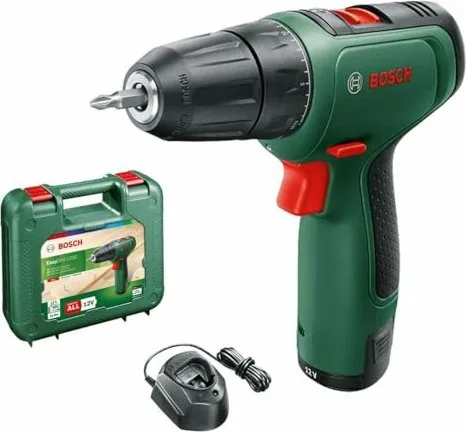
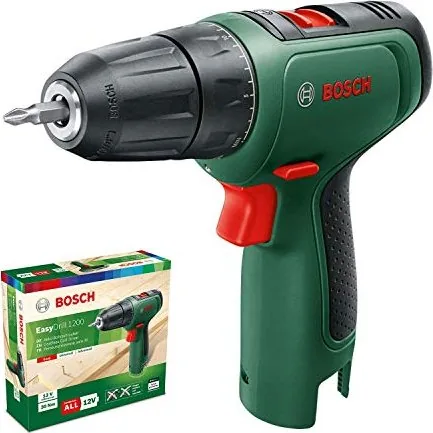
The Bosch DIY EasyDrill 1200 Cordless Drill Driver stands as a testament to precision engineering designed specifically for home improvement enthusiasts. This versatile tool combines reliability with ease of use, making it an essential addition to any DIY toolkit. Whether you are assembling furniture, hanging shelves, or tackling minor repairs around the house, this drill driver delivers consistent performance without the hassle of cords.
At the heart of its operation is a robust 12-volt lithium-ion battery system. This power source ensures that the tool remains lightweight yet powerful enough to handle a variety of tasks. The ergonomic design features an insulated grip that enhances user safety and comfort during extended periods of work. A standout feature is the integrated PowerLight, which illuminates the work area in dimly lit corners, ensuring accuracy even in challenging environments.
The EasyDrill 1200 offers two-speed settings, allowing users to switch between low torque for screwdriving applications and high speed for drilling into wood, metal, ceramic, and plastic. The adjustable torque ring provides 20 different settings, giving you precise control over how tightly a screw is driven, preventing damage to materials or stripped heads. Additionally, the keyless chuck allows for quick and tool-free bit changes, streamlining your workflow significantly.
Safety is paramount in the design of this device. It includes a temperature-dependent overload protection system that automatically reduces speed if the motor becomes too hot, protecting both the tool and the user. The automatic spindle lock holds the chuck stationary when the trigger is released, making bit changes safer and easier. With these thoughtful features, the Bosch DIY EasyDrill 1200 Manual guides users through safe and efficient operation every time.
Important Notes
- Always remove the battery before changing accessories.
- Wear appropriate eye protection when drilling.
- Ensure the workpiece is securely clamped before starting.
- Use only recommended chargers for optimal battery life.
Pros
- Lightweight and ergonomic design for comfortable handling.
- Two-speed gearbox offers versatility for drilling and screwdriving.
- Integrated LED light improves visibility in dark spaces.
- Keyless chuck enables fast and easy bit changes.
- Electronic Cell Protection prevents deep discharge of the battery.
Cons
- Not suitable for heavy-duty masonry drilling without impact function.
- Battery capacity may be insufficient for very long continuous jobs.
- Torque limit might be lower than professional-grade models.
Search for 67,706 Manuals online


Type-in Brand or Model