
Bluetti EB240 Manual
PDF manual · 23 Pages
English



Quick check
Incorrect answer, please try again.
Chat with your Bluetti EB240 manual using AI
Get instant AI answers from your Bluetti EB240 manual
Ask anything about the Bluetti EB240. Answers come from this manual, with the pages they are based on.
EB240 Maintenance Schedule
If not used for a long time, charge fully before storage and then charge at least once every month.
Please fully charge the product before storage and charge it at least once every 3 months.
Free maintenance reminders
Timed to your purchase date. Always free, unsubscribe anytime.
Ask a Question
Do you recommend EB240?
Yes NoFrequently Asked Questions
The battery icon indicates the battery level. The level is displayed in 5 segments. When the battery is being charged, the icon flashes. When fully charged, the icon stops flashing and all 5 segments are filled.
Is this answer helpful?
Yes, you need to check the power at each output port. For example, the AC output port provides up to 1000W continuous power through the built-in inverter, suitable for devices requiring no more than 1000W.
Is this answer helpful?
Cold weather can influence battery capacity. In sub-zero temperatures, you may discharge the product but you should not charge it. If charged below 0 C, the battery could be damaged. The system shuts off charging until temperature rises above 10 C.
Is this answer helpful?
The cooling fan starts automatically when the inverter load exceeds 400W, the 12V socket load exceeds 80W, or charging power exceeds 100W. The system adjusts power to keep the outer case at a touchable temperature.
Is this answer helpful?
If the product malfunctions, error codes appear on the screen. For over-voltage or under-voltage protection, charge the product or check connections. For overheating, wait for it to cool down and restart the machine manually.
Is this answer helpful?
The company provides a warranty of 12 months from the date of purchase. Contact customer service for any inquiries or comments concerning the product with the serial number and model information.
Is this answer helpful?
Advantages and Disadvantages
Advantages

- Massive 2400Wh battery storage capacity ensures extended power availability for essential devices.
- Continuous 1000W output power supports a wide range of household appliances and electronics.
- Intelligent cooling system activates automatically to maintain safe operating temperatures.
- High MPPT charging efficiency of up to 99.5% allows for faster solar energy replenishment.
Disadvantages

- Weight is approximately 22kg which may be heavy for some portability needs.
- Charging is prevented below 0 C to protect the battery from cold damage.
- Specific error codes indicate system faults requiring manual restart or cable disconnection.
- AC output shuts down if total load exceeds the rated capacity for extended periods.
Product Specification
Type
Solar Generator
Battery
Li-Ion, 1800Wh
Battery Cycles
>2500 cycles to 80% capacity
AC Outlets
2x Schuko Outlets (Type-F)
AC Output Power
1000W
DC Output
1x Cigarette Lighter Socket (12V/9A/108W)
USB Output
4x USB-A (15W), 1x USB-C (PD, 45W)
Charging Methods
AC Adapter (200W), Solar (500W)
Charging Inputs
1
Solar Charging Inputs
1
Power Adapter Quantity
1x 200W
Charging Time (Adapter)
9h
Charging Time (Solar)
8-9h (240W Panel)
Weight
37.48 lbs
Dimensions
15.47x6.50x14.33in
Features
Carrying Handles
Manufacturer Warranty
2 Years
Note
Prices may include 0% VAT rates for AT and DE
Product Description
Powering Your Adventures with the Bluetti EB240 Solargenerator
Taking control of your energy needs during outdoor activities or emergencies is easier than ever with this powerful station. The Bluetti EB240 Solargenerator offers a robust off-grid solution designed for reliability and high capacity. With a massive 2400Wh battery storage, this unit ensures you keep your essential devices running for extended periods. Whether you are camping in the wilderness or preparing for a power outage at home, understanding the specific features and operation guidelines is crucial for optimal performance.
Key Features and Specifications
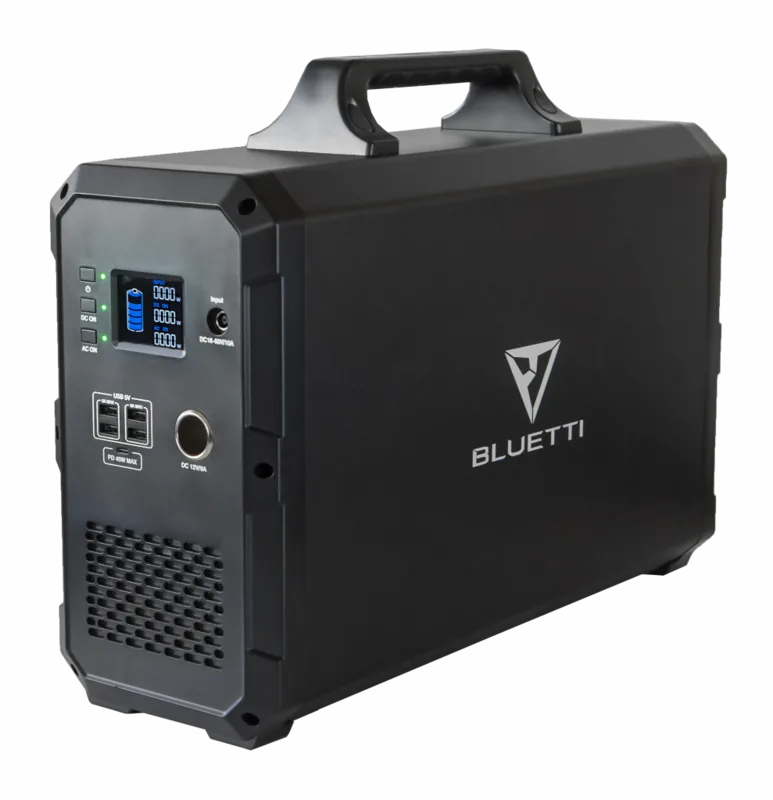
This portable power station boasts a continuous output power of 1000W, making it suitable for driving various household appliances alongside smaller electronics. The DC and AC outputs provide immense versatility with multiple ports including Type-C Power Delivery, standard 5V USB, and AC100-120V outlets. The clear LCD display keeps you informed about charging power, DC and AC on-off status, battery percentage, and output power. Safety is prioritized heavily with intelligent cooling systems that start working automatically when loads exceed 400W or charging power hits 100W, ensuring the unit maintains a touchable temperature during operation.
Usage and Maintenance
Proper care extends the lifespan of the battery and internal components. Storing the unit in a dry, well-ventilated area away from direct sunlight and heat sources like electric furnaces is highly recommended. Users should note that charging below 0 C could damage the battery due to low-temperature protection mechanisms within the system. Regular maintenance involves fully charging the unit before long-term storage and recharging it at least once every three months to preserve battery health. If the device turns off unexpectedly, checking error codes on the screen can diagnose common issues ranging from over-voltage protection to heat sink overheating.
Notes for Optimizing Performance
Ensure that input and output ports remain unblocked to allow proper airflow within the ventilation zones. The solar charging function requires specific voltage ranges between 16V and 60V to activate efficiently, so using compatible panels maximizes the potential of the 500W PV input rating. MPPT charging efficiency reaches up to 99.5%, providing fast energy replenishment. Always adhere to safety warnings regarding fire safety and electrical connections to prevent accidents, especially avoiding water extinguishers during electrical fires.
Search for 67,732 Manuals online


Type-in Brand or Model