
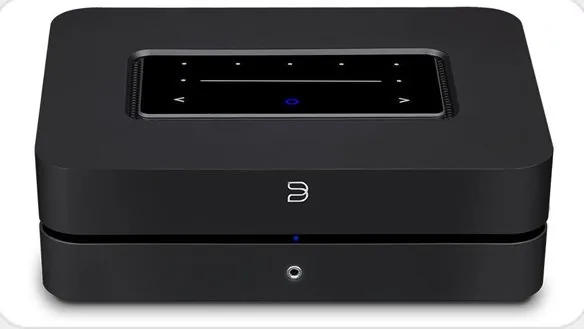
Bluesound Powernode (2021) Manual
PDF manual · 2 Pages
English



Quick check
Incorrect answer, please try again.
Chat with your Bluesound Powernode (2021) manual using AI
Get instant AI answers from your Bluesound Powernode (2021) manual
Ask anything about the Bluesound Powernode (2021). Answers come from this manual, with the pages they are based on.
Ask a Question
Do you recommend Powernode (2021)?
Yes NoFrequently Asked Questions
You can connect the Powernode wirelessly via Wi-Fi or using the included Ethernet cable. Download the BluOS app on your phone or tablet, follow the Add A Player wizard, and select your network credentials to complete the setup.
Is this answer helpful?
The Powernode supports multiple inputs including HDMI eARC for TVs, Optical inputs for digital sources, Analog inputs for turntables or CD players, and a USB Type A port for flash drives containing music files.
Is this answer helpful?
Yes, once connected to your network, the Powernode can be grouped with other Bluesound Players to create a synchronized multi-room listening experience throughout your home.
Is this answer helpful?
No, the Powernode does not include a built-in phono stage. If you wish to connect a turntable, you must use an external phono preamp before connecting to the Analog input.
Is this answer helpful?
Visit bluesound.com/downloads to find the latest version of the BluOS app for iOS and Android devices. The app is required to set up the device and manage your streaming preferences.
Is this answer helpful?
Advantages and Disadvantages
Advantages

- Supports high-resolution audio streaming for superior sound quality
- Enables easy multi-room audio grouping with other Bluesound players
- Includes versatile connectivity options like HDMI eARC and Optical inputs
- Simple setup process guided by the user-friendly BluOS mobile app
Disadvantages

- Requires a stable network connection for full streaming features
- No built-in phono stage for direct turntable connection without external preamp
- Limited to two-channel stereo configuration despite advanced networking
Product Specification
Type
Streaming Amplifier
Power
2x 80W (8Ω)
D/A Converter
24bit/384kHz
Tuner
Internet Radio
Audio Formats
AAC, AIFF, ALAC, FLAC, MP3, MQA, OGG/Vorbis, WAV, WMA
Streaming Clients
Amazon Music, Apple AirPlay 2, Deezer, Qobuz, Roon, Spotify, Tidal
Audio Connections
Digital Audio In (optical 3.5mm), AUX In (3.5mm jack), eARC, Sub Out (RCA), Headphones (3.5mm jack)
Other Connections
USB-A, 1x HDMI In, RJ-45
Wireless
Bluetooth 5.0, aptX, aptX HD, Wi-Fi 5 (WLAN 802.11a/b/g/n/ac)
Features
Speaker Outputs
Dimensions
8.66x2.76x7.48 in (WxHxD)
Weight
3.92 lbs
Product Description
Experience HiFi for a Wireless Generation with Bluesound Powernode
The Bluesound Powernode (2021) represents a significant leap in home audio, designed to bring high-resolution music streaming directly into your living room. This network music streaming amplifier is more than just an amp; it is the heart of a versatile two-channel system that can seamlessly integrate with other Bluesound players for multi-room listening. Whether you are connecting a turntable, TV, or digital source, the Powernode ensures that every note is delivered with clarity and depth.
Setting up your system is straightforward and intuitive. The device features a sleek interface with clearly marked inputs including HDMI eARC, Optical, and Analog connections. You can easily hook up speakers to the main output and utilize the subwoofer out for added bass response. The included accessories, such as the Toslink adaptor and power cords, ensure compatibility with various regional standards and audio sources. Once powered on, the LED indicator will guide you through the hotspot mode, making it simple to connect via the BluOS app on your smartphone or tablet.
The BluOS app acts as the command center for your entire audio ecosystem. It guides you through the initial network setup, allowing you to add the Powernode to your Wi-Fi or wired Ethernet network effortlessly. With this connection established, you unlock the full potential of hi-res audio streaming from popular services. The unit supports grouping with other compatible players, enabling synchronized playback throughout your home. For those who prefer physical media or older equipment, the analog and optical inputs provide robust connectivity options. The headphone jack offers a private listening experience when needed, while the USB port allows for direct playback from flash drives.
The Powernode embodies the philosophy of HiFi for a wireless generation, combining powerful amplification with modern streaming capabilities. Its design prioritizes ease of use without compromising on sound quality. By connecting your loudspeakers to this amplifier, you create a premium stereo system that adapts to your lifestyle. Whether you are hosting a party or enjoying a quiet evening alone, the Powernode delivers an immersive auditory experience that respects the original recording.
Important Notes
- Ensure your phone or tablet is nearby during the initial setup process.
- Use the supplied Toslink adaptor for optical audio sources like TVs or turntables.
- The device requires a stable network connection for full streaming functionality.
- Visit the official support site for detailed troubleshooting tips and manual updates.
Search for 67,706 Manuals online


Type-in Brand or Model