
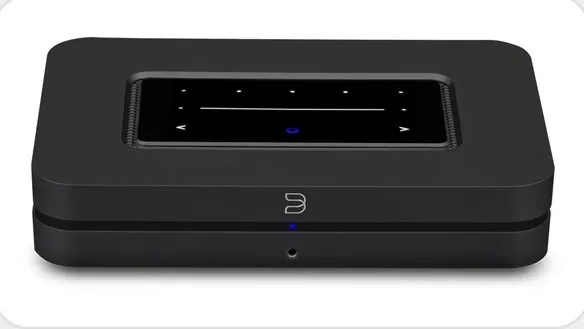
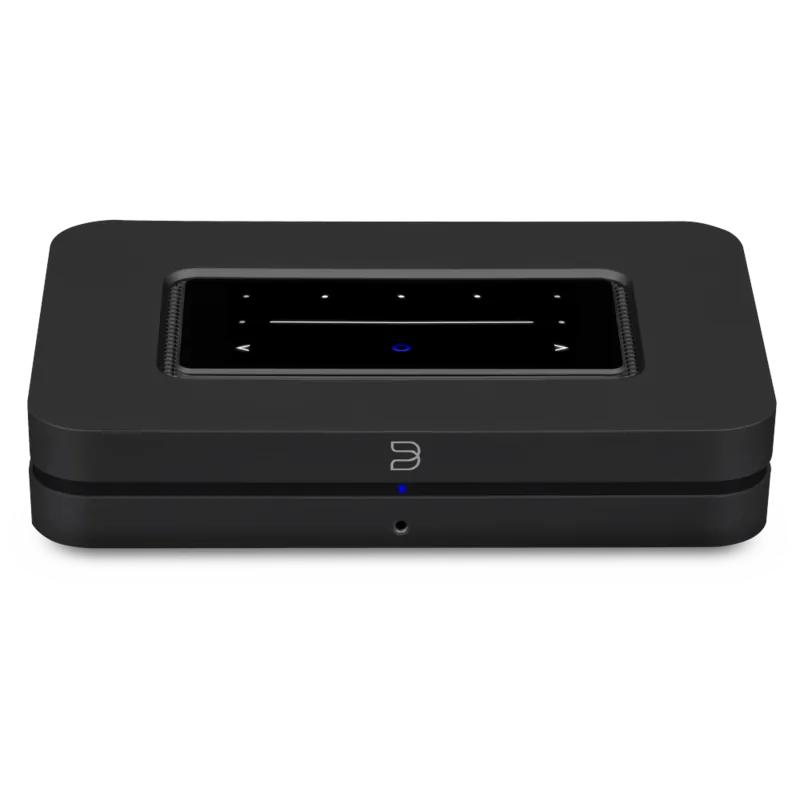
Bluesound Node (2021) Manual
PDF manual · 2 Pages
English



Quick check
Incorrect answer, please try again.
Chat with your Bluesound Node (2021) manual using AI
Get instant AI answers from your Bluesound Node (2021) manual
Ask anything about the Bluesound Node (2021). Answers come from this manual, with the pages they are based on.
Ask a Question
Do you recommend Node (2021)?
Yes NoFrequently Asked Questions
The Node (2021) provides analog RCA, optical in/out, coaxial out, USB-A, HDMI eARC, subwoofer output, headphone jack, trigger, IR in, and Ethernet for network connection, allowing flexible integration with many systems.
Is this answer helpful?
Use the analog RCA output to utilize the Node’s internal DAC. If you prefer an external DAC, connect via optical or coaxial digital outputs, which bypass the internal DAC and allow your external converter to perform digital‑to‑analog conversion.
Is this answer helpful?
Download the BluOS app on your phone or tablet, power on the Node and follow the Add A Player wizard in the app. The wizard guides you through hotspot mode, joining your Wi‑Fi or using a wired Ethernet connection for reliable streaming.
Is this answer helpful?
Yes. The Node integrates with other Bluesound players via BluOS to create multi‑room listening zones. Use the BluOS app to group players, synchronize playback, and manage zones across your home network.
Is this answer helpful?
Yes. The Node is designed for hi‑resolution streaming and supports high‑quality audio formats through BluOS, delivering detailed playback suitable for audiophiles and everyday listeners.
Is this answer helpful?
Included accessories typically cover power cords (region dependent), an Ethernet cable, and adapters like mini‑jack to Toslink where applicable. Check the package contents for region‑specific inclusions.
Is this answer helpful?
For troubleshooting, firmware updates, and the latest guidance, visit Bluesound’s support site or contact their regional support channels listed in product materials.
Is this answer helpful?
Advantages and Disadvantages
Advantages

- High‑resolution streaming and accurate audio reproduction for critical listening.
- Flexible I/O: analog RCA, optical, coaxial, USB, HDMI eARC, subwoofer out, trigger and IR.
- BluOS app offers guided setup and robust multi‑room grouping with other Bluesound players.
- Choice to use internal DAC or bypass with digital outputs for external conversion.
- Compact design integrates easily with existing amplifiers or active speakers.
Disadvantages

- Some users may prefer a dedicated external DAC for ultimate sound quality.
- Advanced features require familiarity with BluOS app and network configuration.
- No built‑in speaker amplification — requires separate amp or active speakers.
- Dependence on app and network for full functionality could be limiting offline.
- Fewer front‑panel controls compared with full‑size integrated streamers or receivers.
Product Specification
Type
Streaming Player
D/A Converter
32bit/384kHz
Tuner
Internet Radio
Audio Formats
AAC, AIFF, ALAC, FLAC, MP3, MQA, OGG/Vorbis, WAV, WMA
Streaming Clients
Amazon Music, Apple AirPlay 2, Deezer, Qobuz, Roon, Spotify, Tidal
Audio Connections
Digital Audio In (optical 0.14in), AUX In (0.14in Jack), eARC, Digital Audio Out (coaxial), Digital Audio Out (optical), Stereo Line Out (RCA), Sub Out (RCA), Headphones (0.14in Jack)
Other Connections
USB-A, 1x HDMI In, RJ-45
Wireless
Bluetooth 5.0, aptX, aptX HD, Wi-Fi 5 (WLAN 802.11a/b/g/n/ac)
Dimensions
8.66x1.81x5.75in (WxHxD)
Weight
2.40lb
Product Description
Bluesound Node (2021) — Streamlined Hi‑Res Listening
Bluesound Node (2021) is a compact, high‑resolution network music player designed to bring powerful, modern streaming to any amplifier or active speakers. Built for audiophiles and everyday listeners alike, it blends versatile connectivity, refined digital audio performance, and seamless multi‑room capability through the BluOS ecosystem.
Key features and experience
Position the Node, connect power and your preferred audio outputs (analog RCA, optical, or coaxial), and set it up via the BluOS app on your phone or tablet. The Node’s analog RCA output uses its internal DAC for conversion, while optical or coaxial digital outputs bypass the internal DAC to use an external converter. The front panel provides basic playback controls, preset buttons, and a clear status LED, while the rear panel offers headphone out, subwoofer output, analog and digital I/O, USB, Ethernet, HDMI eARC, trigger and IR connections for flexible system integration.
Bluesound emphasizes hi‑resolution audio and multi‑room grouping: use the Node standalone with an existing amplifier or pair multiple Bluesound players to create synchronized whole‑home audio. Setup is guided by the BluOS app’s Add A Player wizard, and additional resources and troubleshooting are available through Bluesound’s support channels.
Performance and versatility
The Node (2021) delivers clean, detailed streaming from local network sources and popular streaming services supported by BluOS. Its network connectivity supports wired Ethernet or Wi‑Fi, ensuring reliable playback. Audiophile features include support for high‑resolution formats, option to use internal DAC or external converters, and integration with home theater setups via HDMI eARC.
Practical considerations
Placement and cabling are straightforward: connect analog or digital outputs based on whether you prefer the Node’s internal DAC or an external DAC. The device includes essential accessories such as power cords, Ethernet cable, and adapters. For most users, the BluOS app simplifies configuration; advanced users will appreciate the Node’s flexible I/O, trigger support, and multi‑room capabilities.
Notes
- Use analog RCA for the Node’s internal DAC; use optical or coaxial to bypass it.
- Download the BluOS app to complete network setup and player management.
- Visit Bluesound support for firmware updates, troubleshooting, and the latest guidance.
Search for 67,706 Manuals online


Type-in Brand or Model