

BlueParrott S450-XT Manual
PDF manual · 16 Pages
English



Quick check
Incorrect answer, please try again.
Chat with your BlueParrott S450-XT manual using AI
Get instant AI answers from your BlueParrott S450-XT manual
Ask anything about the BlueParrott S450-XT. Answers come from this manual, with the pages they are based on.
Ask a Question
Do you recommend S450-XT?
Yes NoFrequently Asked Questions
A fully charged S450-XT provides up to 24 hours of wireless talk or media time. Charging a fully depleted battery takes about four hours. The LED is red while charging and turns solid blue when charging is complete.
Is this answer helpful?
Yes. The headset can store up to eight paired devices and can use multipoint mode to remain connected to two Bluetooth devices at the same time. This allows calls from either connected phone to be handled through the headset.
Is this answer helpful?
Turn on the headset, then hold the multifunction button for about six seconds until the headset announces discovery mode and the LED flashes red and blue. Select BlueParrott S450-XT in the phone Bluetooth menu. The passcode is 0000 if requested.
Is this answer helpful?
Yes. Connect the headset to a computer using the supplied Micro-USB cable to use it as a USB headset. It also charges during use. Bluetooth is disabled while the USB connection is active.
Is this answer helpful?
No. The 3.5 mm cable is intended for passive media listening, including when the battery is empty. When this cable is connected, the microphone is disabled and the headset cannot be used for calls.
Is this answer helpful?
The Parrott button is configured as a mute control by default. It can be reassigned through BlueParrott software or the mobile app for actions such as speed dial or launching a smartphone application.
Is this answer helpful?
Advantages and Disadvantages
Advantages

- Up to 24 hours of wireless talk or media time after a full charge.
- Supports Bluetooth, NFC pairing, USB headset use, and 3.5 mm passive audio playback.
- Multipoint mode can keep two Bluetooth devices connected simultaneously.
- Customizable Parrott button can support mute, speed dial, or app launching.
- Dedicated music, volume, call, and mute controls reduce phone handling.
Disadvantages

- A full battery charge can take approximately four hours.
- The 3.5 mm connection supports media only; the headset microphone is disabled.
- Bluetooth is disabled while the headset is connected as a USB headset.
- Connecting a charger during a Bluetooth call resets the headset and transfers the call to the phone.
Product Specification
Type
Headphones (Over-Ear)
Form Factor
Headband
Design
Closed
Microphone
Boom microphone
Connection
0.14-inch jack
Wireless
Bluetooth 4.0, aptX, NFC, Multipoint
Cable
Single-sided, detachable
Controls
Voice control, 3-button remote control
Battery Life
24 h (talk time), 500 h (standby)
Battery
USB Micro-B charging port, 3.5 h charging time
Frequency Range
20 Hz-20 kHz (headphones), 150 Hz-6.80 kHz (microphone)
Impedance
32 ohms
Sensitivity
123 dB
Driver
1.57 in
Device Features
Water-resistant (IP54)
Software Features
Voice assistant (Apple Siri, Google Assistant)
Color
Black
Weight
5.22 oz
Product Description
BlueParrott S450-XT Manual: A Versatile Headset for Work and Media
The BlueParrott S450-XT is a wireless stereo headset designed for people who need dependable calls, music playback, and flexible connectivity in one over-ear design. This BlueParrott S450-XT Manual overview highlights the controls and practical features that make the headset suitable for mobile work, travel, home offices, and everyday listening.
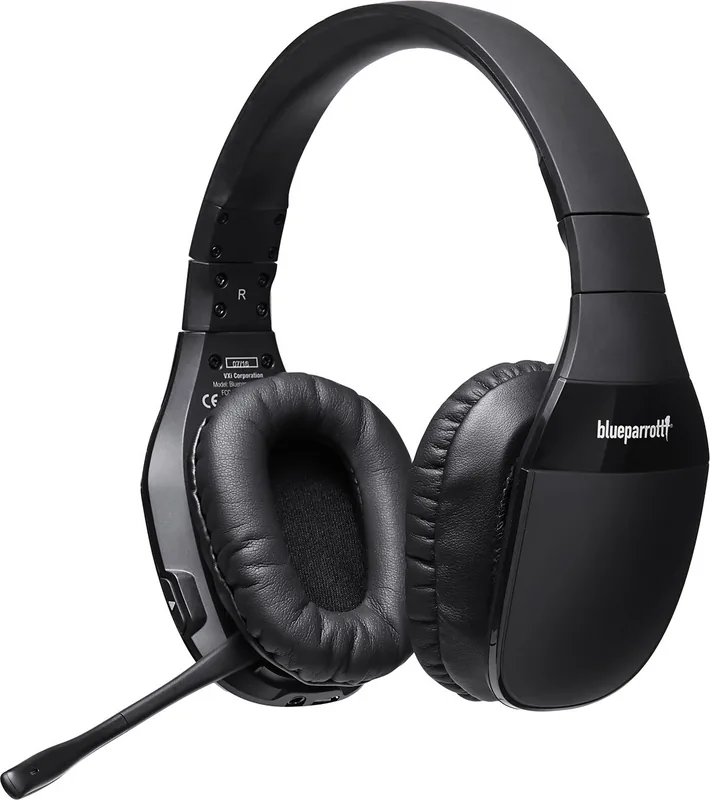
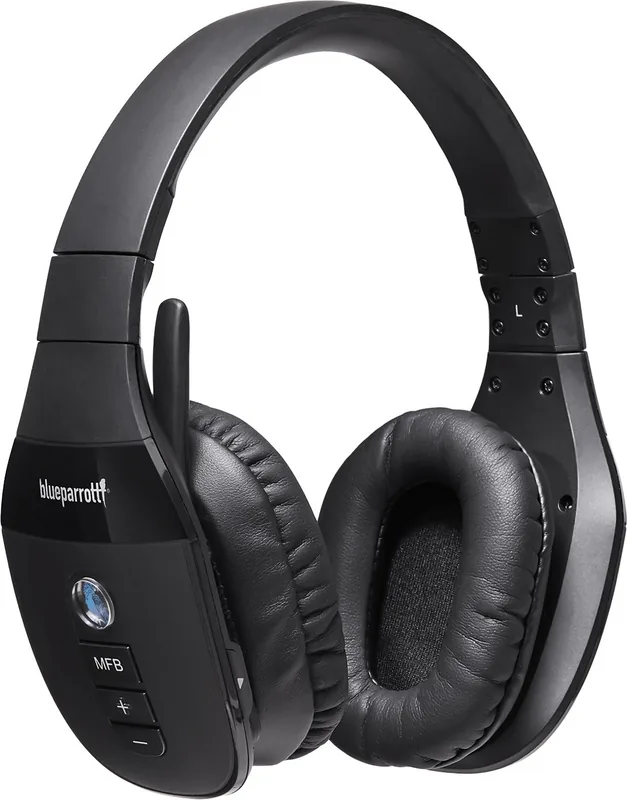
Its adjustable headband and earcups help create a comfortable fit, while the boom microphone can be lowered and positioned near the corner of the mouth for clear voice pickup. The headset includes dedicated volume, track skip, multifunction, and Parrott buttons, making common tasks easy to manage without constantly reaching for a phone.
Wireless and Wired Connection Options
Bluetooth pairing can be completed through NFC on compatible phones or through standard Bluetooth discovery. The headset stores up to eight paired devices and supports multipoint operation with two Bluetooth devices connected at once. This can be useful for users who switch between a personal phone and a work phone during the day.
The S450-XT also offers a 3.5 mm audio connection for passive listening when the battery is depleted. In this mode, media playback remains available, although the microphone is disabled. A Micro-USB connection lets the headset work as a USB headset with a computer while it charges. Bluetooth is disabled during active USB use, so users should select the connection method that fits their task.
Calls, Music, and Custom Controls
For Bluetooth calls, the multifunction button answers, ends, or rejects calls, while voice controls can activate compatible phone assistants such as Siri or Google voice services. Redial, call waiting controls, and mute functions add convenience for busy callers. The Parrott button is set to mute by default, but it can be customized for functions such as speed dial or launching an app through BlueParrott software.
Music controls include play and pause through a quick double press of the multifunction button, plus dedicated previous and next track buttons. LED and audio prompts communicate pairing, connection, mute, and battery status. A low-battery notification repeats at intervals to help avoid unexpected interruptions.
Battery and Care Notes
A full charge takes about four hours and provides up to 24 hours of wireless talk or media time. The charging LED shows red while charging and blue when fully charged. For safe operation, use a comfortable volume level, avoid exposing the headset to temperatures above 60 C, and keep the product away from water.
Note: Connecting the headset to a charger during an active Bluetooth call resets the headset and returns the call to the phone. Charge before important calls whenever possible.
Search for 67,706 Manuals online


Type-in Brand or Model