
BlueParrott M300-XT Manual
PDF manual · 19 Pages
English



Quick check
Incorrect answer, please try again.
Chat with your BlueParrott M300-XT manual using AI
Get instant AI answers from your BlueParrott M300-XT manual
Ask anything about the BlueParrott M300-XT. Answers come from this manual, with the pages they are based on.
M300-XT Maintenance Schedule
Do not store the headset for a longer period (maximum three months) without charging it to maintain battery health.
Use only normal dish soap and water on a damp cloth. Wipe gently, rinse with water-only cloth, and let dry completely.
Free maintenance reminders
Timed to your purchase date. Always free, unsubscribe anytime.
Ask a Question
Do you recommend M300-XT?
Yes NoFrequently Asked Questions
Ensure the headset is powered off. Press and hold the Multi-function button for about 6 seconds until you hear Pair mode and see flashing red and blue lights. Then, go to your phone's Bluetooth menu and select M300-XT from the list.
Is this answer helpful?
Yes, the M300-XT supports Multipoint mode. You can pair it with two smartphones and monitor both. If you are on a call and receive another, you will hear a notification and can manage the incoming call directly.
Is this answer helpful?
By default, the BlueParrott button mutes the microphone. However, you can customize it using the BlueParrott app to perform actions like speed dial, push-to-talk, checking battery levels, or accessing a second paired device.
Is this answer helpful?
The headset provides up to 14 hours of talk time. It takes approximately 150 minutes to fully charge the battery using the supplied USB-C cable. The LED indicator turns blue when fully charged and red while charging.
Is this answer helpful?
Apply normal dish soap and water to a cloth, wringing out excess liquid. Gently wipe the headset to remove dirt, then wipe again with a water-dampened cloth. Let it rest for a minute and allow it to dry completely before use.
Is this answer helpful?
Yes, the headset is ambidextrous. To switch ears, rotate the microphone horizontally to the other side, swivel it up and over, and point it towards your mouth for optimal positioning.
Is this answer helpful?
Advantages and Disadvantages
Advantages

- Blocks 80% of background noise for crystal-clear calls
- Up to 14 hours of talk time on a single charge
- Customizable BlueParrott button for mute, speed dial, or push-to-talk
- Multipoint mode connects to two smartphones simultaneously
- USB-C charging port for modern convenience
Disadvantages

- Full charge time is relatively long at 150 minutes
- NFC pairing is not supported by all smartphones
- Requires the BlueParrott app for full customization
- No active noise cancellation, only passive noise blocking
- Resetting clears all paired devices requiring re-pairing
Product Specification
Type
Earphones (In-Ear)
Form
Headband, monaural
Principle
closed
Microphone
Boom microphone
Wireless
Bluetooth 5.1, NFC, Multipoint
Control
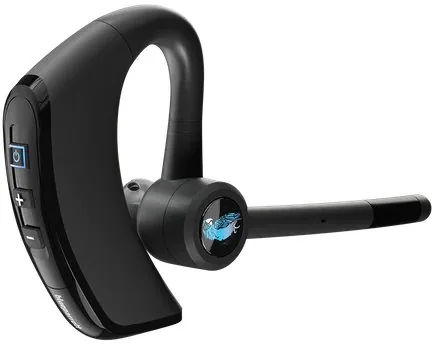
3-button remote
Battery life
14h (calls), 420h (standby)
Battery
USB-C charging port, 2.5h charge time
Frequency range
20Hz-20kHz
Impedance
32 ohms
Drivers
10.3mm
Device features
water-resistant (IP54)
Color
black
Weight
0.71 oz
Product Description
BlueParrott M300-XT: The Ultimate Headset for Professionals
The BlueParrott M300-XT is designed specifically for professionals who need reliable communication in noisy environments. This headset stands out with its ability to block up to 80% of background noise, ensuring that your voice comes through crystal clear even in the busiest settings. With a robust build and advanced features, it is an ideal companion for drivers, warehouse workers, and customer service agents.
One of the most notable features is the customizable BlueParrott button. You can program this button to perform specific tasks such as muting the microphone, initiating speed dial, or activating push-to-talk functionality. This level of customization allows users to tailor the device to their specific workflow needs without fumbling with multiple controls.
Connectivity is seamless with Bluetooth technology that supports multipoint mode. This means you can connect to two smartphones simultaneously and switch between them effortlessly. Whether you are managing personal calls or business lines, the M300-XT keeps you connected without missing a beat. The range extends up to 300 feet, allowing you to roam freely while staying linked to your devices.
Battery life is another critical aspect where this headset excels. It offers up to 14 hours of talk time on a single charge, ensuring that your conversations remain uninterrupted throughout long shifts. Charging is convenient via USB-C, and the LED indicator provides clear status updates during the charging process. A full charge takes approximately 150 minutes, which is efficient for overnight charging routines.
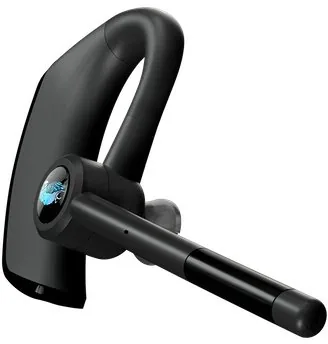
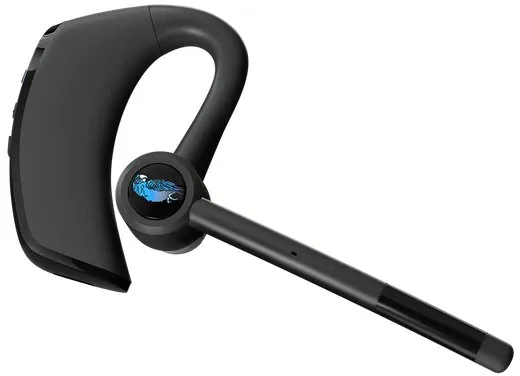
Comfort is paramount, and the M300-XT delivers with interchangeable EarGels in small, medium, and large sizes. Users can select the perfect fit to ensure the headset stays secure without causing discomfort over extended periods. The microphone swivels easily, allowing you to position it optimally regardless of whether you wear it on your left or right ear.
Key Features Summary
The device includes a USB cable and multiple EarGel sizes. It features dual microphones for superior noise cancellation and supports NFC pairing for quick connection to compatible smartphones. The BlueParrott app enhances functionality by allowing further customization of buttons and access to support resources.
Important Notes
Always avoid storing the headset in extreme temperatures to preserve battery health. If the device gets wet, allow it to dry thoroughly before powering it on. Regular cleaning with mild soap and water will keep the headset hygienic and functional.
Search for 67,706 Manuals online


Type-in Brand or Model