
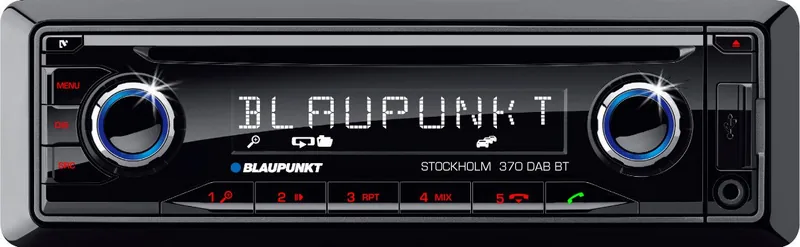
Blaupunkt Stockholm 370 DAB BT Manual
PDF manual · 248 Pages
English



Quick check
Incorrect answer, please try again.
Chat with your Blaupunkt Stockholm 370 DAB BT manual using AI
Get instant AI answers from your Blaupunkt Stockholm 370 DAB BT manual
Ask anything about the Blaupunkt Stockholm 370 DAB BT. Answers come from this manual, with the pages they are based on.
Stockholm 370 DAB BT Maintenance Schedule
Use only a dry or slightly moistened cloth. Do not use solvents, cleaning agents, scouring products, dashboard sprays, or plastic care products.
If necessary, clean the contacts of the control panel regularly using a soft cloth moistened with cleaning alcohol.
Ask a Question
Do you recommend Stockholm 370 DAB BT?
Yes NoFrequently Asked Questions
Yes. It supports Bluetooth hands-free calling, including call answer, reject, speed dial, phone book access, and voice dialing when the phone allows it.
Is this answer helpful?
Yes. The unit supports DAB digital radio, which offers clearer sound and more stable reception than standard analog broadcasting.
Is this answer helpful?
You can use CD, USB, AUX, and in supported versions SD cards. It also works with iPod and iPhone devices for broader playback options.
Is this answer helpful?
Yes, DAB reception requires a compatible DAB antenna. This can be a separate DAB antenna or a combined DAB/AM/FM type, depending on the setup.
Is this answer helpful?
The system can store up to five paired Bluetooth devices. If you try to add a sixth, one of the existing entries must be removed first.
Is this answer helpful?
Yes. It uses a detachable control panel, which can be removed when leaving the vehicle to reduce theft risk.
Is this answer helpful?
Yes. It includes memory banks for stations and user settings such as volume behavior, button beep, and other audio-related preferences.
Is this answer helpful?
Advantages and Disadvantages
Advantages

- DAB digital radio offers cleaner sound and more stable station reception.
- Bluetooth hands-free calling adds safer communication while driving.
- Supports multiple sources: CD, USB, AUX, SD, iPod, and iPhone.
- Detachable control panel helps protect the unit against theft.
Disadvantages

- DAB reception needs a suitable antenna to work properly.
- Some phone features depend on the connected device's capabilities.
- Bluetooth memory is limited to a small number of paired devices.
- The menu system can feel detailed for users who prefer very simple controls.
Product Specification
Type
Digital Receiver, 1-DIN
Display
Dot-Matrix
Navigation
no
TMC
no
Tuner
FM, AM, LW, DAB, DAB+
Media
CD (CD-R/RW), USB storage, Memory card
Audio formats
MP3, WMA
Power
4x 50W Peak
Connections
4x Preamplifier output (4V), 1x AUX In (Front), 1x USB (Front), Card reader (SD/SDHC), Bluetooth
Anti-theft protection
detachable control panel
Features
Hands-free system
Product Description
Blaupunkt Stockholm 370 DAB BT: Compact Car Audio with Modern Everyday Convenience
The Blaupunkt Stockholm 370 DAB BT brings together classic car radio reliability and the kind of connected features drivers expect today. It is designed for users who want a straightforward in-dash system with digital radio, Bluetooth calling, and flexible playback options without turning the dashboard into a complicated control center. If you are looking for the Blaupunkt Stockholm 370 DAB BT Manual, you will quickly notice that the unit is built around practical use: clear controls, a detachable faceplate, and a layout that makes daily operation feel familiar.
One of its biggest strengths is DAB support. Digital radio gives you cleaner sound, more stable reception, and access to station ensembles that help organize channels efficiently. The radio also supports FM with RDS features, so you can follow traffic announcements, station names, and alternative frequencies when reception changes. For drivers who spend a lot of time on the road, that balance between digital and traditional radio is a major advantage.
The Stockholm 370 DAB BT is also made for modern media habits. Bluetooth pairing makes hands-free calling simple, while voice dialing, phone book access, and speed dial options add convenience when you need to stay focused on driving. On top of that, it supports external audio sources through USB, front AUX-IN, SD card input on certain versions, and playback options for CD, MP3, WMA, iPod, and iPhone devices. That variety makes it easy to enjoy both stored music and connected devices.
Another thoughtful detail is the removable control panel, which helps protect the unit against theft. The interface also includes display controls, volume handling, and source selection that are easy to manage once the system is installed. For users who want a balanced mix of features, safety, and straightforward operation, this Blaupunkt unit fits well into everyday commuting as well as longer trips.
Notes
- DAB reception may require a compatible antenna.
- Bluetooth pairing is limited to a small number of saved devices.
- Some functions depend on the connected phone or vehicle setup.
Search for 67,706 Manuals online


Type-in Brand or Model
Lena Hoffmann
8 months ago
Is the interface easy to understand, and does the built-in microphone work well for voice calls?
Manual.ly
8 months ago
Yes. Customers report the layout is clear and all main functions are easy to find right away. The built-in microphone is also working reliably, with good voice pickup for typical call and recording use. For best results, speak at a normal distance to the device and avoid placing it far away or in very noisy environments. If you notice low volume, check the microphone/input settings in your connected app or device and ensure the microphone is not muted.